Lenovo A2010 Ear Speaker Not Working Problem Ways Solution
Lenovo A2010 Ear Speaker Not Working Solution Earpiece Jumper Ways
Hardware method to solve Lenovo A2010 Speaker Problem. In the following lines you will get to know the method to analyze and resolve speaker problem in the best possible manner. Let’s begin with solving:
Lenovo A2010 Headset Speaker Problem
If the earpiece is not working or no sounds can be heard on it, you may first manually check the receiver speaker using a multimeter. If the speaker is damaged replace it. A poor,distorted or garbled sounds is also an indication of a bad speaker.
If the speaker is okay clean the speaker terminal contact pads, ensure that it has properly or good connection between the speaker’s terminal. Check the filter components, such coils and ESD diodes.
Lenovo A2010 Earpiece Solution
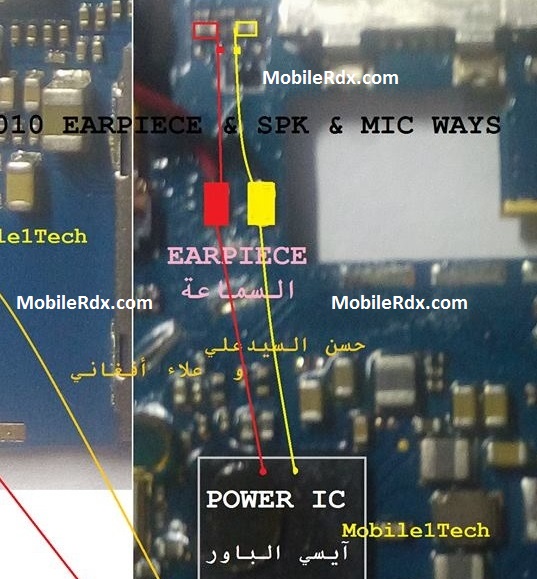
Hints in troubleshooting Lenovo A2010 Earpiece Speaker
1. Start to check with Speaker assembly, it is located at the top of the board behind the LCD screen.
2. Check for possible corrosion build ups, speaker terminal bending. Clean it including the speaker terminal pads or aligned it again if either the connection might be weak.
3. Check the speaker using a multimeter. Set the tester and check if there is crackling sound can be heard and the tester responds. If no indication of anything, the speaker is already burned out or damaged. Replace it at once.
4. If the speaker is okay, and still there is no sound can be heard, check the firmware. Update it or do re-flash.
In order to troubleshoot, all you have to do is to follow the following steps:
Put jumper if it is faulty, as one of the reasons for this problem is that the phone heavily dropped or water damage.
Check the diode by using multi meter, if it is faulty then change it.
If you have further Questions please leave a comment.
Note: Please note that even though every solution posted on our website is tested by one or more members of our team before posting, but still we do not take any responsibility for any damage it may cause to your cell phones. Use these repairing solutions at your own risk. Thank You.
Lenovo A2010 Earpiece Speaker Ways, Audio Problem Solution Repair, How To Fix Speaker Sound Problem In Samsung Lenovo A2010, Earpiece Ways, Jumper, Earpiece Solution.