Flash64 (F64 Box Setup) v1.09.28.2026 [Latest Version] Free
If you are a mobile technician in search of the best and user-friendly tool to repair, reprogram, and unlock EMMC and UFS memory chips, consider Flash64 Box. It is a powerful solution featuring advanced functions of flashing, unlocking, and repairing smartphones on some brands and chipsets.
Flash64 is a professional UFS/eMMC high-speed programmer that is revolutionizing data storage solutions. It fully supports UFS versions 1.0 to 4.1, with HS-Gear speeds of up to 420 MB/s. As for eMMC, it supports versions 4.1 to 5.1 with up to 8-bit HS200 speeds of 200 MB/s.
What is Flash64 Box (F64 Box)?
Flash64, also known as F64 Box, is a professional and latest EMMC/UFS repair tool in the market designed for Qualcomm, Mediatek (MTK), Spreadtrum (SPD), chipsets & UFS & EMMC-type memory chips.
Additionally, Flash64 also supports Nano Memory Cards (NM) with 4-bit speeds of up to 90 MB/s and MicroSD cards, including SDSC, SDHC, SDXC, and SDUC, with UHS-I speeds of up to 104 MB/s. The Flash64 Ultra model introduces additional functionality by supporting newer interfaces, such as RFFE, JTAG, SPI, I2C, and UART, to enable advanced diagnostics in modern electronics.
Features of Flash64 Box (F64 Box)
- Multi-Brand & Multi-Chipset Support
- Firmware Flashing (Stock ROM)
- FRP / Google Account Removal
- Unlock Password, Pattern, PIN
- UFS Secure Write Protection Removal (WP Remove)
- Dead Boot Repair for MTK, Qualcomm, SPD Devices
- IMEI, WiFi & Serial Number Repair
- Partition Management Tools
- Auto LBA Skip on UFS with Secure Write-Protected Blocks
- Regular Free Updates & Support
Why You Should Use Flash64
If you work in mobile repair, speed, reliability, and compatibility are important. Flash64 Box delivers all three, offering one of the fastest and most stable repair solutions on the market. Its frequent updates ensure compatibility with the latest devices and security patches.
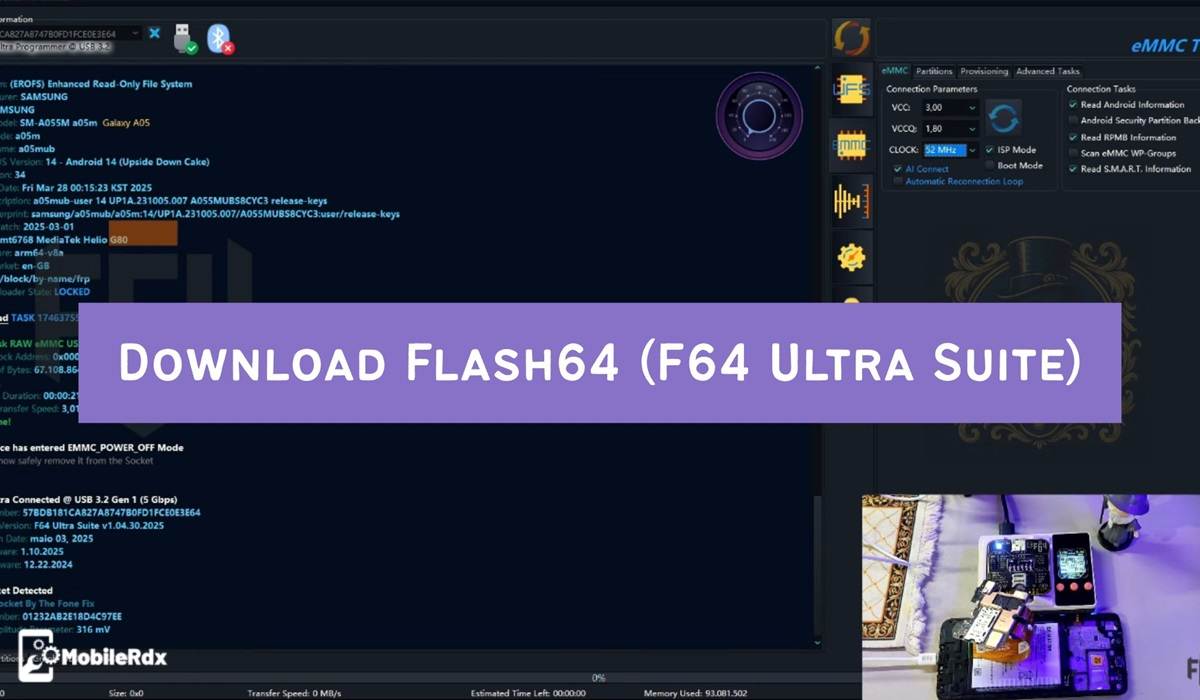
Download Links
File Name: Flash64_Update_V1.09.28.2026.zip
File Size: 328 MB
Type: Paid
Credit: Team _F64
Password: 123456
Data Loss Risk Analysis by Brand & UFS Specification
| Brand | UFS Specification | Data Status after WP Remove |
|---|---|---|
| Samsung | 2.0 | NO Data Loss |
| Samsung | 2.1 | NO Data Loss |
| Samsung | 2.2 | NO Data Loss |
| Samsung | 3.0 | NO Data Loss |
| Samsung | 3.1 | NO Data Loss |
| Samsung | 4.0 | WARNING: 100% Data Loss on all LUNs! Backup required! |
| YMTC | 2.2 | NO Data Loss |
| Other Brands (SK Hynix, Micron, KIOXIA, etc.) | Any Version | 100% Data Loss on all LUNs! Backup required! |
Flash64 v1.09.28.2026 Changelog
09.28.2026 – Android 17 Certified
1. Added Google Pixel Full Factory Image Flashing for Tensor SoC-based phones.
Official Firmware Source: https://developers.google.com/android/images
* You can Provision the UFS IC using the PIXEL bootloader file
* You can Create the GPTs using the PIXEL bootloader fil
* You can load ALL files using the flash-all.bat
- Pixel 11 Pro Fold – yogi (Tensor G6)
- Pixel 11 Pro XL – kodiak (Tensor G6)
- Pixel 11 Pro – grizzly (Tensor G6)
- Pixel 11 – cubs (Tensor G6)
- Pixel 10 Pro Fold – rango (Tensor GS501)
- Pixel 10 Pro – blazer (Tensor GS501)
- Pixel 10 – frankel (Tensor GS501)
- Pixel 10 Pro XL – mustang (Tensor GS501)
- Pixel 10a – stallion (Tensor GS401)
- Pixel 9a – tegu (Tensor GS401)
- Pixel 9 Pro Fold – comet (Tensor GS401)
- Pixel 9 Pro – caiman (Tensor GS401)
- Pixel 9 Pro XL – komodo (Tensor GS401)
- Pixel 9 – tokay (Tensor GS401)
- Pixel 8a – akita (Tensor GS301)
- Pixel 8 Pro – husky (Tensor GS301)
- Pixel 8 – shiba (Tensor GS301)
- Pixel Fold – felix (Tensor GS201)
- Pixel Tablet – tangorpro (Tensor GS201)
- Pixel 7a – lynx (Tensor GS201)
- Pixel 7 Pro – cheetah (Tensor GS201)
- Pixel 7 – panther (Tensor GS201)
- Pixel 6a – bluejay (Tensor GS101)
- Pixel 6 – oriole (Tensor GS101)
- Pixel 6 Pro – raven (Tensor GS101)
2. Fixed Motorola flashfile.xml and servicefile.xml “Sector Overflow” errors
* Flashing Official Motorola Flash packages will no longer need fastboot flashing after
3. Added support for malformed rawprogram.xml created by other tools
4. GPT Bug Fixes…
5. Added ISP Pinouts
1. Samsung Galaxy S26 SM-S942U.isp (Lemor PH)
2. Samsung Galaxy A34 5G SM-A346E.isp (Lemor PH)
3. SM6850_UFS.isp (By Mr. UPROM)
🔧 How to Setup & Use Flash64 Ultra Box (F64 Setup)
✅ Step 1: Download & Setup
- Download Flash64 Box Setup v1.09.28.2026 to your Windows PC.
- Extract the ZIP file with 7-Zip or WinRAR.
- Connect the F64 Box to your Windows PC via USB.
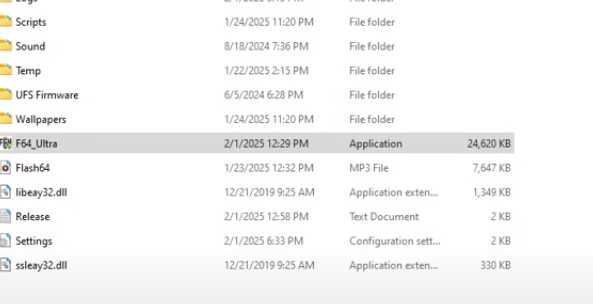
- Open the tool by locating the F64_Ultra.exe file.
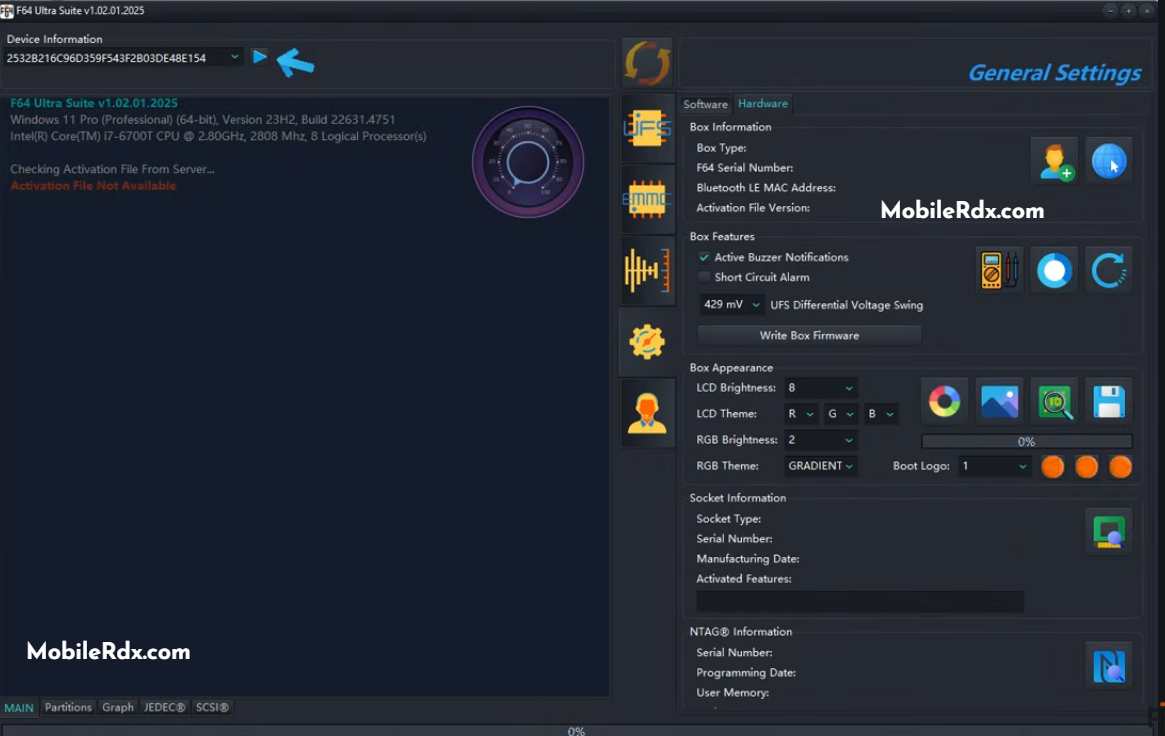
🔑 Step 2: Activation & Registration
- When you open for the first time, if you have not activated click the Play icon next to Device Information.
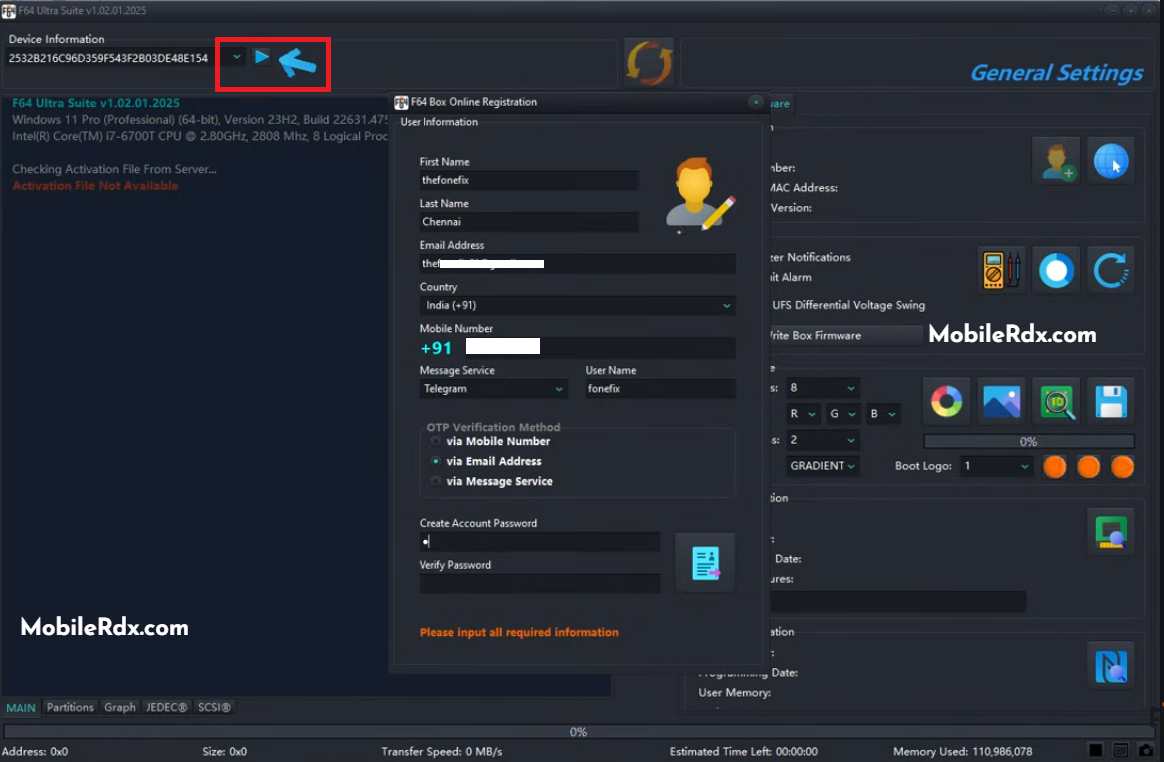
- Go to the following: Settings > Hardware > Add Profile.
- Enter the User Information where prompted.
- Complete OTP verification to register your user ID.
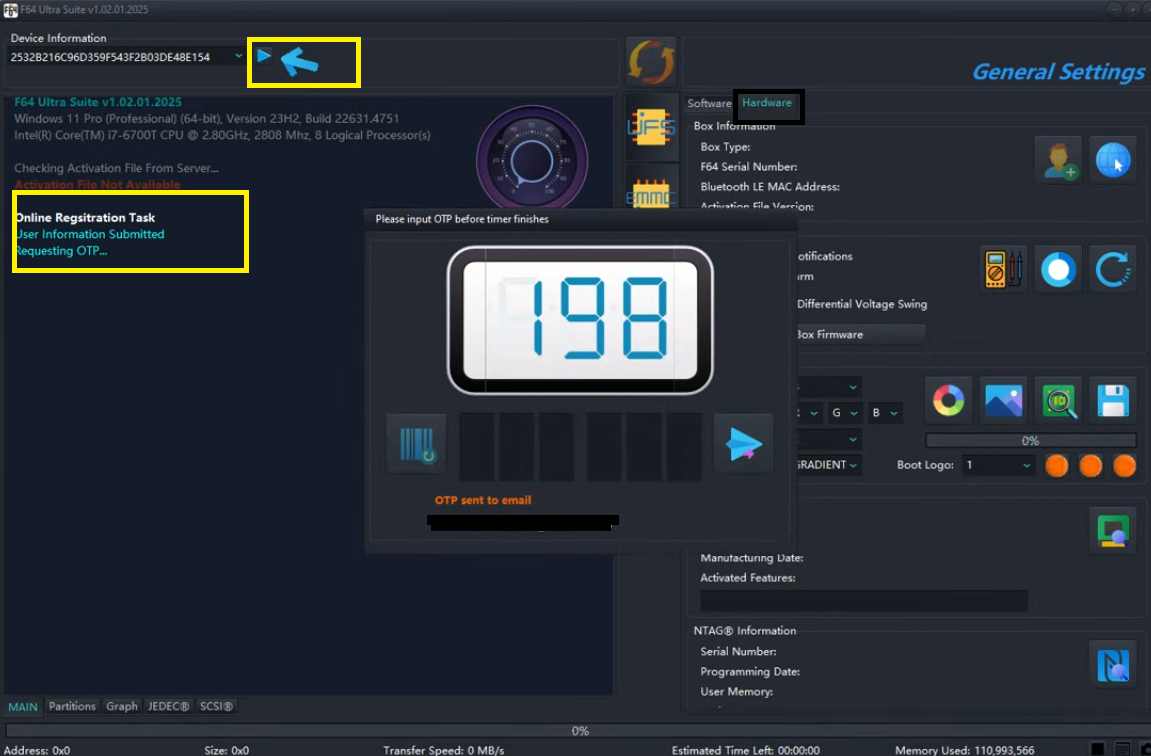
- When registration is confirmed, at the bottom of the screen, you will disconnect your F64 Box and reconnect.
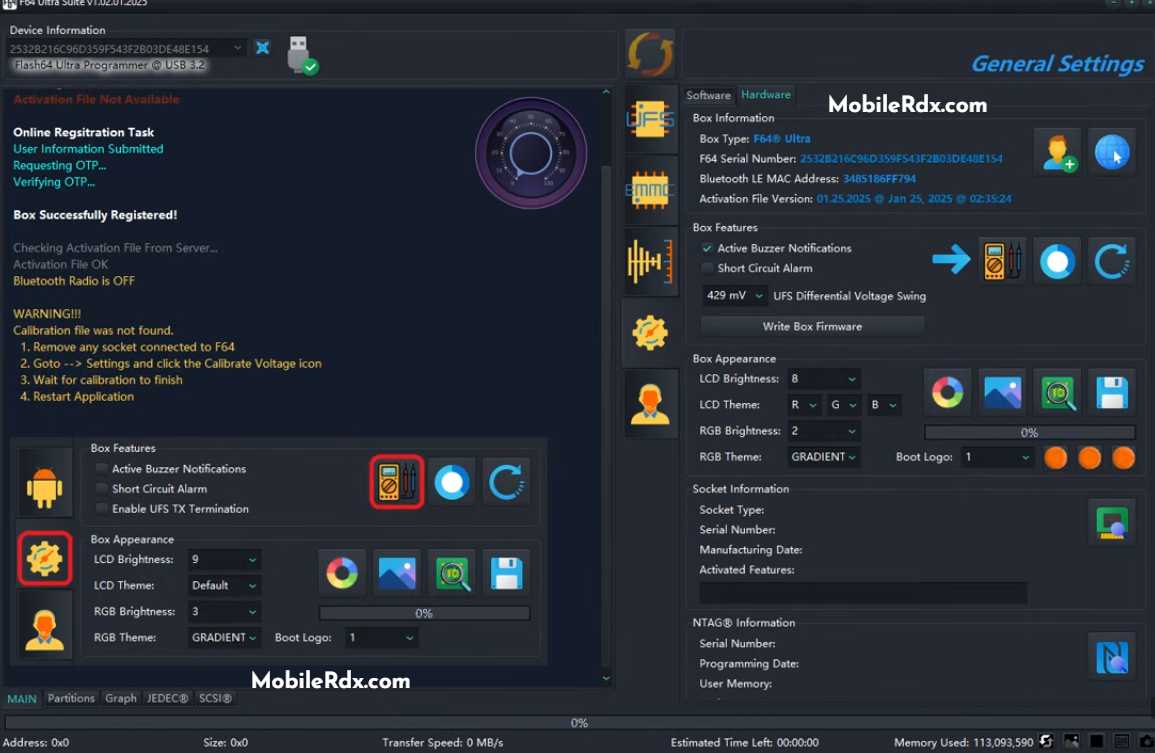
- Go to the following: Settings > Hardware > Click on the Multimeter icon.
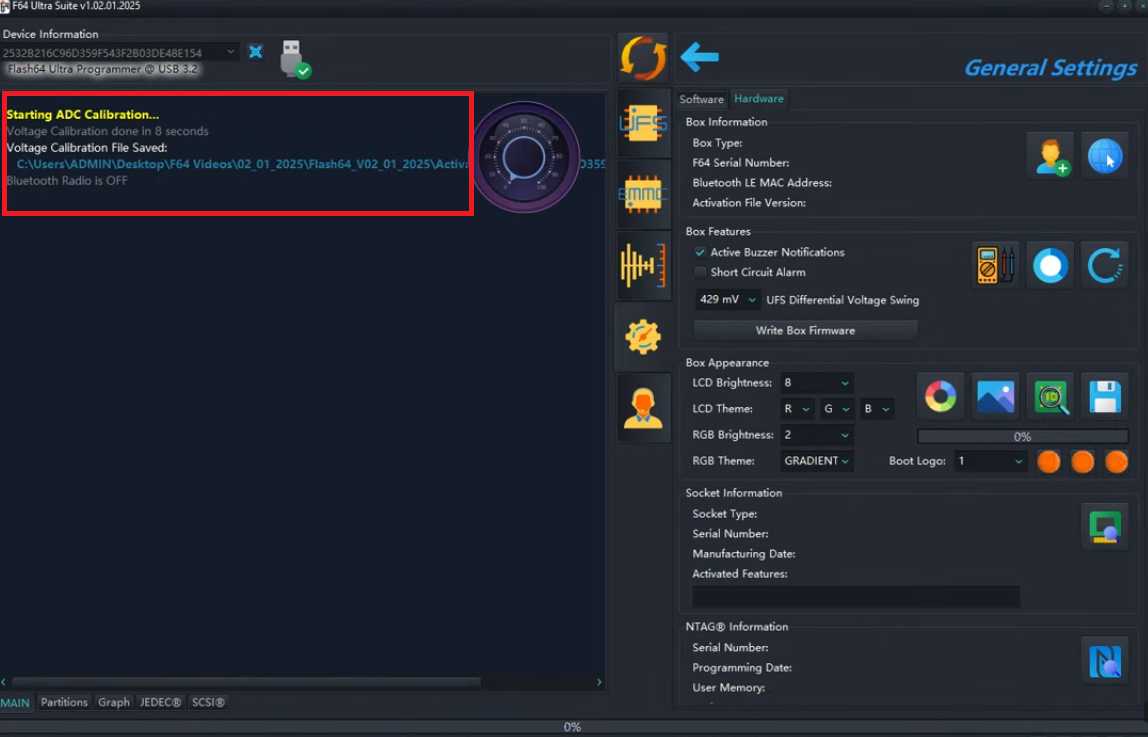
- It should start ADC (Tool) Calibration.
- Once calibration is complete, the box has been successfully activated.
🚀 Step 3: Using Flash64 for Mobile Repair
- Disassemble your Android smartphone.
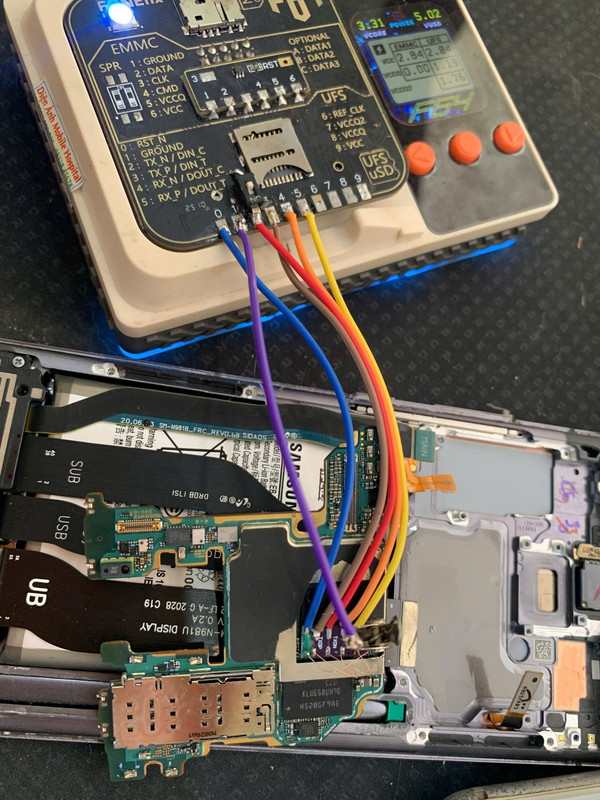
- Identify and locate the correct ISP pinout.
- Short the appropriate pins and connect the mobile to the F64 box.
- Use the tool to perform EMMC/UFS Read/Write, Firmware Flashing, FRP unlocking, Dead Boot Repair, etc…
Frequently Asked Questions
It is a high-speed UFS EMMC chip programmer used for reading, writing, and repairing UFS (up to 4.1) and eMMC (up to 5.1) chips in smartphones, tablets, and Iots of devices.
UFS: Up to 420 MB/s (HS-Gear 4).
eMMC: Up to 200 MB/s (HS200). It is currently one of the fastest programmers on the market for 2026 workflows.
Yes With the F64 ISP adapter, you can connect to the motherboard PCB without removing the IC (chip-off), given the device supports ISP pinouts.
Dead Boot Repair
Data Recovery
FRP/Account Removal
Health Repair
Ultra: Full kit with all BGA adapters (153, 254, 297) and high-speed ASIC hardware.
Lite: Usually just the main box or limited adapters, designed for technicians who already own compatible sockets.
One of the best things about the F64 Box is that it usually comes with no hidden costs or annual renewals. Once you purchase the Box, you can use the software for a lifetime.