Here is a working and tested solution for the Xiaomi Redmi A3 Not Charging issue, including charging methods and a USB jumper. When faced with this problem, start by checking or replacing the charging connector. If there is an issue that remains after replacing the connector, refer to the provided image for jumper details. Follow the steps below to troubleshoot and resolve this charging problem effectively.
Xiaomi Redmi A3 Charging Ways Solution
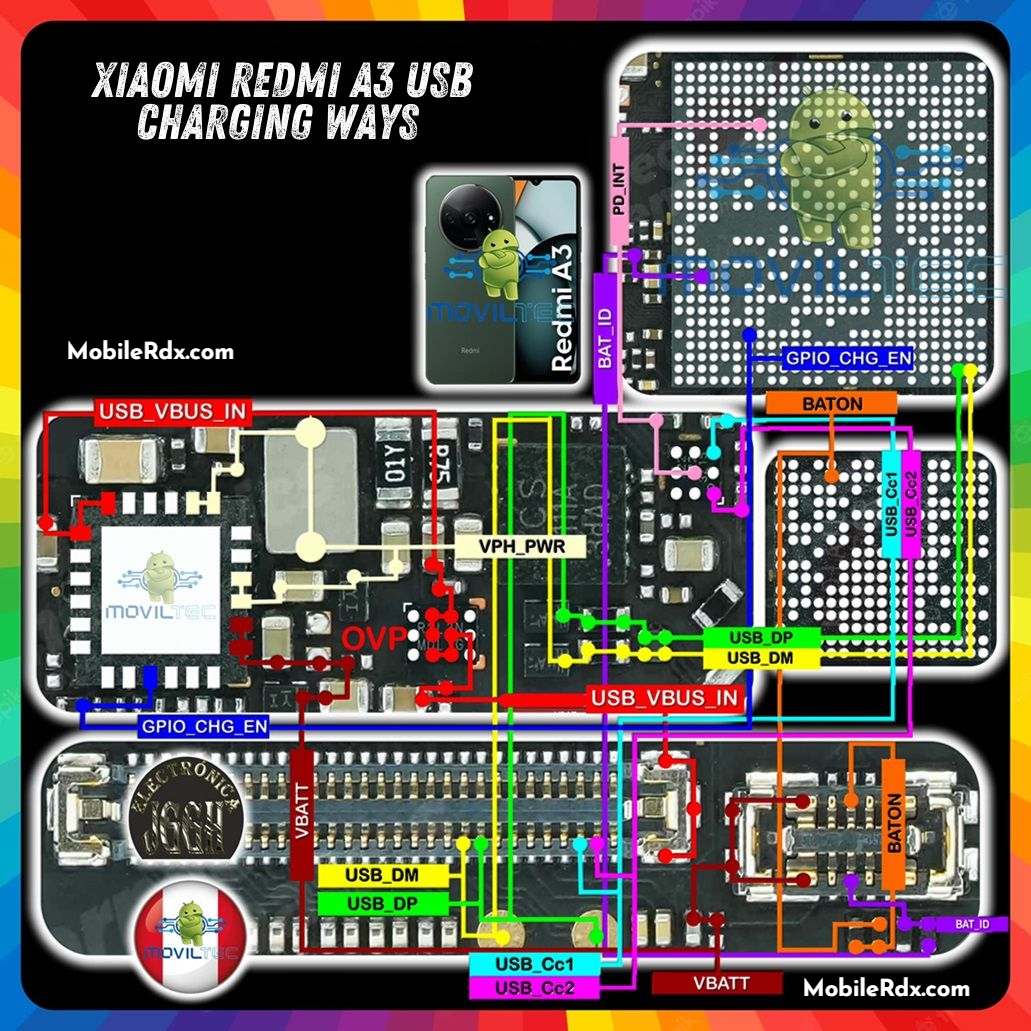
For information about the charging paths and jumpers for the Xiaomi Redmi A3, see the image below.Use a multimeter to check the Redmi A3 motherboard’s continuity and make jumpers if required to repair any track damage.
- First, open the mobile
- Then clean the section of the charging connector of the mobile motherboard
- Then remove the old charging connector and add a new connector
Hardware Reasons for Xiaomi Redmi A3 Charging Problem
There are four basic hardware-related reasons why your Xiaomi Redmi A3 could be charging slowly, and I will explain each of them in turn and order of increasing probability. The issue could be:
- There is dirt, dust, or debris lodged in the charging port.
- The power adapter is damaged or faulty.
- The USB cable is no longer working properly.
- You are using the wrong power adapter for your phone, or a weak USB port.
How To Repair Xiaomi Redmi A3 Not Charging Problem:
Once you have disassembled the mobile phone, proceed with the steps outlined in the diagram above. Check the charging jack and its connection points for any issues. If they are functioning well, try replacing the charger to verify. If the motherboard fails to display accurate readings at the charging points, following dissatisfaction with the mobile phone’s performance, refer back to the steps indicated in the diagram.
Check all parts and tracks carefully, as shown in the Xiaomi Redmi A3 diagram, for any indication of corrosion, carbon debris, water damage, or malfunctioning parts. Take extra caution when replacing a motherboard if any parts are damaged. Make proper use of jumpers for missing tracks.
Check out our website for the latest solutions and tips, along with more details on this problem and creative fixes. Content will be put there when it becomes available. Look through the related posts below for additional information about mobile phone issues.