Close Menu
MobileRdx
    Facebook X (Twitter) Instagram
    MobileRdxMobileRdx
    • Hardware
      • Samsung
      • Xiaomi Hardware
      • Huawei Hardware
      • Oppo Hardware
      • Vivo Hardware
    • Box Setup
      • UnlockTool Setup
      • TFT Unlock Tool
      • UFI Box
      • Easy Jtag Plus Box
      • Infinity CM2
      • Z3x Box Samsung Tool PRO
      • Miracle Box
    • GsmTools
    • Contact Us
    • Privacy Policy
    |
    MobileRdx
    |

    Samsung Galaxy J7 J710F Battery Connector Problem Ways Solution

    By Mobile RdxMarch 27, 2019 Samsung

    Samsung Galaxy J7 J710F Battery Connector Problem Ways Solution

    Samsung Galaxy J7 2016  J710F Battery Connector Ways Battery Terminal Jumper  Set Dead Problem Repair Solution

    Samsung J710F battery Low then Shutdown or restart set dead fault caused by either a faulty resistor and capacitor. Here we want to share the experience how to repair this kind of damage.

    Damage to the battery Samsung Galaxy J7 J710F could be of the causes for the phone does get wet, padded seat battery connector corroded and rusted breaking lines.

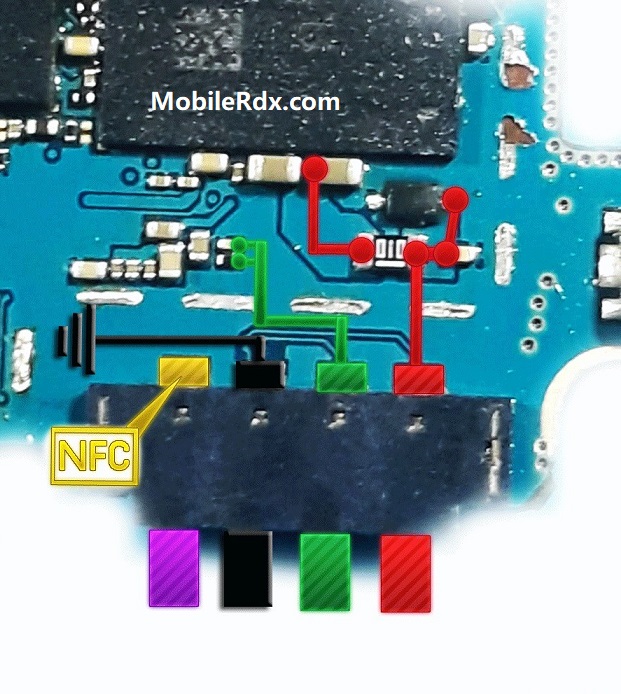
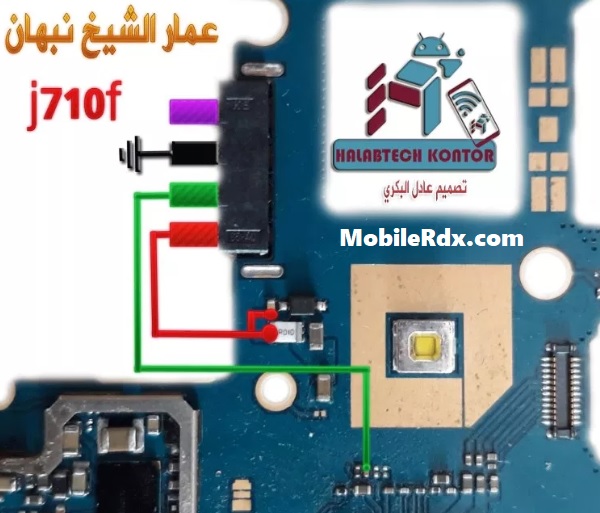
    Here are tips on battery connector lines, check the track as in the picture below, if there is a path-breaking or not, if there is a path-breaking try doing jumpers carefully to avoid short-circuit condition of the phone.

    Hardware Solution:
    Samsung Galaxy J7 J710F Battery Connector Ways

    Or
    Samsung Galaxy J7 J710F Battery Connector Problem Ways Solution
    “any damage resulting from the tips is not our responsibility”
    Diagnostics:
    If Samsung Galaxy J7 J710F is not getting power ON, Replace the battery and try to power it ON. Plug in charging pin into the jack and try to make it charge. Check battery terminal’s +v and -V points with electronics meter.

    Solution:
    Disassemble the phone Samsung Galaxy J7 J710F and check battery connectors if these are loose or not fix. Then check the whole mother board for water and rust damages, Carbon or broken parts.
    If find some rust or carbon make it clean with electronics cleaner and apply hot air with a heat gun to make it dry.
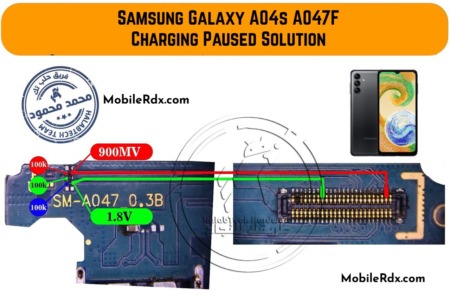
    Find out these parts that are identified in above diagram and make a check for volts. If find some broken parts or tracks are missing then apply jumpers as given in above diagrams.
    Read More:-  Samsung Galaxy J6+ J610F Power Button Ways On-Off Key Repair

    Related Posts

    Samsung Galaxy M12 Charging Paused Solution | Battery Temperature Error

    Samsung Galaxy A70 Charging Paused Solution | Battery Temperature Error

    Samsung Galaxy J8 J810 Charging Paused Solution | Battery Temperature

    Leave A Reply Cancel Reply

    All Box Latest Setup
    UnlockTool V2025.12.21.0
    Miracle BFT Best Flash Tool V1.7
    MRT Tool V6.1.0 – Free
    TFT Unlock Tool v6.2.1.1 – Free
    Android Utility Pro V202.00.1225
    UMT Tool Setup QCFire (v12.9)
    Z3x SamsTool Online V1.29
    Infinity CM2 Latest Setup
    EFT Dongle V5.2.8 Setup
    Z3x Box Samsung Setup V45.14
    Facebook X (Twitter) Instagram Pinterest
    • About Us
    • Contact Us
    • Privacy Policy
    © 2026 MobileRdx. Made with โค๏ธ in India

    Type above and press Enter to search. Press Esc to cancel.