Close Menu
MobileRdx
    Facebook X (Twitter) Instagram
    MobileRdxMobileRdx
    • Hardware
      • Samsung
      • Xiaomi Hardware
      • Huawei Hardware
      • Oppo Hardware
      • Vivo Hardware
    • Box Setup
      • UnlockTool Setup
      • TFT Unlock Tool
      • UFI Box
      • Easy Jtag Plus Box
      • Infinity CM2
      • Z3x Box Samsung Tool PRO
      • Miracle Box
    • GsmTools
    • Contact Us
    • Privacy Policy
    |
    MobileRdx
    |

    Samsung E1205T Sim Card Ways Insert Sim Card Solution

    By Mobile RdxDecember 20, 2018 Samsung

    Samsung B313E Sim Card Ways Solution Insert Sim Problem

    Here’s the full solution for Samsung E1205T SIM card ways problem that it does not accept or detect any SIM card being inserted into it. This solution shows the full line paths or connection tracks of the Nokia SIM circuit, from the SIM pin connector through to the SIM filter IC and to the innermost part of the main chips solder ball bumps.

    Reasons for Problems

    It might be due to dust on SIM Jacket contacts.
    It might be due to faulty capacitors. If any of them is faulty then it will affect your overall SIM card function.
    The issue might also be due to SIM card IC.

    Samsung E1205T Sim Card Ways Problem Hardware Procedure:
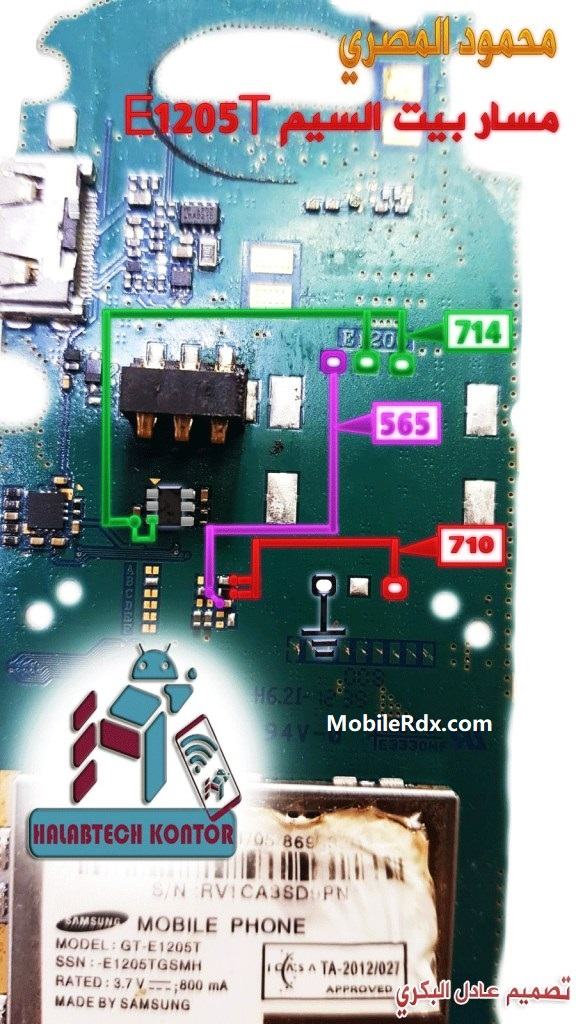
    Samsung E1205T Sim Card Ways Insert Sim Card Solution

    How To Make Samsung E1205T Sim Card Jumper:

    • Check the voltage on the line as shown above and make sure everything produces voltage.
    • If there is one line does not produce voltage then you have to make a jumper as shown above.
    • If the four lines have produced a voltage then please try to insert sim card and turn on the cell phone.

    The solution above may help if having trouble finding the replacement for the flex ribbon cable, you may only need to apply a jumper wire on an opens line paths after tracing it.

    Here are the hints in troubleshooting the Samsung E1205T Insert Sim Card Problem:
    1. Check the flex ribbon cable assembly. Replace if severely damaged.
    2. Clean the SIM slot and the flex pin connector.
    3. Check the VSIM voltage across the 0 ohms resistor. Check/replace the resistor if damaged.
    Read More:-  Samsung GT-C3330 Not Charging Problem Solution Ways

    Related Posts

    Download UMT Card Manager Tool 2023 [Latest Version]

    Repair: Samsung Galaxy A32 Mic Not Working Problem | Mic Ways

    Samsung Galaxy A30 Network Ways | Repair No Service and Signal Problem

    Leave A Reply Cancel Reply

    All Box Latest Setup
    UnlockTool V2026.01.20.0
    Miracle BFT Best Flash Tool V1.7
    MRT Tool V6.1.0 – Free
    TFT Unlock Tool v6.2.1.1 – Free
    Android Utility Pro V202.00.1225
    UMT Tool Setup QCFire (v12.9)
    Z3x SamsTool Online V1.29
    Infinity CM2 Latest Setup
    EFT Dongle V5.2.8 Setup
    Z3x Box Samsung Setup V45.14
    Facebook X (Twitter) Instagram Pinterest
    • About Us
    • Contact Us
    • Privacy Policy
    © 2026 MobileRdx. Made with ❤️ in India

    Type above and press Enter to search. Press Esc to cancel.