Sony T2 Charging Ways Solution And USB Jumper
Sony Xperia T2 Ultra Charging Ways Charging Solution Not Charging Problem USB Ways Charging Jumper Charging Short
In this post, I will guide you on how to troubleshoot Sony T2 charging Problem or won’t respond when connected to a charger. So, if you are currently having this problem, continue reading to learn the steps to rule out possibilities to discover what the problem with your phone really is.
Many users who have bought the high-end Sony Xperia T2 are facing the problem of Sony T2 not charging issue. Most of the smartphones are functioning correctly but some of the users complained about the problem of Sony T2 not charging correctly. Some of the Sony T2 owners thought that the problem was with the charger and they bought new chargers but after that, they realized the problem was not in the charger. In this tutorial, we will suggest you some quick solutions to Sony T2 not charging issues.
Other reasons why the Sony T2 not charging may be:
- The Smartphone is defective
- The phone has a damaged battery
- The connector is bent, broken or pushed
- There is a temporary phone problem
- The charging unit or the cable is defective
So if you are experiencing any charging problem or problem connecting your Sony T2 to your computer via USB cable then it is possible that your Sony T2 charging connector is faulty. Replacing it with a new one is the only solution here. But if by any chance the USB connector prints are broken then you have to make the jumpers as shown in the diagram below.
Sony T2 Charging Ways Not Charging Problem Solution:
Here Sony Xperia T2 Charging Ways USB Connector Jumper problem solutions. Please study these diagrams very carefully before you start repairing.
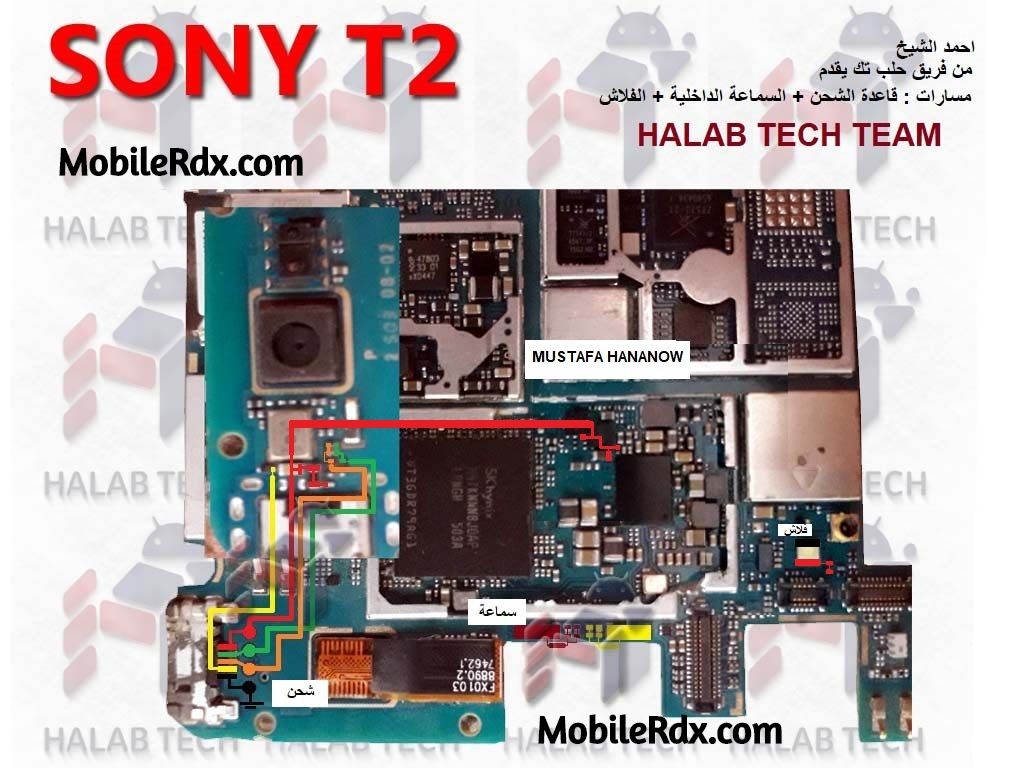
Image Source: Halabtech.com
If the charging is slow then all you have to do is to check with any other Sony charger, but you have to make sure that the charger is original, as slow charging issues almost always occur with phones using 3rd party chargers. Clean battery charging pins and check. Clean charging connector pins.
Please Note that we will edit these solutions or add new ones if found on this page at any time in the future. So feel free to come back any time on this page to stay up to date. If you have any further Questions please leave a message or Chat with us.
Keep in mind: – The every solution posted on Our website is well tested before by our specialist team, But still, we do not take any responsibility for any damage it may cause to your cell phone. Use these repairing solutions at your own Risk, Thank you.