Samsung Galaxy J3 Pro J330F Home Key Ways | Home Button Jumper
Samsung SM-J330FN Home Button Ways, Home Key Jumper Not Working Problem Home Key Ways
This solution is for Samsung Galaxy J3 Pro J330F Home Key Ways Home Button Ways and Jumpers points. If your phone’s power button is not working you can use the guide in this article to solve your problem.
Samsung Galaxy J3 Pro J330F Home Key Problems
Home button not working.
Delay in response when the button is pressed.
Home button becomes stiff and is not pressed easily.
The home button needs to be pressed very hard in order to get it working.
Reasons for Problems
Dust might be present at the corners of the home button due to which it becomes stiff or you need to press it very hard in order to get it working.
Might be due to phone lagging problem.
Home button strip might have lost contact with the onboard connector.
Might be due to any kind of physical or water damage.
Home button components might be damaged from inside.
Samsung Galaxy J3 Pro J330F Home Key Ways:
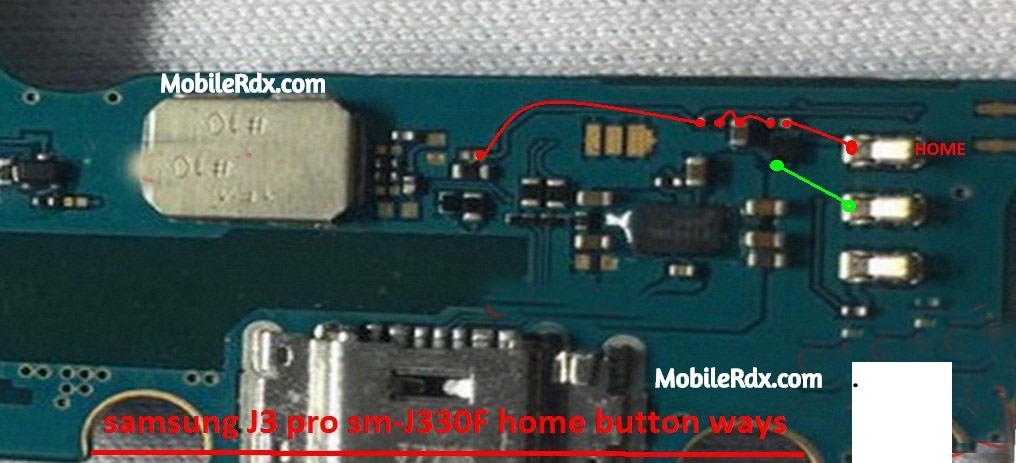
Clean both home button strip and its onboard connector, after you do that re-plug and check.
In case of display strip still has a loose contact with on-board connector than changing the entire charging dock strip,
(Home button is at the charging dock strip).
If the above step fails then you need to change your entire display, and this is mainly because of the fact that Home Button components are inside the display screen, which cannot be repaired manually, as that’s the machine’s work.
You don’t have any other option than to change your display screen in order to get your Home button fixed.
If you have further questions please don’t hesitate to leave a comment.
Note: Every repairing solution posted here is tested by at least one member of our team. Use the information available here at Your Own Risk. We are not responsible if any harm comes to your device during the repairing process.