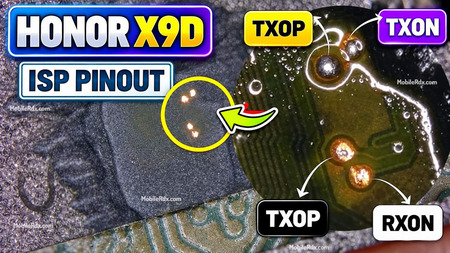
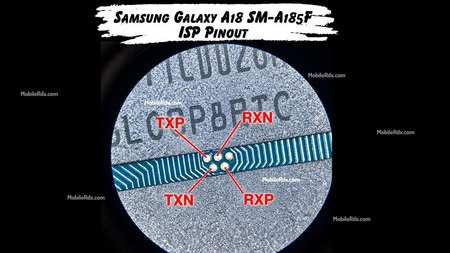
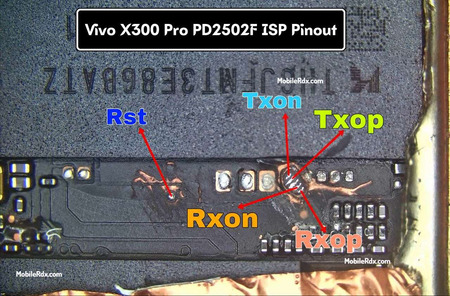
In this article, we’ll show you Vivo V40 UFS ISP Pinout that allows you to write DUMP file, chip reprogramming, or flash firmware, bypass FRP, remove locks, and flash the stock firmware using any eMMC repair tool.
The V40 5G runs on Qualcomm Snapdragon 7 Gen 3 hardware and comes with 256GB or 512GB storage options. Before soldering, confirm the model code and board revision. Vivo can use more than one layout, so a similar V-series diagram is not a safe replacement for the correct V2348 image.
What Is Vivo V40 ISP Pinout?
ISP means In-System Programming. It gives a UFS-capable repair box access to the storage chip through test points on the motherboard. You do not remove the chip, but the job still needs microscope work, short jumper wires, and correct voltage settings.
Technicians use ISP when the phone cannot boot, the storage is not detected in normal mode, or a failed flash has damaged the boot partitions. Start with Identify or Read ID. Do not erase or write data until the connection stays stable.
When the V40 ISP Connection Is Useful
- Logo hang after an interrupted firmware flash
- Phone not detected by the computer
- Storage identification and backup work
- Boot or partition repair
- Recovery work when normal Qualcomm mode is unavailable
Vivo V40 5G V2348 ISP Pinout Image
Place the verified SM-7550 CPU image below. Compare the board code and storage package before applying power. Do not use a V40 Lite, V40 Pro, or another Vivo V-series diagram on this model.

ISP Lines Shown on the Diagram
- RST – storage reset
- CLK – clock signal
- TXOP and TXON – transmit pair
- RXOP and RXON – receive pair
- GND – ground reference
The line names are common on UFS diagrams, but the physical point location is board-specific. Confirm the image and test continuity instead of guessing from the label alone.
Tools Required for the Job
- UFI Box, Easy JTAG Plus, Flash64, or another UFS-capable box
- Fine jumper wire and a sharp soldering tip
- Microscope or strong magnifier
- No-clean flux and 99% IPA
- Multimeter for continuity and short testing
- Correct UFS adapter and a stable USB cable
Vivo V40 5G Specifications
| Model | Vivo V40 5G |
| Model code | V2348 |
| Chipset | Qualcomm Snapdragon 7 Gen 3 (SM7550-AB) |
| Storage | 256GB / 512GB |
| Display | 6.78-inch AMOLED, 120Hz |
| Battery | 5500mAh |
| Charging | 80W FlashCharge |
| Release | June 2024 |
Vivo V40 ISP Connection Procedure
1.Confirm V2348 on the phone label or board.
2. Disconnect the battery before cleaning or soldering.
3. Remove the shield carefully and clean the storage area with IPA.
4. Compare the verified diagram with the physical board.
5. Solder only the points shown for the V2348 revision.

6. Check every jumper for continuity and shorts.
7. Connect the board to the UFS box and select the correct profile.
8. Run Identify or Read ID first.

9. Save a full backup before any erase, format, or write operation.
Common Problems and Fixes
- No detection: check ground, adapter direction, solder joints, and box voltage.
- Unstable detection: shorten the jumpers and inspect TX/RX lines for bridges.
- Read error: clean the points and select the correct UFS profile.
- Board heating: disconnect power and check for a short before trying again.
- Wrong storage size: stop the job and confirm the board revision and chip package.
Safety Notes
Remove the battery before soldering. Use the voltage recommended by your box and adapter. A wrong voltage or bridged data line can damage the storage chip or the motherboard. Keep the original backup safe before changing partitions. Work only on a device owned by the customer or supplied with permission.
Frequently Asked Questions
The Vivo V40 5G is commonly listed with model code V2348. Check the board before using a pinout.
It uses Qualcomm Snapdragon 7 Gen 3, also identified as SM7550-AB.
No. Board layouts can differ between models and regions. Use the verified V2348 diagram only.
A UFS-capable UFI Box, Easy JTAG Plus, Flash64, or Medusa setup may work with the correct adapter and voltage profile.
Final Thoughts
ISP can help recover a Vivo V40 when normal flashing is not available. Confirm V2348, use the correct board image, and begin with storage identification. Do not write or erase data until the connection is stable and the backup is complete.