Samsung Galaxy Y Pro B5510 Display Light Solution Backlight Ways Jumper.
If having problem like blank or dark screen display in Samsung Galaxy Y Pro B5510 and you can only view a shadow of the text on the LCD screen, this problem is caused by a failure of LCD screen illuminating white LED backlights. This solution may help fix on how to solved and fix the problem…. but first you must try to replace the LCD screen first to easily ensure and confirm that white LED bulb that is mounted or attached on the back of the LCD is still working or not.
If the newly installed LCD still shows the same problem, refer to the solution below and locate the highlighted components on the Samsung GT-B5510 PCB motherboard. These components holds and control the LCD LED backlights to work.
Please Note that we will edit these solutions or add new ones if found in this page at any time in the future. So feel free to come back any time on this page to stay up to date.
Check your entire motherboard for any traces of water damage, in case you find moisture on any part of the board clean it with the help of cotton cloth. Besides that you can also use blow dryer for few seconds in order to completely eliminate moisture from your phone
Hardware Solution
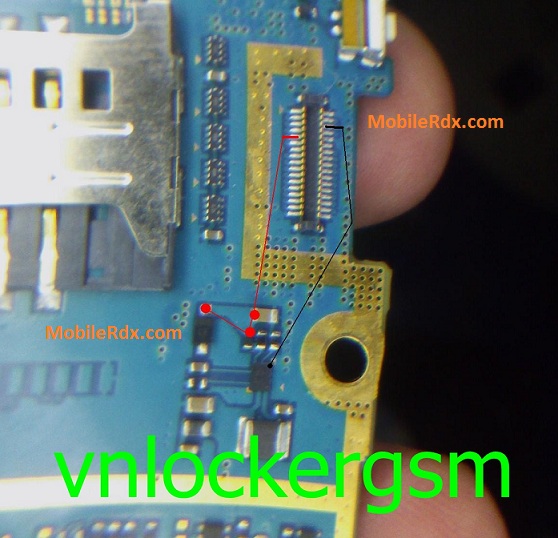
In troubleshooting this problem you may need to try to replace Samsung B5510 LCD screen first to easily confirm if the LED light bulb is already damaged or not. If the said newly installed LCD still shows a dark screen display and the LED failed to light up, this solution below will show us the next step to proceed in fixing this problem.
If everything fails then check with any other good and working LCD Screen.
The above-mentioned steps will surely help you to resolve all of your Nokia 215 Display screen problems, hence allowing you to use your phone flawlessly without any trouble.
Samsung GT-B5510,LCD,Display,Solution,Jumper,Problem,Ways
Samsung Galaxy Y Pro B5510 LCD Display Light IC Solution Jumper Problem Ways LCD Display Light Not Working