HTC Desire 600 Charging Problem Ways Usb Jumper Solution
HTC Desire 600 Not Charging Problem Jumper
This post serves as your troubleshooting guide in case your HTC Desire 600 won’t charge. Whether you are charging with Samsung’s manufacturer charger or a wireless charging pad, charging issues are among the most common problems any Android smartphone owner may face. It is also among the problems that need to be addressed immediately as your phone will only sit atop your table when it totally depletes its battery.
Solution
Before doing, Be sure to check the battery and charger are Exactly working condition. then verify the phone’s USB pin connector is broken or any fault.
Check the charging (+) and (-) line paths are short using multimeter, if it shows short them, remove/replace the diode, capacitors and filers. also replace the fuse. Note: use these work at your own risk.
Check all the components shown on the image below.
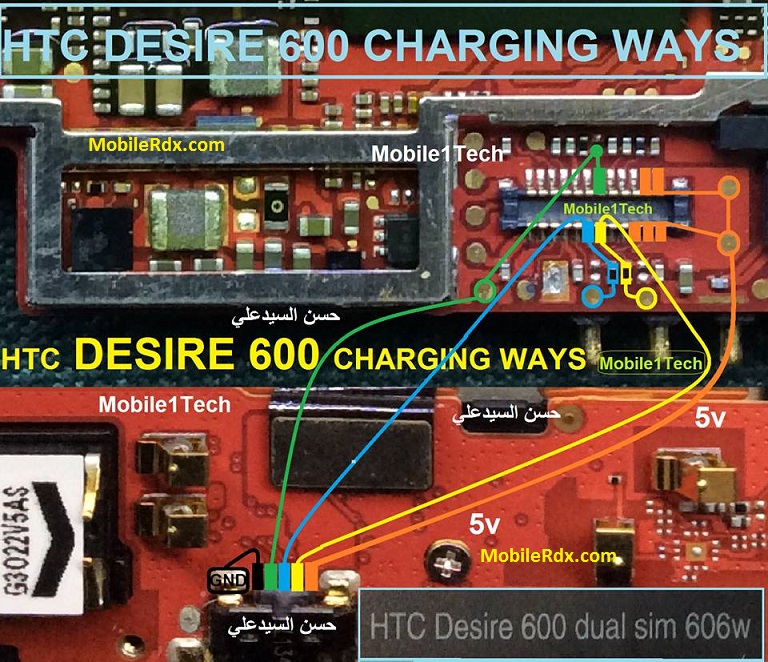
Repair hints for HTC Desire 600 Not Charging Problem:
1. Try to use another working charger.
2. Check, clean or replace the charging pin connector if oxidized.
3. Clean the charging pin connector terminal contact pads.
4. Check/ replace the fuse and the chip diode.
5. Check/replace the highligted transistor, resistors and capacitor.
6. If the above procedure won’t fix the problem, the possible faulty Charging IC.
7. Reheat, rework charging ic, replace if necessary.
CONNECT WITH US
We are always open to your problems, questions and suggestions, so feel free to send them at prateet000@gmail.com. We support every Android device available and we are serious in what we do. This is a free service we offer and we won’t charge you a penny for it. But please note that we receive hundreds of emails every day and it’s impossible for us to respond to every single one of them. But rest assured we read every message we receive. For those whom we’ve helped, please spread the word by sharing our posts to your friends.
HTC Desire 600 Charging Solution Jumper Problem Ways No Charging Not Supported