Samsung G850 No Sound On Speaker Headphone Problem Solution
Samsung Galaxy Alpha G850 Speaker Ways Sound Problem Solution No Sound In Ringer Problem Ringer Jumper
Samsung Galaxy Alpha G850 buzzer problem might not be that big for people who prefer to keep their phone on vibration mode, but there are times when one needs the assistance of a buzzer ( a good number of times). Besides that, it is also recommended that one should resolve such type of problem at the earliest; else it might become the reason of several other problems too!
Let’s have a look at Samsung SM-G850 buzzer problems as well as their solutions:
Problems
- SM-G850 buzzer sound is very low.
- The sound is distorted or is hazy.
- No buzzer sound at all.
Reasons of Problems
- The phone might be water damaged.
- Dust in buzzer.
- Buzzer contacts might be water damaged or rusted.
- Buzzer contact pins are not making proper contact with buzzer contacts.
- No connection between charging pin and buzzer contacts.
- Any of the capacitors might be damaged.
- Dry soldering of first two pins of the on-board connector.
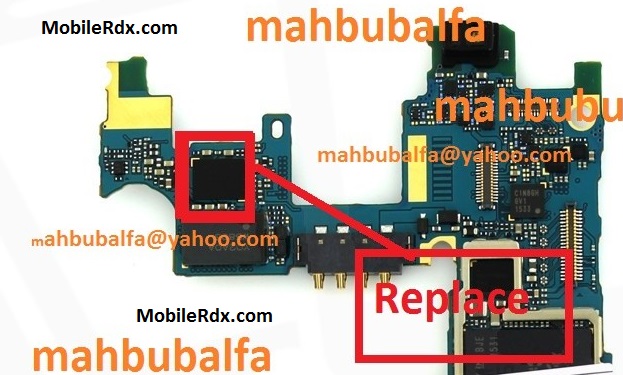
Samsung Galaxy Alpha SM-G850 Ringer hands-free speaker Solution
The solution above shows the IHF speaker connection and line paths which can be used for checking or tracking.
The IHF audio signals are feeds from the audio IC (AVILMA) and then filtered by filter coils before it goes through to the IHF speaker.
Tips for Repairing Samsung G850 Ringer IHF speaker:
a) Check the IHF speaker or try to install new replacement spare parts.
b) Check the speaker terminal and contact pads and ensure that it is clean.
c) Check the filter coils and ESD protection resistors and then replace if found damaged.
d) Rework the audio IC if all of the above is been done but the problem still exists, this may possibly fix Nokia C6 Ringer Speaker no sound problem
Samsung SM-G850 Speaker Ways, Ringer Jumpers Solution, Speaker Not Working Problem Repair, Speaker Jumper,