Huawei Honor 4X Charging Ways Solution Usb Jumper
Huawei Honor 4X Charging Solution USB Jumper Ways
In Huawei Honor 4X USB cable connector is also used for charging the phone. Because of excessive use or any other reason USB connector can be damaged.
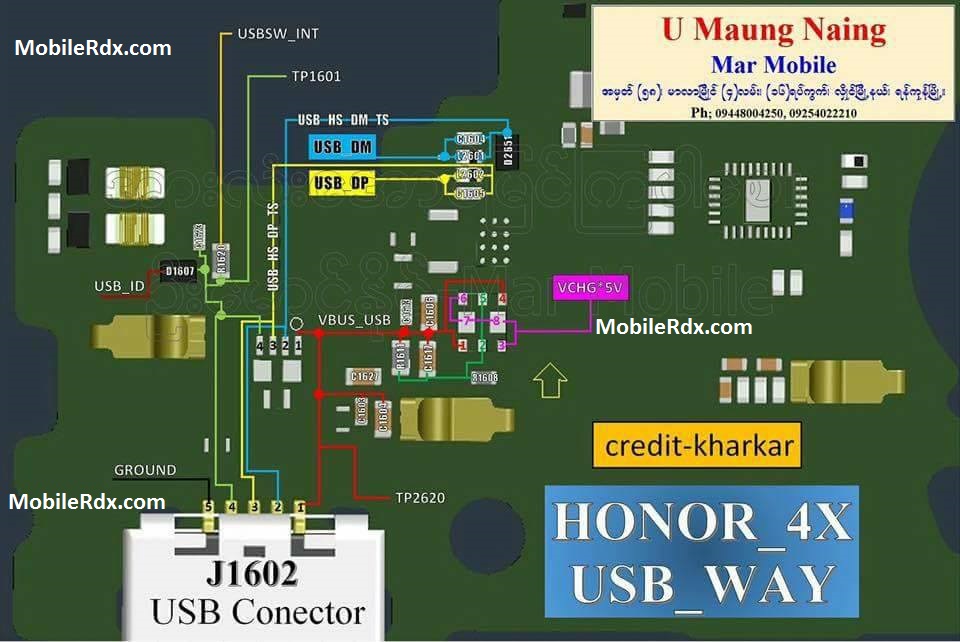
So if you are experiencing any charging problem or problem connecting your Huawei Honor 4X Charging Solution USB Jumper to your computer via USB cable then it is possible that your Huawei Honor 4X charging connector is faulty. Replacing it with a new one is the only solution here. But if by any chance the USB connector prints are broken then you have to make the jumpers as shown in the diagram below.
First, check the fuse if open or damaged, the second check the diode if shorted. Check the resistor near the power IC. Resolder or replace if damaged. Trace the CHARGE (charging voltage) line paths and the ground of the charging pads.
- Bent, broken or pushed in connectors on the device or battery.
- The phone is defective.
- Damaged battery.
- Defective charging unit or cable.
- Temporary phone problem.
- The phone is defective.
Hardware Solution:
Resolving Huawei Honor 4X charging problem:
Normally Huawei Honor 4X charging problem is due to faulty charging connector, and in order to overcome that, all you have to do is to:
Remove Battery cover, Battery and C cover, then check charging connector’s pins
First Clean and remount all the pins of charging connector.
Put Battery in again and connect the charger.
Then check the fuse and the and the diode, replace if found damaged.
If you have further questions please don’t hesitate to leave a comment.
Note: Every repairing solution posted here is tested by at least one member of our team. Use the information available here at Your Own Risk. We are not responsible if any harm comes to your device during the repairing process.
Huawei Honor 4X Charging Solution Jumper Ways No Charging Not Supported