Huawei Ascend Y221 Speaker Problem Jumper Solution
Huawei Y221 Ringer Ways Speaker Jumper Solution problem Repair
Here’s the Huawei Ascend Y221 solution for not working ringer, buzzer or hands-free speaker problem. This solution may help on how to troubleshoot and repair the phone handset.
To repair the Huawei Y221 hands, free speaker, you may first clean the speaker terminal contact pads on the PCB board if there is a corrosion and oxidation build up., then check the speaker using a multimeter to easily determine if it’s working or not. Replace a damaged speaker if found. If the speaker confirmed okay, you may refer to the solution below and do have a check and test procedure on some components which is associated or connected with the hands-free speaker circuit.
Hardware Solution:
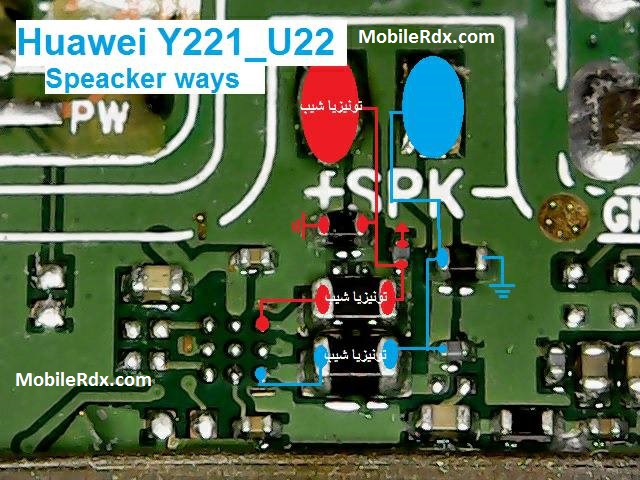
Hints to fix Huawei Ascend Y221Speaker or Ringer Problem Repair Solution:
Check the speaker assembly for possible damaged and or misaligned. Use a multimeter to check it (How to use Multimeter), replace if already busted.
If the speaker is okay, check and clean the speaker terminal contact pads. Corrosion might weaken and loosen the connection.
Trace the speaker+ and speaker- connection to each certain components where it is being connected.
Check and replace the filter capacitor and resistor components.
Check and ensure first that speaker is working or already tried installing a replacement spare on.
If the speakers were okay, you may then proceed to check those components showed on the solution above.
Huawei Ascend Y221 Ringer Solution Jumper Problem Ways Ringer Not Working
Huawei Y221, Ringer Problem, Ringer Solution, Speaker Jumpers, Ringer Ways