Samsung Galaxy S7 Edge G935F Power Button Ways Solution
Samsung SM-G935F Power Key Way On-Off Button Jumper Power Problem Solution Power Ways Set Dead Problem
In Samsung Galaxy S7 Edge G935F volume and power keys are on the right side of the mobile phone, they are used to control the volume like while listening to the music or during a phone call. Volume keys like power buttons are soldered on the motherboard and can easily be damaged if the user puts too much pressure on them.
Here are the connection line paths for Samsung G935F that may useful in troubleshooting a not working Volume control both UP (+) and DOWN (-) button switches. This shows the connection line paths (jumper ways), especially when trying to fix the button switch if severely damaged or the PCB solder pads has been already lifted. You may use a multimeter to trace each of the volume button keys terminals connection across to a component where it is being connected. This solution may also work with Samsung Galaxy S7 Edge G935F phones.
Hardware Solution:
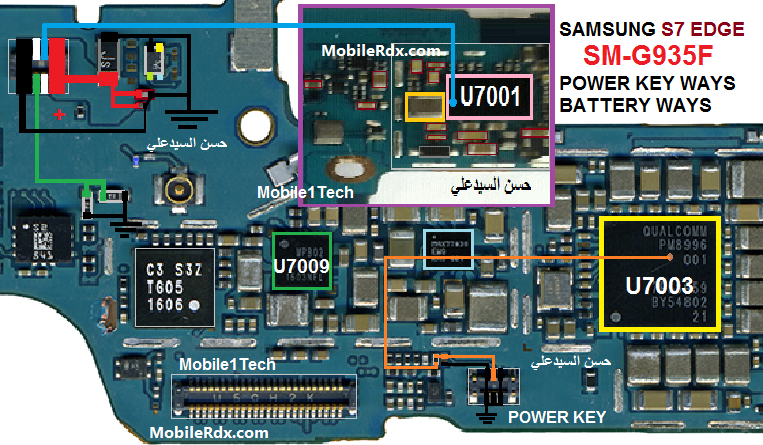
To fix this problem you may first visually check the button switch assembly for possible damaged. Just replace it, and carefully re-solder it without lifting the PCB board terminal solder pads.
If the said switches assembly seems okay but it still it does not respond or work. Refer to the solution above and locate the highlighted component on the PCB board.
Damage or fault repairs caused by the existing solutions on this blog is not liable MobileRdx.com, we just want a little help you in improving your mobile phone.
Note: Please note that even though every solution posted on our website is tested by one or more members of our team before posting, but still we do not take any responsibility for any damage it may cause to your cell phones. Use these repairing solutions at your own risk. Thank You.
Samsung Galaxy S7 Edge G935F Volume Button Ways, Jumper, Volume Key Not Working Problem, Volume Button Jumper, Volume Key Way, Up Down key problem Ways Solution.