Xiaomi Mi 5 Qcn File For
1. No service problem fix. 2. Imei problem fix. 3. Network unlock problem fix. 4. After flash no service fix.Download Xiaomi Mi 5 QCN File, and Other Files
Xiaomi MI 5 QCN File QCN IMEI Rebuild Tool QPST ToolStep01 : Generate QCN File For Xiaomi Mi 5 Mobile
Run “Rebuilder tool” on pc >> “Open File” >> Browse “Mi5 QCn File” >>> “Replace IMEI with original IMEI Number” >> Click “Rebuild” button and save new QCN file on pc.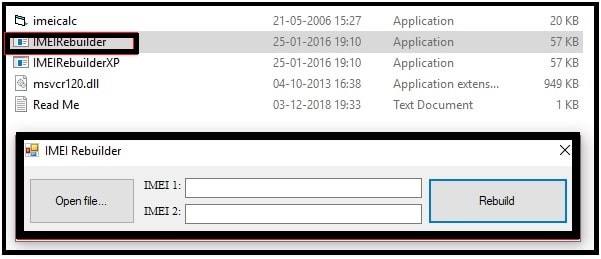
Step02 Write Or Repair Xiaomi Mi 5 IMEI Number
- Download QCN Rebuilder and QCN File From above
- Run QCN Rebuilder Load Download QCN Replace IMEI With the Original IMEI then Rebuild QCN
- Enable USB Debugging From Developer options Connect Phone to PC using USB then Enable Qualcomm USB diag port (using below code over adb)
adb devices
su
setprop sys.usb.config rndis,diag,adb
Enable DIAG Port On Xiaomi Mi 5 Mobile [With or Without Root ]
- Note: if the Phone is Not Rooted Then use EDL and BOX Like UMT
- Or just Dial This Number With Dialer to enable Diag. * #9090#, *#*#13491#*#*, *#*#717717#*#*
- Launch QPST Software Downloaded Tool from above.
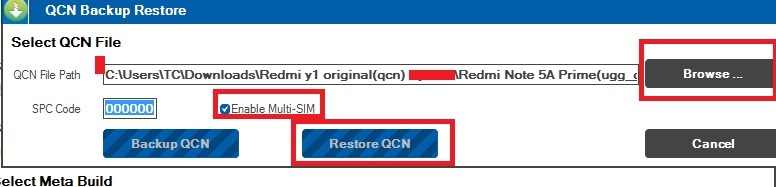
- Click on the Restore Tab.
- Choose Your Phone By Clicking on First Browse.. Button.
- Select Rebuild QCN File ***.xqcn file [Downloaded From above].
- Now Hit the Start Button.
- Done.
if the Dual IMEI Writer unable to Rewrite Correct IMEI Then use hex Converter to Find and Replace Installed IMEI.