Xiaomi 17 Ultra (Nezha) EDL Test Point is a hardware-specific ISP pinout or gold point used to enter the device into EDL mode (9008) for firmware flashing, unlocking, or repairs. So, if your Xiaomi Qualcomm phone is bricked, you forgot the pattern lock, or you are unable to unlock FRP, then the Xiaomi 17 Ultra Test Point can help you fix it quickly.
Because the Xiaomi 17 Ultra runs on the Qualcomm SM8850 chipset, it works via the Qualcomm HS-USB QDLoader 9008 port. This guide shows how to locate the test point and force the device into EDL mode.
What is the EDL Test Point?
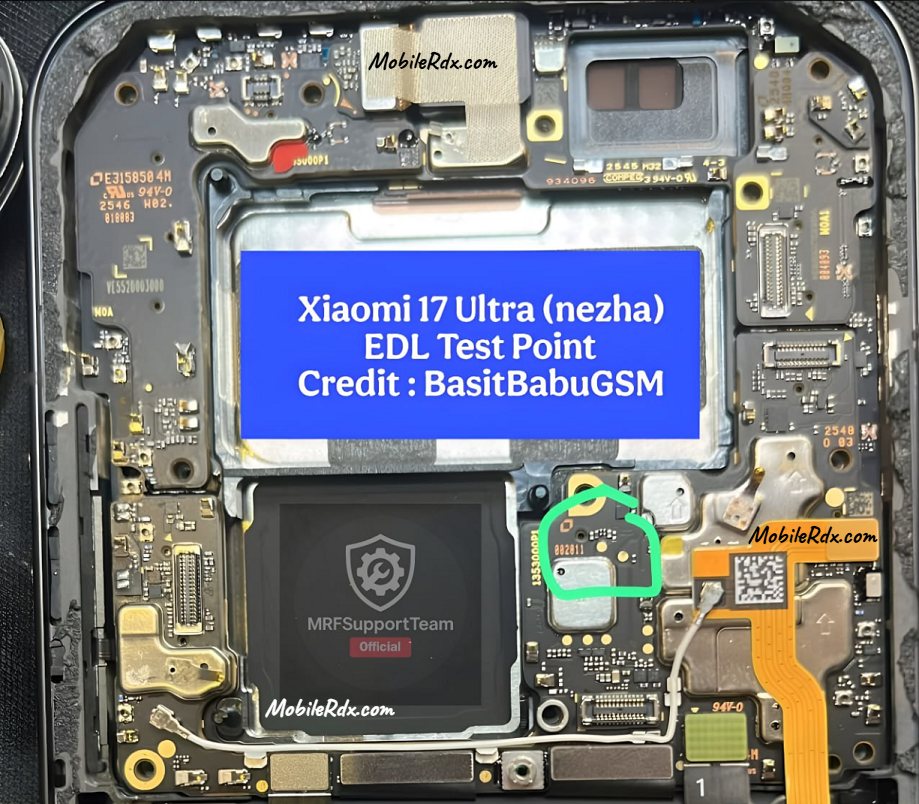
The EDL Test Points consist of two copper pads near the battery connector of your motherboard (PCB). just short these 2 points using tweezers or using a jumper wire when you plug in your phone into a computer; it allows you to go into 9008 Flash Mode, which is the only place where you can make repairs that require going beyond what you can do with fastboot or recovery mode
Xiaomi 17 Ultra Test Point Image:
Below is the test point image for the Xiaomi 17 Ultra to boot your phone into Flash Mode. By shorting the two points, you can force the device into Qualcomm QDLoader 9008 mode. This connection is necessary to flash stock firmware, bypass the FRP lock, or reset user data if the phone is bricked.
Required Tools
Before proceeding, ensure that you have the following tools and drivers ready:
PC/Laptop: Running Windows OS.
USB Cable: A high-quality or original data cable.
Conductive Tool: Tweezers or a piece of copper wire to short the test points.
Opening Tools: A heat gun, removal tool, and screwdriver to disassemble the back panel.
Drivers: [Qualcomm HS-USB QDLoader 9008 Driver] is installed on your PC.
Software: UnlockTool, DFT Pro, Chimera, or your preferred FRP unlock tool.
Steps to Use Xiaomi 17 Ultra Test Point
- Turn off the phone completely and unplug it from the computer.
- Remove the back cover to expose the motherboard.
- Unplug the battery connector from the motherboard (this is often necessary for the device to enter EDL mode correctly).
- Find the two specific EDL copper pins on the motherboard.
- Use metal tweezers or a copper wire to bridge (touch) both test points simultaneously.
- While holding the tweezers in place (keeping the points shorted), plug the USB cable into the phone and PC.
- Once the computer makes a sound or the device is detected, remove the tweezers. Immediately reconnect the battery flex cable (some devices will exit EDL mode if the battery isn’t reconnected quickly).
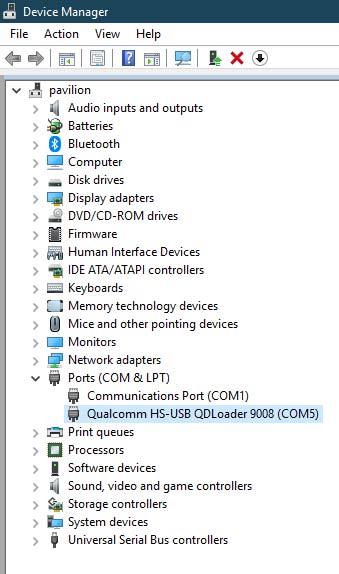
- Check Device Manager on your PC. The phone should be listed under Ports (COM & LPT) as “Qualcomm HS-USB QDLoader 9008.”
- You are now ready to use your flashing or unlock tool.