In this guide, we share a clear working image of the Samsung Galaxy S26+ SM-S947B UFS ISP pinout and test points so you can flash firmware or ROM dump using ISP pinouts, remove FRP lock, bypass MDM locks, fix dead boot issues, or reprogram the UFS chip using compatible ISP boxes such as UFI Box, Easy JTAG Plus, Medusa Pro, or Flash64. We also cover the step-by-step process for connecting the ISP pinout to a proper UFS programmer box.
The Samsung Galaxy S26+ SM-S947B is the international variant of the 2026 premium Samsung flagship lineup. It is powered by the Exynos 2600 processor, runs Android 16, and features a 6.7-inch Dynamic AMOLED 2X display. The device uses a UFS storage chip for internal memory, which means standard eMMC ISP methods will not work here. You need a UFS-compatible programmer for chip-level operations.
What Is ISP Pinout?
ISP stands for In-System Programming. It allows you to communicate directly with the memory chip (UFS or eMMC) while it remains soldered on the motherboard. Instead of removing the chip entirely (chip-off method), you solder thin jumper wires to specific test points on the PCB and connect them to a programmer box. This method bypasses the CPU and lets you read, write, or erase data directly from the storage chip.
ISP is commonly used for FRP bypass, dead boot repair, firmware flashing, MDM removal, and IMEI restoration on devices that are bricked, FRP-locked, or stuck in boot loops. For the Samsung Galaxy S26+ SM-S947B, the ISP points are located on the UFS chip area of the motherboard.
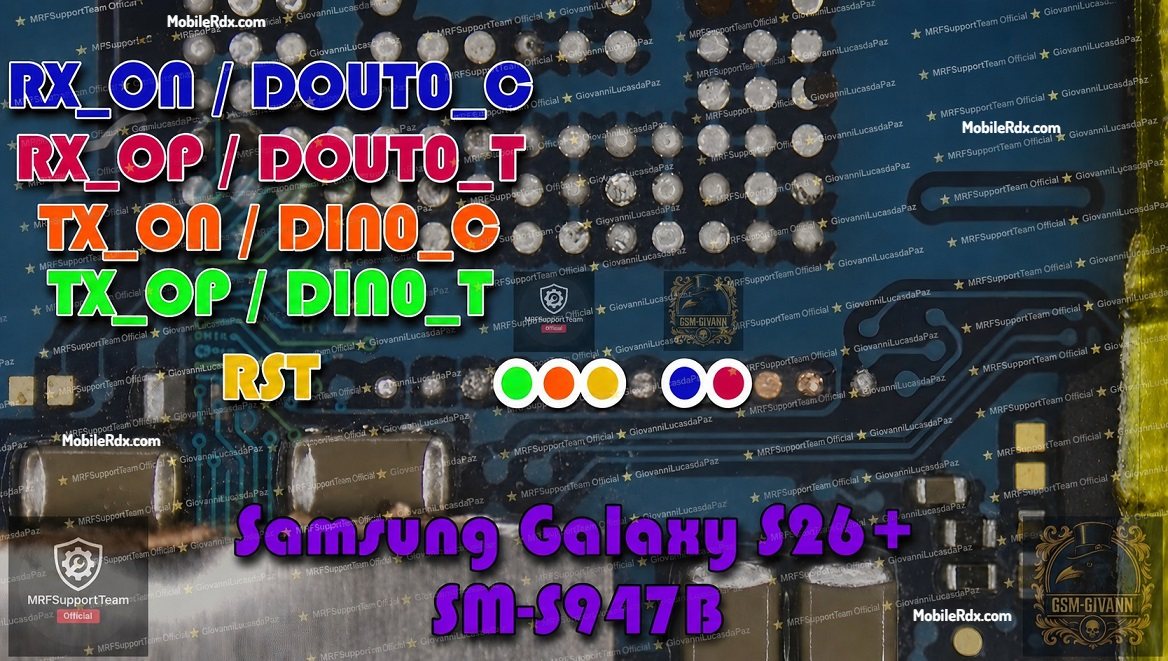
Samsung Galaxy S26+ SM-S947B UFS ISP Pinout Image
The test points are located on the main motherboard near the UFS memory chip area. You may need to remove the protective EMI shielding or a small section of the mask to access the points. Use a microscope or 10x magnifier to identify the pin labels clearly before soldering.
UFS ISP Pin Labels You Need
- RST — Hardware reset pin
- TX0_P (TXOP) — Transmit positive signal
- TX0_N (TXON) — Transmit negative signal
- RX0_P (RXOP) — Receive positive signal
- RX0_N (RXON) — Receive negative signal
- VCC — Main power supply (2.5V or 3.3V)
- VCCQ2 — I/O power supply (1.8V)
- GND — Ground (connect to any ground point on the board)
Required Tools for ISP Pinout Method
Make sure your workstation has the following tools before attempting ISP connections:
- UFI Box, Easy JTAG Plus, or Medusa Pro II
- 0.1 mm to 0.3 mm jumper wires
- Fine-tip soldering iron
- Soldering flux
- Isopropyl alcohol (IPA 99%) for cleaning
- Multimeter for continuity checks
- Microscope or 10x magnifier
How to Connect Samsung Galaxy S26+ SM-S947B ISP to UFS Box
- Remove the battery from the phone. This is extremely important to prevent voltage conflicts during soldering and connection.
- Clean the PCB area around the UFS chip using isopropyl alcohol.
- Locate the ISP test points on the motherboard near the UFS chip area using the pinout diagram.
- Solder jumper wires carefully to RST, TX0_P, TX0_N, RX0_P, and RX0_N points.
- Connect the wires to your UFS programmer box according to the tool pinout configuration.
- Double-check each connection using a multimeter to ensure there are no shorts between pins.
- Connect the UFS box to your PC and open the software (UFI Tool, Easy JTAG, or Medusa).
- Click Identify UFS or Detect Device in the software to verify the connection.
- Once detected, navigate to User Partition > Special Task > Reset FRP for FRP bypass, or select the appropriate operation for flashing or repair.
If you have the right connections, the tool will display the UFS chip information in the software window, including vendor ID, chip capacity, and firmware version.
Frequently Asked Questions
What is the Samsung Galaxy S26+ SM-S947B ISP pinout used for?
The ISP pinout allows technicians to connect directly to the UFS memory chip for FRP bypass, dead boot repair, firmware flashing, MDM removal, and IMEI restoration without removing the chip from the motherboard.
What tools are compatible with SM-S947B ISP?
UFI Box, Easy JTAG Plus, Medusa Pro II, and Flash64 are compatible. Ensure your tool supports UFS chips, as the S26+ uses UFS storage, not eMMC.
What processor does the Samsung Galaxy S26+ use?
The SM-S947B is powered by the Exynos 2600 processor, which is Samsung’s flagship chip for 2026 with clock speeds up to 3.8 GHz.
Do I need to remove the battery before ISP connection?
Yes. Always disconnect the battery before soldering or connecting to a UFS programmer to prevent short circuits and voltage damage.
What if the device is not detected by the UFS tool?
Recheck your soldering for loose connections. Ensure wires are as short as possible to prevent signal loss. Verify that GND is properly connected. Try a different USB port or cable.
Conclusion
The Samsung Galaxy S26+ SM-S947B ISP pinout provides a reliable chip-level repair method for technicians working with Exynos 2600 flagship devices. With the right tools and careful soldering, you can bypass FRP, recover dead boot devices, and perform full firmware operations. Always use a multimeter to verify connections and work on a properly grounded bench to avoid ESD damage to the motherboard.