TunaProTool is a lightweight Android servicing utility built for mobile repair technicians. It handles FRP bypass, screen unlock, firmware flashing, and chipset-level repair inside a single clean interface. The tool comes with a built-in ADB-enabled function for Samsung Exynos devices — no separate tools or extra drivers needed. Whether you work on Samsung, Xiaomi, Redmi, or Oppo phones, this tool covers the basics and the tough jobs.
What Is TunaProTool?
TunaProTool is a Windows-based mobile servicing application developed for Android repair professionals. It focuses on three core areas: FRP bypass, unlocking, and flashing. The tool offers both local and cloud server modes for paid credits. However, the Samsung Exynos FRP module is completely free — no OTP, no registration, just download and run.
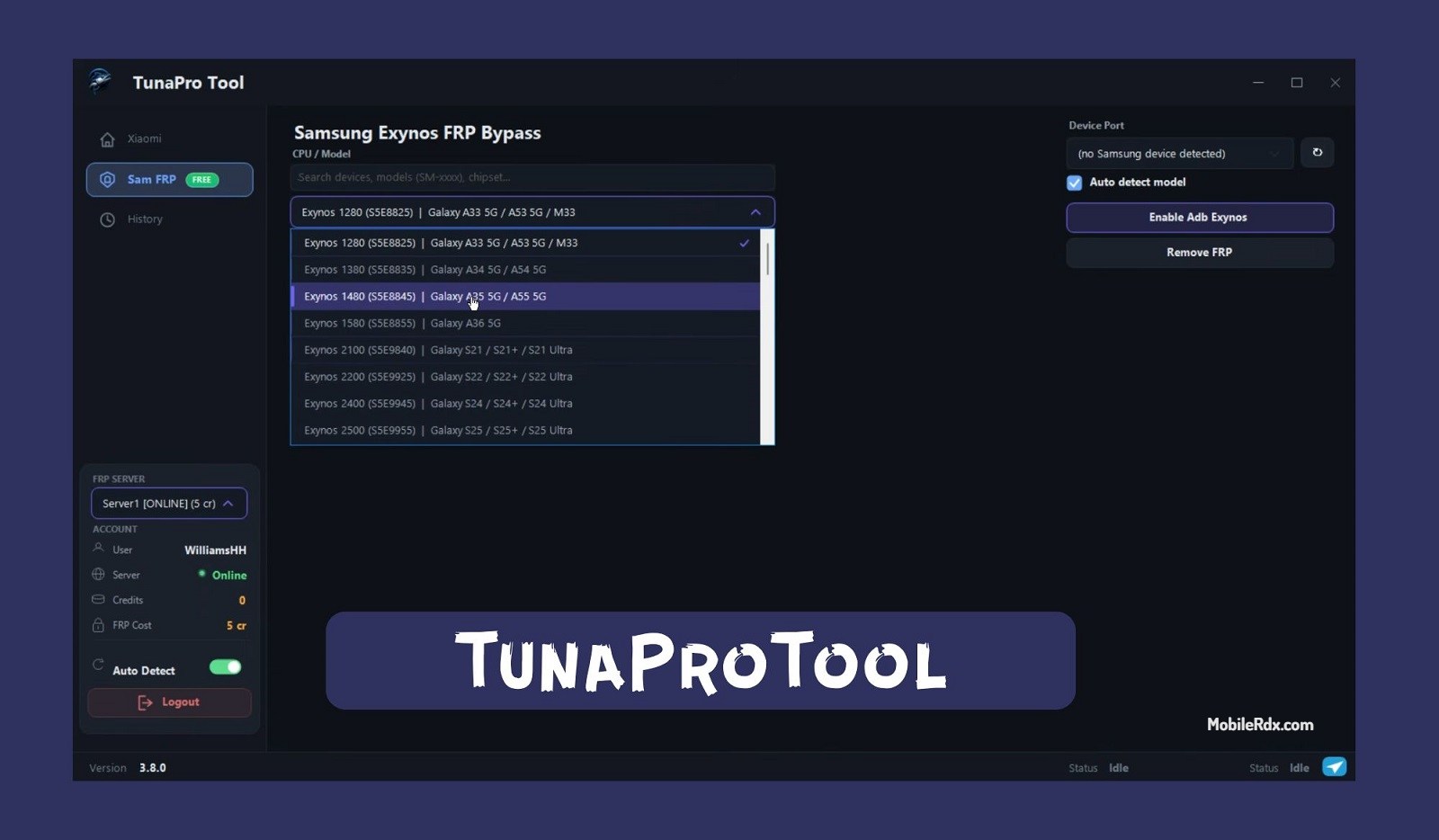
The tool stands out because of its built-in ADB enable function. Normally, Samsung Exynos devices need a separate ADB enable step before FRP bypass can work. TunaProTool does both in one go, saving time and eliminating the need for extra software.
Features of TunaProTool
- Samsung Exynos FRP Bypass — One-click FRP removal on Exynos-powered Galaxy devices. Supports Android 14, 15, and 16 security.
- Built-in ADB Enable — Automatically enables ADB on supported Exynos devices. No extra ADB enable tool needed.
- Xiaomi FRP Remove — Bypass Google account and Mi Account on Xiaomi, Redmi, and POCO devices via cloud server.
- Screen Unlock — Remove pattern, PIN, password, and fingerprint locks on supported Android devices.
- MTK Support — Bypass MediaTek auth and perform FRP on MTK-powered devices.
- Auth Bypass — Handle Qualcomm and MediaTek authentication bypass for flashing and repair.
- Factory Reset — Perform factory reset without Google account verification.
- Cloud Server Mode — Paid credits for Xiaomi FRP, MTK auth, and advanced operations. Pay per device.
- Auto Device Detection — Automatically detects connected device model and chipset.
- Clean Interface — Simple dashboard with clearly labeled modules. No confusing menus.
Supported Devices
TunaProTool supports a wide range of Android devices. The Samsung Exynos module alone covers over 60 Galaxy models:
- Samsung Galaxy — A-series (A03 to A56), S-series (S20 to S26), Note series, M-series, F-series, Tab series with Exynos chipsets
- Xiaomi / Redmi / POCO — Mi, Redmi Note, POCO X/F/M series (via cloud server)
- Oppo & Vivo — Select models for FRP and unlock via ADB
- MediaTek Devices — Infinix, Tecno, Itel, and other MTK-powered phones
- Qualcomm Devices — FRP and EDL operations on select Snapdragon models
System Requirements
- OS: Windows 7, 8, 8.1, 10, 11 (64-bit only)
- Processor: Intel Core i3 or higher
- RAM: 4 GB minimum
- Storage: 100 MB free space
- USB: USB 2.0 or 3.0 port
- Drivers: Samsung USB drivers, ADB drivers installed
- Internet: Required for Xiaomi cloud operations
Download TunaProTool V3.9
Download the latest version of TunaProTool from the official website or trusted mirrors below:
- File Name: TunaproToolV3.9.rar
- Version: V3.8.0
- Size: 33 MB
- Platform: Windows 64-bit
- Type: Portable (extract and run)
How to Install TunaProTool
- Download the TunaproToolV3.9.rar file from the link above.
- Extract the RAR archive using WinRAR or 7-Zip.
- Open the extracted folder and run TunaProTool.exe as Administrator.
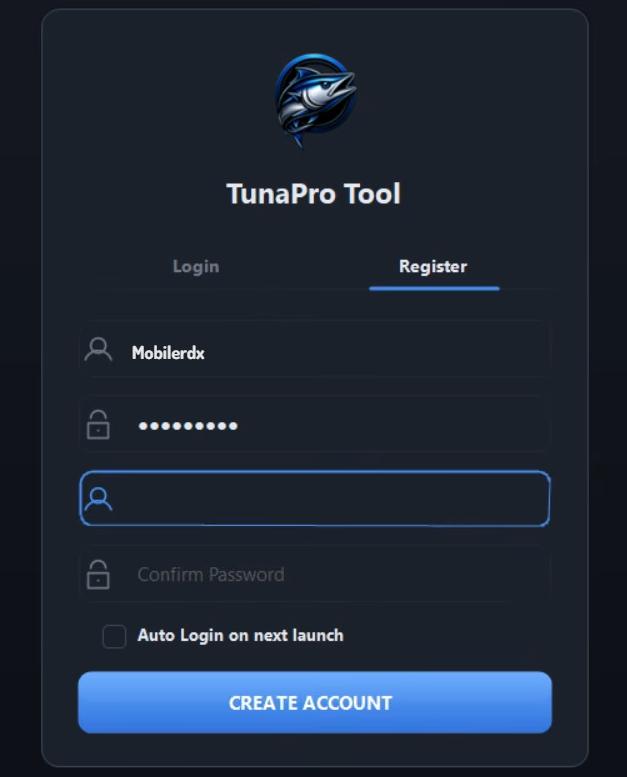
- If you’re using the Samsung Exynos FRP module, click “Register” to create a free account.
- Log in to access the free Samsung Exynos FRP feature.
- No OTP or credit card required for the free module.
How to Use TunaProTool for Samsung FRP Bypass
- Launch TunaProTool.exe as administrator.
- Log in with your registered account.
- Connect your Samsung Galaxy device to the PC via USB cable.
- Put the device in Download Mode (Volume Down + Power or Volume Up + Volume Down depending on model).
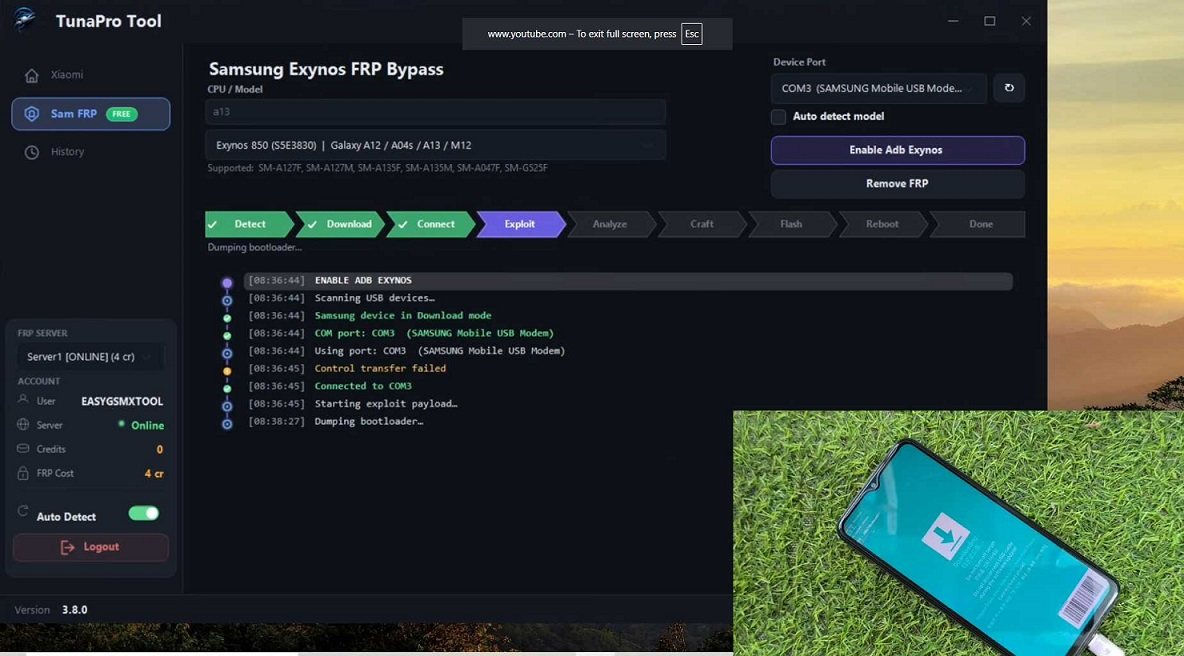
- Select the “Samsung Exynos FRP” module from the dashboard.
- Click “Enable ADB” to enable ADB on the device.
- Once ADB is enabled, click “Remove FRP.”
- Wait for the process to complete. The device will reboot automatically.
- FRP is now removed. Set up the device as new.
How to Use TunaProTool for Xiaomi FRP
- Launch the tool and log in.
- Connect your Xiaomi/Redmi/POCO device in EDL or Fastboot mode.
- Select the “Xiaomi FRP” module.
- Purchase credits from a reseller or the official site if you haven’t already.
- Enter the device IMEI or use auto-detect.
- Click “Remove FRP” — the cloud server handles the operation.
- Wait for the confirmation message. Device will reboot FRP-free.
TunaProTool Free vs Paid
| Feature | Free | Paid (Cloud) |
|---|---|---|
| Samsung Exynos FRP | ✅ Yes | ✅ Yes |
| Built-in ADB Enable | ✅ Yes | ✅ Yes |
| Xiaomi FRP | ❌ No | ✅ Credits needed |
| MTK Auth Bypass | ❌ No | ✅ Credits needed |
| Screen Unlock | ✅ Limited | ✅ Full |
| Auto Device Detection | ✅ Yes | ✅ Yes |
| Cloud Server | ❌ No | ✅ Pay per device |
TunaProTool is a good addition to any repair shop’s toolkit. The free Samsung Exynos FRP module works without OTP or credit card — just register and run. The built-in ADB enable function saves you from hunting for separate ADB enable tools. For Xiaomi and MTK jobs, the cloud credit system is convenient if you handle more than a few devices per month. The interface is clean, the tool is lightweight at just 33 MB, and the official site provides regular updates.
If you work on Samsung Exynos phones daily, this tool is worth keeping in your arsenal. The free module alone justifies the download. For technicians who regularly need Xiaomi FRP and MTK auth, the credit system is reasonably priced.
Frequently Asked Questions
The Samsung Exynos FRP module is free with registration. Xiaomi FRP, MTK auth bypass, and other cloud features require paid credits.
The latest version is V3.9 released in June 2026. File size is 33 MB for Windows 64-bit.
Yes. The Samsung Exynos FRP module supports Android 14, 15, and 16 security on supported Galaxy models.
No. The free Samsung Exynos module does not require OTP. You only need to register a free account.
It is designed for mobile repair technicians who need a lightweight tool for Samsung FRP bypass, Xiaomi account removal, and basic Android servicing.
Read More:
- Download UnlockTool V2026.07.09.0 Setup — Best paid all-in-one for FRP and flashing
- Download BFT Best Flash Tool V1.7 — Free alternative for Samsung and Xiaomi FRP
- Download Cheetah Tool Pro V2026.07.22 — Dongle-free FRP tool with Android 16 support