If you are looking for the working Oppo Reno14F 5G UFS ISP pinout, you are at the right place. The Oppo Reno14 F 5G (CPH2743) runs on the Qualcomm Snapdragon 6 Gen 1 platform with UFS storage. In this post, we have shared the tested ISP pinout points that work for FRP bypass, dead boot repair, and firmware flashing.
What Is ISP Pinout?
ISP (In-System Programming) allows you to access the UFS memory chip directly while it is still soldered on the motherboard. Instead of desoldering the chip, you connect jumper wires to the correct test points on the board. This method is used to bypass FRP, flash firmware, repair dead boot, or remove user locks — all without removing the UFS chip.
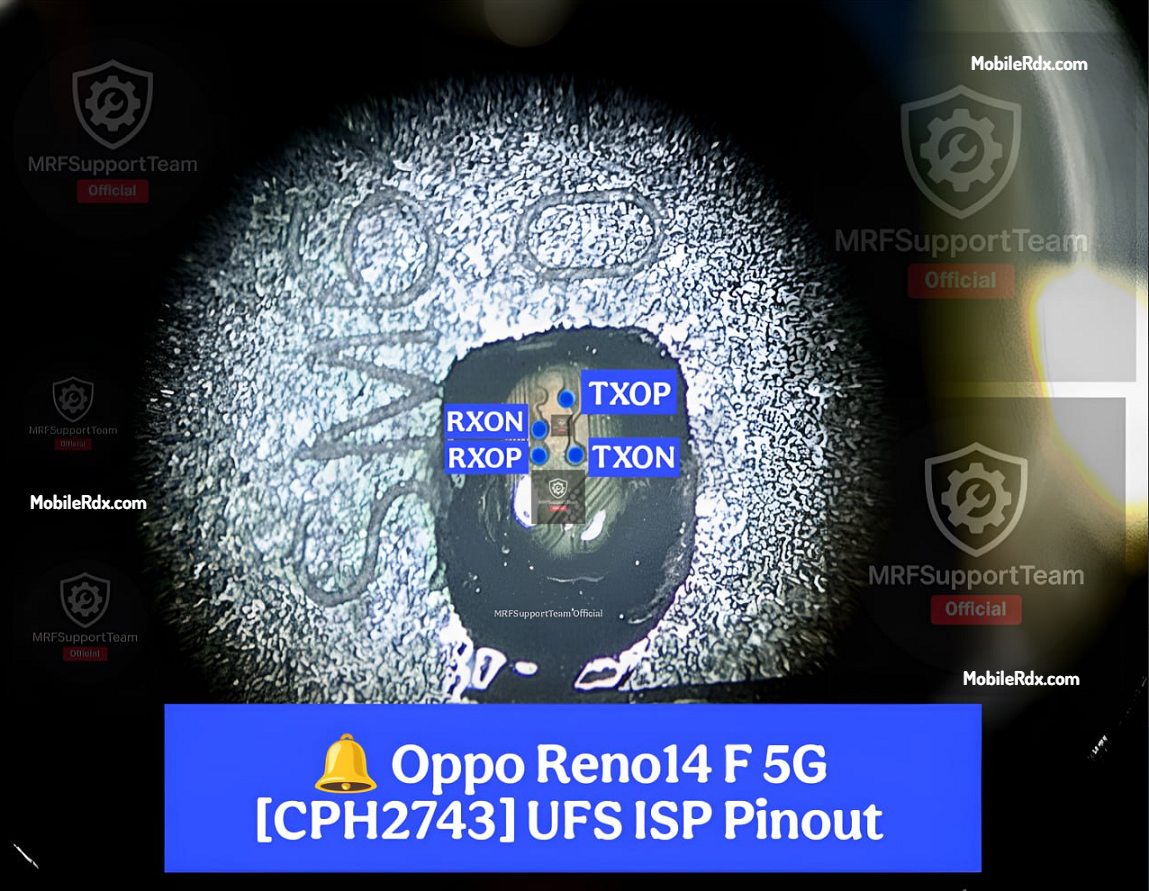
Oppo Reno14 F 5G UFS ISP Pinout Points
The UFS ISP test points on the Oppo Reno14 F 5G (CPH2743) are located on the PCB near the UFS chip. Below is the ISP pinout layout shared by the MRF Support Team Official:
Tools Required
- UFI Box / Easy JTAG Plus / Flash64
- 0.1mm – 0.3mm jumper wires
- Fine tip soldering iron (temperature-controlled)
- Soldering flux and leaded solder
- Isopropyl alcohol (IPA 99%) for cleaning
- Multimeter for continuity testing
- Microscope or 10x magnifying lens
How to Connect Oppo Reno14F 5G UFS ISP – Step by Step
- Remove the battery—Disconnect the battery flex to prevent voltage conflicts and short circuits.
- Remove the metal shield—Use a hot air station to remove the shield covering the UFS chip area.
- Clean the PCB – Use IPA and a brush to clean the area around the test points.
- Identify the test points – Locate TXOP, TXON, RXOP, RXON, and GND near the UFS chip.
- Solder jumper wires – Use a fine tip iron with flux. Keep wires short to avoid interference.
- Verify with multimeter – Check continuity between each point to confirm no shorts.
- Connect to UFI / Easy JTAG – Connect the wires to your ISP tool according to its pinout.
- Identify UFS – Click Identify UFS in the software. Chip info means connection is correct.
- Perform the operation – Erase FRP, flash firmware, dump UFS, or reset the device.
Common Issues & Solutions
- Tool not detecting UFS: Double-check the TX and RX connections. Try swapping the TXOP/TXON with RXOP/RXON pairs.
- Short circuit detected: Clean the solder area properly and check for solder bridges with a multimeter.
- Wrong UFS detection: Use UFI v1.8.0.5 or higher for best compatibility with Snapdragon 6 Gen 1 UFS chips.
The Oppo Reno14F 5G (CPH2743) UFS ISP pinout makes FRP bypass, firmware flashing, and dead boot repair much easier for this device. Work carefully under a microscope, confirm each point with a multimeter, and you will get a successful connection. If you are repairing this model regularly, save the pinout image for quick reference.
Frequently Asked Questions
The Oppo Reno14F 5G (CPH2743) is powered by the Qualcomm Snapdragon 6 Gen 1 (SM6450) processor with UFS storage.
Yes. Once connected via ISP, use UFI or Easy JTAG to navigate to User Partition > Special Task > Reset FRP to remove the FRP lock.
UFI Box and Easy JTAG Plus both work well. Use UFI v1.8.0.5 or later for best results with Snapdragon UFS chips.
No. Yes, UFS ISP test points are accessible on the PCB surface near the UFS chip, drilling the CPU.