Download Android Win Tool (AWT) v2.2.8 [Latest Version] Flashing, FRP & Repair Tool
Android Win Tool is a simple Windows program that supports Android and fastboot flash, Qualcomm MTK IMEI repair, EDL flash, fastboot flash, reading info, removing FRP, changing CSC, Xiaomi CPID,Factory Reset, and erasing KG on MediaTek, SPD, and Qualcomm phones easily.
What Is Android Win Tool?
Android Win Tool (AWT) is a complete tool for technicians to use every day for flashing stock and custom firmware, fixing IMEI, MEID, and serial numbers, and also clearing account locks on phones that support it. The tool also removes FRP lock, Samsung accounts, Mi account remove, and bootloader unlock.
The tool connects devices in ADB, Fastboot, EDL, and META modes, so most repair jobs can be fix in a single program. Xiaomi users get extra attention here. AWT was the first tool to repair IMEI on Xiaomi MediaTek 5G phones, and the Xiaomi Qualcomm CPID 2026 method was released in recent builds. The free version give acces to work with a few devices, but if you use it regularly in a repair shop, you’ll need to purchase an activation to access the full features.
Key Functions of Android Win Tool
- Qualcomm repair and service functions
- MediaTek (MTK) repair and service functions
- EDL Flasher for supported Qualcomm devices
- Fastboot Flasher for Android phones
- ADB commands for basic device operations
- Fastboot commands for repair and reboot tasks
- FRP reset options through supported modes
- EFS backup and restore functions
- EFS reset and repair options
- IMEI repair options for supported devices
- QCN read, write, and edit functions
- Partition Manager to read, write, and erase partitions
- Partition information and file management
- Xiaomi ADB and Fastboot functions
- Xiaomi repair and service options
- Samsung service options
- Root functions using Magisk
- Patch boot image for root
- Restore patched boot image
- VBMeta patch and AVB-related options
- APK installation through ADB
- Magisk APK installation
- OTA disable option on supported devices
- Reboot to EDL, Recovery, Bootloader, and Fastboot
- Sideload and ZIP installation options
- Device information and hardware details
- Device Manager for connected phones
- Online service options
- Support for multiple Android chipsets and brands
- Regular updates with new device support and fixes
ADB & Fastboot Commands
- Read device information
- Reboot device
- Reboot to Recovery
- Reboot to Bootloader
- Reboot to Fastboot
- Reboot to Sideload
- Reboot to EDL
- Reset FRP on supported devices
- Install APK files
- Install ZIP files
- OEM Unlock through Fastboot
- Reset EFS on supported devices
What’s New in v2.2.8
Infinix / TECNO / itel
META Partition Manager:
- Added LK Patch for supported devices. It backs up both LK slots, prepares the images, and verifies each write by reading back the data. Unsupported LK images are not written.
- Added an automatic staged Unlock Bootloader workflow, tested on Infinix X6855. It includes LK backups, active-slot checks, and fastboot status verification. Availability depends on the META connection state. Fastboot status alone does not confirm a persistent unlock or successful Android boot.
- Improved META connection and partition discovery compatibility, including experimental read-only eMMC discovery for Infinix X6840.
- Added BETA META partition listing, read, write, and erase support for Infinix X6891 on validated partitions. Write and erase operations are limited to partitions up to 256 MiB.
- Improved operation status messages, progress completion, and full on-screen operation log submission.
MediaTek Flash
- Added V6 firmware flashing support for Infinix X6855, including devices blocked by the standard SLA-protected flashing path. Support for other V6 models is under investigation through Report Device.
- Added Report Device to collect support information for investigating additional V6 devices. The selected DA2 is assessed offline and included in the same encrypted support report. Reporting does not enable flashing or attempt a device-side exploit.
- Improved Read Info readability and simplified confirmation messages for backup, erase, and flash operations.
- Reduced unnecessary local diagnostic files and removed internal report locations from the operation display. Required recovery plans and partition backups remain available.
Qualcomm EDL
- Expanded the loader library with 316 additional files. Identifiable entries include Samsung A525F, OnePlus N30 and N10 T-Mobile, ASUS ZS660KL, LeEco X722, Lenovo ThinkSmart View Plus, Xiaomi daisy, jasmine, and rosy, plus selected Quectel and u-blox modules. Loader availability does not guarantee device compatibility.
- Fixed various bugs and improved overall stability.
Supported Devices
The tool covers three main chipset families plus brand-specific modules:
- Xiaomi—Qualcomm (CPID 2026) and MediaTek 5G (IMEI repair)
- Samsung — FRP via IMEI or SN services
- Infinix, iTel, Tecno—META mode partition erase
- General Android—MTK, Qualcomm, and Unisoc devices
- Apple—iOS MDM bypass without jailbreak
System Requirements
- Windows 10 or later
- 4 GB RAM minimum, 8 GB recommended
- 500 MB free disk space — the setup itself runs around 362 MB
- USB 2.0 or higher port with good quality cable
- Internet for updates and online services
- Paid activation for shop-level work
Download Android Win Tool V2.2.8 Latest Version
Tool Name: Android_Win_Tool V2.2.8.zip
Size: 430 MB
Type: Free
Developed By: Androidwin Team
Join us on Telegram: t.me/mobilerdx_official
Free Or Paid: Free and Paid
How to Install and Use Android Win Tool
- Download & extract Android Win Tool to your Computer.

- Then Run the AndroidWinTool.exe as Administrator.
- Click Next > Install.

- The installation process will started > Wait for finish > Click Close.

- Next, Go to Desktop screen.
- Run the tool with Admin & wait for a few seconds to open it.
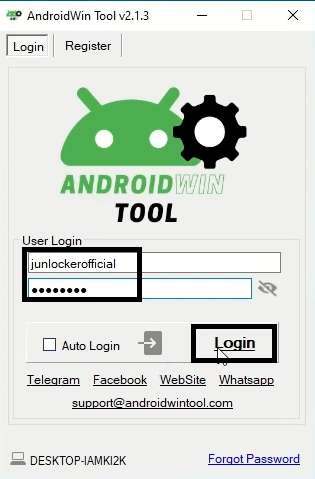
- Click on Sign Up, a webpage will open.
- Fill email, password, and name, and click submit.
- Go back to the Tool > Type Email & Password & Click Sign In.
- Connect your phone to Windows.
- Next, Select the function your want to use.

- Don’t forget to install the USB driver before proceeding.
- After that, check the log screen instructions & connect the phone according to it.
- Now the tool will fix & Restart the phone.
- Disconnect & Setup the phone.
- That’s it.
Free vs. Paid—Which One You Need
The free version does basic flashing and some unlocking. Paid version handles more, such as repair of IMEI, support for Samsung serials and FRP, and support for newer chips. Do you repair phones daily? Then buy paid version. If you use them only now and then, the free version should suffice.
Frequently Asked Questions
Android Win Tool is a Windows-based tool used by mobile technicians for Android flashing, repair, FRP, ADB, Fastboot, and other supported services.
There is a free version for basic flashing and occasional use. Full module access—IMEI repair, Samsung IMEI or SN services, and new chipset methods—needs paid activation.
It covers MTK, Qualcomm, and Unisoc devices, with special modules for Xiaomi (CPID 2026 and MTK 5G IMEI repair), Samsung FRP services, Infinix, iTel, Tecno, and iOS MDM bypass.
Yes, it includes various ADB and Fastboot commands for supported Android devices.
Yes. Android Win Tool was the first tool to repair IMEI on Xiaomi MediaTek 5G phones, and that method is still used in current builds.