Iphone 4 s Headset Problem Solution, Headphone Icon Activated Problem
Iphone 4 Handsfree Not Working Ways Solution Headphone Mode Solution Jumper
If the headset is plug or connected to the Iphone 4 and shows a headset icon or symbol but doesn’t hear anything on the device. This solution below may possibly help to fix the phone, after ensuring that the headset is working fine or already tried using another headset.
Refer to the solution below for it shows the basic and most common parts or components that if damaged will probably result to headset audio failure. This solution provides the location of the components that holds for headset microphone and earpiece speaker circuit components.
Iphone 4 headset no sound can be heard problem solution
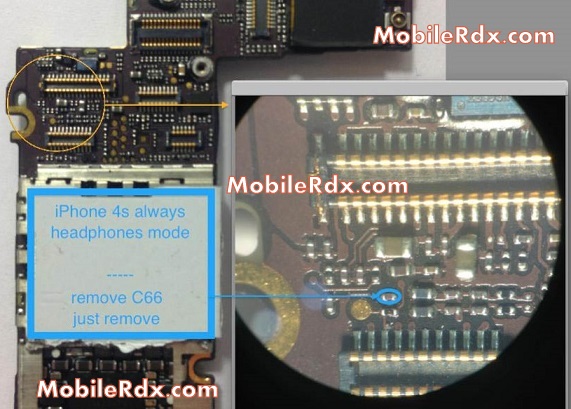
OR
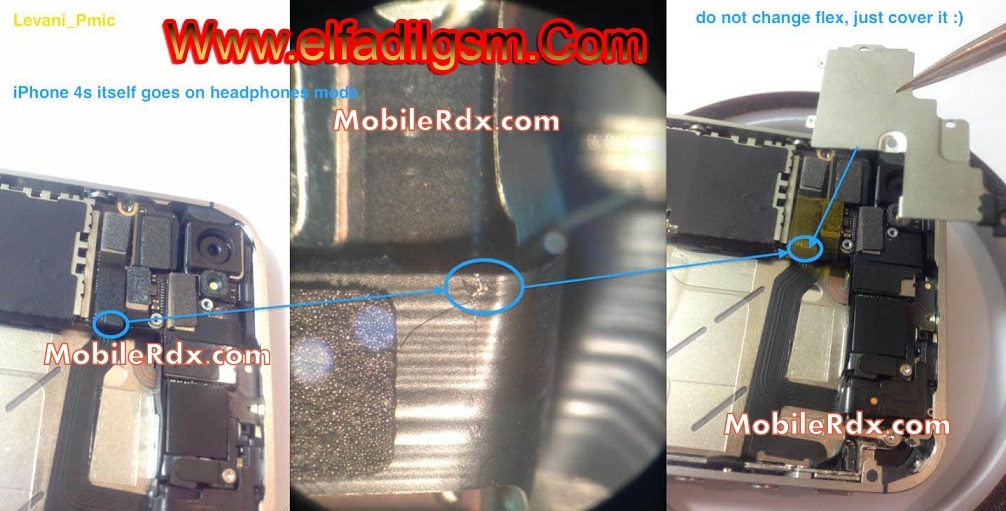
Repair hints for Iphone 4 headset audio problem:
1. Check and try using another working headset.
2. Check if the headset is activated on the audio enhancement settings
3. Visually check the headset jack connector, clean if oxidized, replace if damaged.
4. Clean the headset jack terminal contact pads on the PCB board.
5. Check replace the filter IC’s of the microphone or earpiece speaker corresponding.
1. Check and try using another working headset.
2. Check if the headset is activated on the audio enhancement settings
3. Visually check the headset jack connector, clean if oxidized, replace if damaged.
4. Clean the headset jack terminal contact pads on the PCB board.
5. Check replace the filter IC’s of the microphone or earpiece speaker corresponding.
Iphone 4 Headphone Problem Solution, Repair Ways, Jumper Problem Solution, Headeset Not Working, Headphone Problem Solution