Apple iPhone X Charging Problem Ways Solution Not Charging Problem USB Ways Charging Jumper Charging Case Short
In this post, I will guide you on how to troubleshoot iPhone X Charging Problem or won’t respond when connected to a charger. In this post, how to troubleshoot Xiaomi iPhone X smartphone that’s not charging or won’t respond when compared to a charger. So, if you are currently having this problem, continue reading to learn the steps to rule out possibilities to discover what the problem with your phone is.
Many users who have bought the high-end iPhone X are facing the problem of the iPhone X not charging issue. Most of the smartphones are functioning correctly, but some of the users complained about the problem of iPhone X not charging correctly. Some of the iPhone X owners thought that the problem was with the charger, and they bought new chargers, but after that, they realized the problem was not in the charger. In this tutorial, we will suggest you some quick solutions to fix iPhone X charging issues.
So if you are experiencing any charging problem or problem connecting your iPhone X to your computer via USB cable, then your iPhone X charging connector may be faulty. Replacing it with a new one is the only solution here. But if by any chance the USB connector prints are broken, then you have to make the jumpers as shown in the diagram below.
iPhone X Problem Charging Ways USB Jumper Solution:
Here are iPhone X Charging Problem Ways Not Charging problem solutions. Please study these diagrams very carefully before you start repairing them.
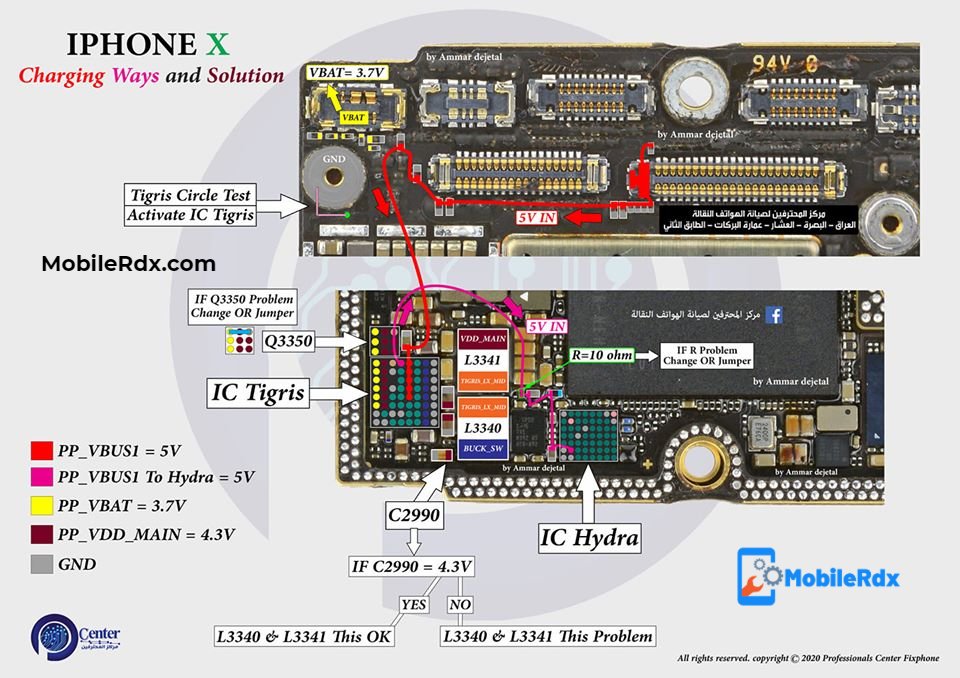
Download High Resolution Image From Here
If the charging is slow, then all you have to do is to check with any other Xiaomi charger, but you have to make sure that the charger is original, as slow charging issues almost always occur with phones using 3rd party chargers. Clean battery charging pins and check. Unused charging connector pins.
Other reasons why the iPhone X charging problem may be:
- The Smartphone is defective
- The phone has a damaged battery
- The connector is bent, broken or pushed
- There is a temporary phone problem
- The charging unit or the cable is defective
Please note that we will edit these solutions or add new ones if found on this page at any time in the future. So feel free to come back any time on this page to stay up to date.
If you have any further questions, please leave a message or Chat with us.
Keep in mind: – The every solution posted on Our website is well tested before by our specialist team, But still, we do not take any responsibility for any damage it may cause to your cell phone. Use these repairing solutions at your own Risk, Thank you.