Nokia Lumia 535 USB Charger Ways Problem Solution
Nokia Lumia 535 Charging Solution Usb Jumper Ways
Here’s the solution for Nokia Lumia 535Not Charging problem , this simple solution provides the basic details on how to fix the problem. Just refer to the solution below and follow some steps procedures on how to troubleshoot the problem.
This solution may works on ‘charger no response indication’ when any working battery charger is plug-in to the DC jack.
So if you are experiencing any charging problem or problem connecting your Nokia Lumia 535 to your computer via USB cable then it is possible that your Nokia Lumia 535 charging connector is faulty. Replacing it with a new one is the only solution here. But if by any chance the USB connector prints are broken then you have to make the jumpers as shown in the diagram below.
Hardware Solution:
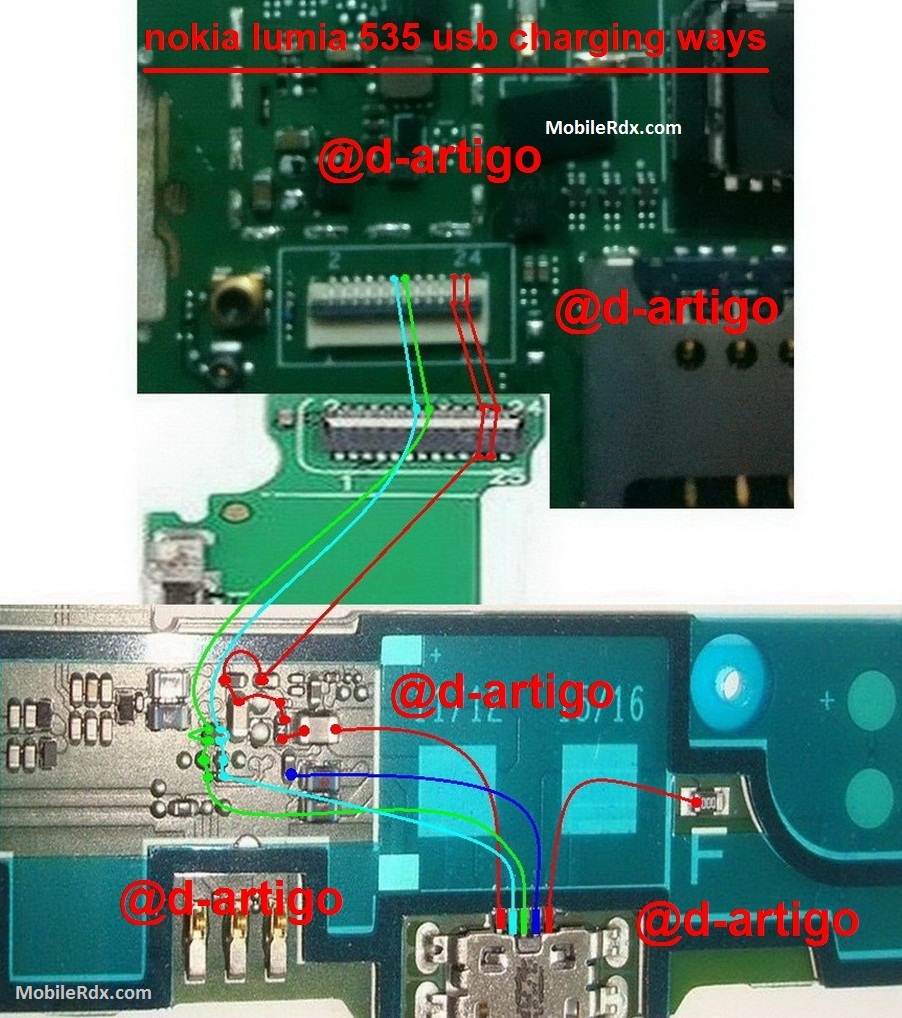
Nokia 535 Charging Solution Jumper Problem Ways No Charging Not Supported
Nokia Lumia 535,Charging,Charging Problem,Charging Solution,Charging Jumpers,Charging Ways
Repair hints for Nokia Lumia 535 Not Charging problem:
1. Visually check the charging pin connector( DC jack) for possible damaged, clean,fix if the terminals is misaligned or replace it.
2. Clean the charging pin terminal contact pads.
3. Check the battery and try using another working phone’s battery.
4. Check the battery terminals, clean if oxidized.
5. Check/replace the fuse
6. Check /replace the chip diode
If you have further questions please don’t hesitate to leave a comment.
Note: Every repairing solution posted here is tested by at least one member of our team. Use the information available here at Your Own Risk. We are not responsible if any harm comes to your device during the repairing process.