Samsung SM-N910C Charging Problem Ways Solution Jumper
Here’s the Samsung Galaxy Note 4 N910C solution for charger no response, a not charging problem on the phone. This will happen if the device suffered wet or water damaged.
Note: Charger no response or shows no battery charging icon is also cause by a weak and fully drained battery and or a damaged battery charger. This solution will only work if the device can fully turns On but it doesn’t charge up when the battery charger is plug-in.
The solution below may help on how to fix such charging problem if occurred.The highlighted components holds for cahrging operation of the device if one of these components become damaged or faulty it will result to a not charging problem.
Samsung Galaxy Note 4 N910C Charging Ways Problem Solution
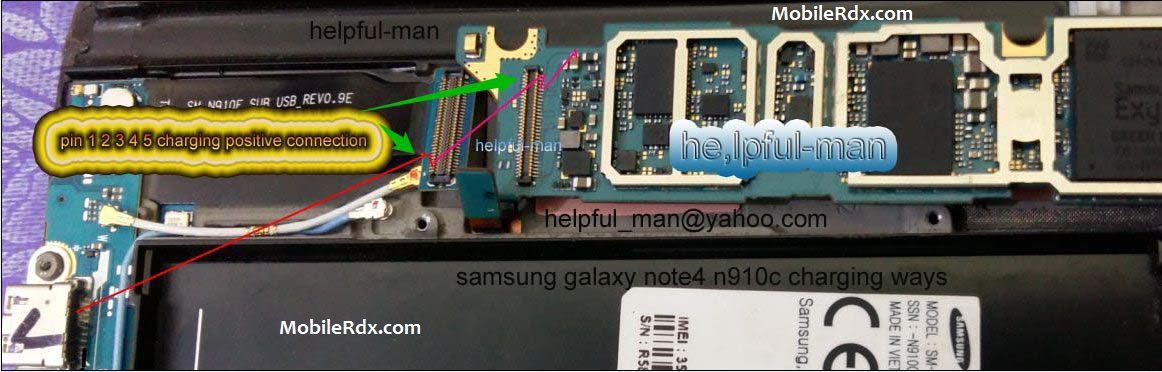
Samsung Galaxy Note 4 SM-N910C Charging Solution, Not Charging Problem Repair, Charging Ic Jumper, Not Charging Solution, Charge Problem.
If the battery and wall charger seems no problem, have a visual check on battery connector and charging pin connector (DC jack) for possible damage. Then proceed to PCB board or hardware troubleshooting to continue.
1) Clean the charging pin connector and terminal contact pads. Ensure that it is not misaligned.
2) Check the fuse for possible open circuit, replace if found damaged.
3) Check the diode for possible short circuit, replace if found damaged.
3. Check the charging transistors for possible oxidation build ups, clean, rework or replace if necessary.
If you have further questions please don’t hesitate to leave a comment.
Note: Every repairing solution posted here is tested by at least one member of our team. Use the information available here at Your Own Risk. We are not responsible if any harm comes to your device during the repairing process.
Samsung Galaxy Note 4 N910C Fake Charging Problem Solution Jumper Ways