

Samsung Star 3 Duos S5222 No Sound On Speaker And Mic Problem Repair Ic Solution
Samsung GT-S5222 Mic And Speaker Problem can encounter with it due to any of the reasons. One of the most common problems faced by Samsung S5222 users is the microphone issue which normally arises due to water damage or moisture. In this type of problem you can hear the voice of others on call, while they are not able to hear you.
Problems
Microphone not working at all.
Distracted sound is recorded via Mic.
Distracted sound is received by the other party when talking on call.
MIC mutes randomly and at any point.
MIC goes cute on call while it works well during voice recording.
Resolving Noise / Low Sound in Speaker Problem
If there is noise or low sound in the speaker then it means that there might be dust on the speaker which is covering speaker’s diaphragm and in order to resolve that, all you have to do is to:
Open top of the phone display unit and clean the hole gently where the speaker is placed
If there is too much dust on the speaker then it is a good to replace the speaker rather than cleaning it, as in this condition cleaning will give you no avail.
Hardware Solution:
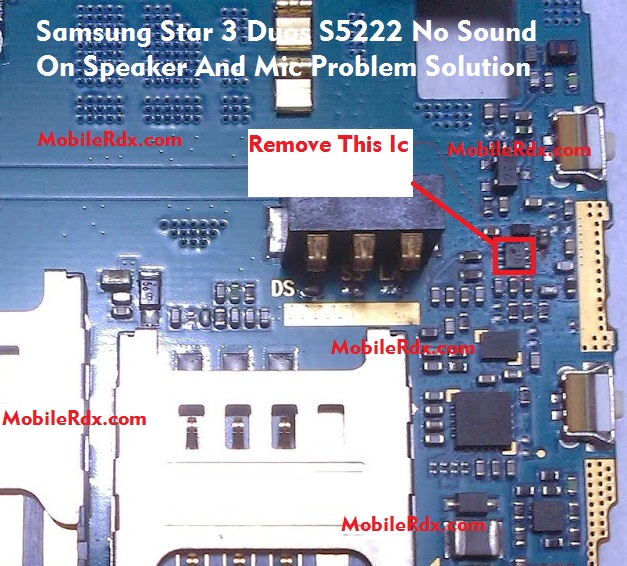
Samsung GT-S5222 Speaker Ways, Speaker Not Working Problem, Mic, Microphone Problem Repair Solution , Sond Ic Samsung S5222 Solution, Mic Ways, Jumper, Speaker Problem Solution.
Dry your Samsung GT-S5222 Mini with a dry towel to eliminate any visible traces of water or moisture.
Remove battery
Clean all the openings (Headphone port, Charging port etc.) with the help of cotton buds in order to eliminate all possible traces of water and moisture completely.
Check the MIC and Speaker hole opening is dust free. If hole is dusty or damaged then clean with PCB cleaner.
Finnaly Remove Red Marked Ic Shown On Above Image
If you have further Questions please leave a comment.
Note: Please note that even though every solution posted on our website is tested by one or more members of our team before posting, but still we do not take any responsibility for any damage it may cause to your cell phones. Use these repairing solutions at your own risk. Thank You.
1 Comment
Working bro thanks