

Samsung GT-S7582 Power On Off Button Ways
One of the most common issues that are found in Samsung Galaxy S Duos 2 S7582 is its power button problem. The reason for this problem could be anything. This could either be due to water damage or just the basic wear and tear. In the case of basic wear and tear, power button losses its Springiness hence you need to press it harder than usual for it to make it work for you or it could either fail completely.
Here is the solution for Samsung Galaxy S Duos 2 S7582 key not work on / off problem. This solution may help fix if the phone shows charging indication or charging icon when the battery charger is plug-in, but could not or can not turn it on.
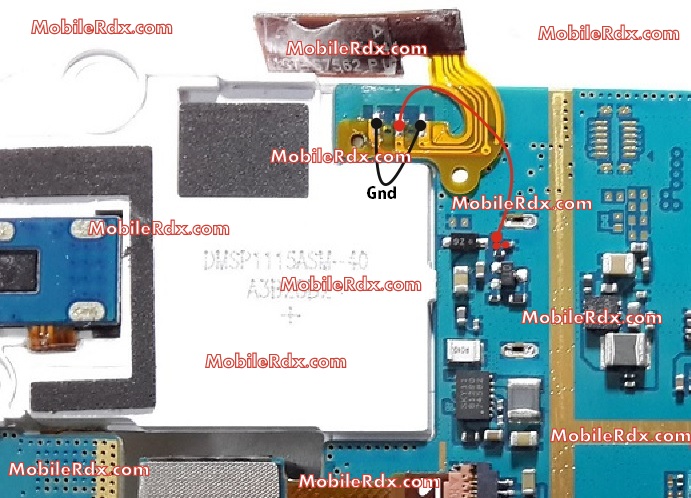
If any of the on/off switch + or – track missing then make a jumper.
Samsung S7582 Power On Off Button Ways
Samsung GT-S7582 Power On Off Key Jumper, Track, Ways
Samsung Galaxy S Duos 2 S7582 In the power ON-OFF, other than it is in the matrix keyboard flex is also connected to the keyboard filter IC. The solution below shows the connection line paths of the power key, this is useful without changing the filter IC and this can be used without having to connect the power key filter IC.
Just refer to the solution given above and track said main power line roads.
Only manage to apply a jumper wire in places where the Samsung Galaxy S Duos 2 S7582 connecting said power key. This can help change without compromising the IC filter matrix or keyboard flex.
Samsung GT-S7582Power Button,Power Key,Power Switch,On Off Button, On Off Switch, Power Problem
1 Comment
thank you very much. It’s working.