Download F64 Android App v2026.10.08 – Latest Version
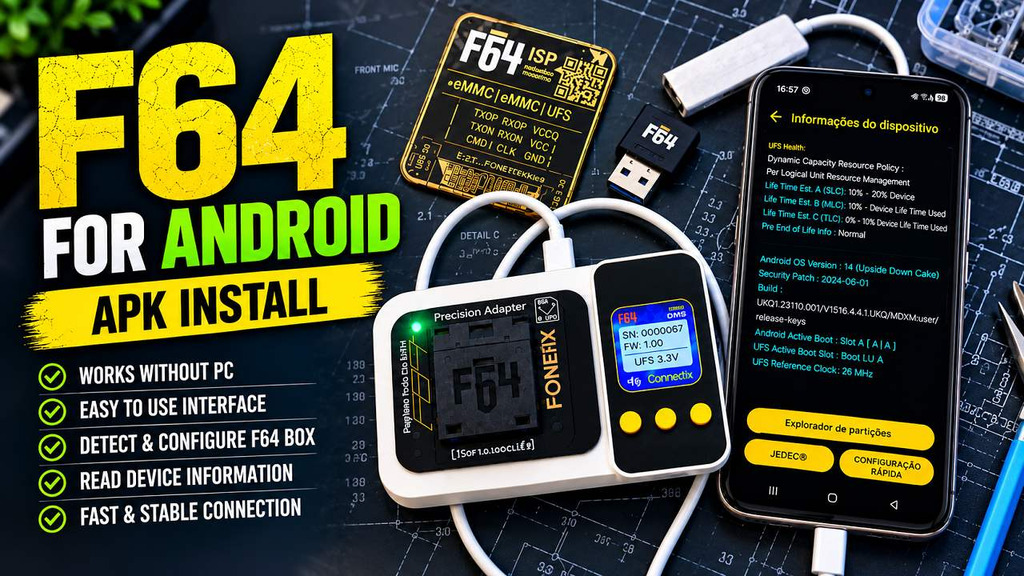
The latest version of the F64 Android App V2026.10.08 supports the new hardware box F64 Ultra and lets mobile repair technicians perform supported UFS service directly from Android phones. Using BLE 5.0 connectivity, the app supports functions including FRP bypass, reading and writing of partitions, switching of boot slots and chip off operations. As a result, this app reduces the need for a laptop for fast repair jobs.
What Is F64 Android App?
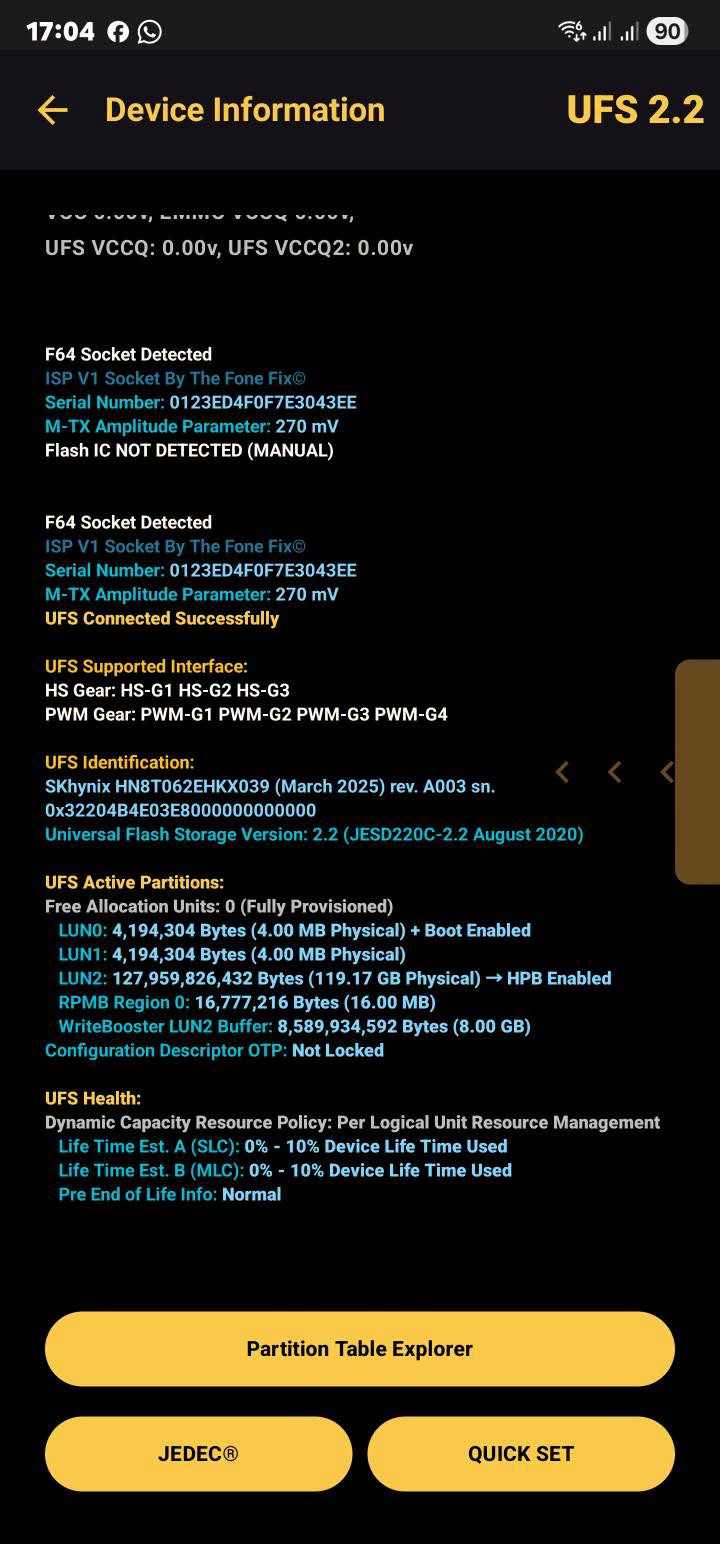
The F64 Team developed F64 app to connect F64 Ultra box to Android phones with BLE 5.0 pairing. After pairing you get full control over UFS storage. You can view chip information, see partition tables and erase FRP and even swap boot slots. Everything in your hand. For now the app only supports UFS storage and requires latest F64 Ultra firmware to work.
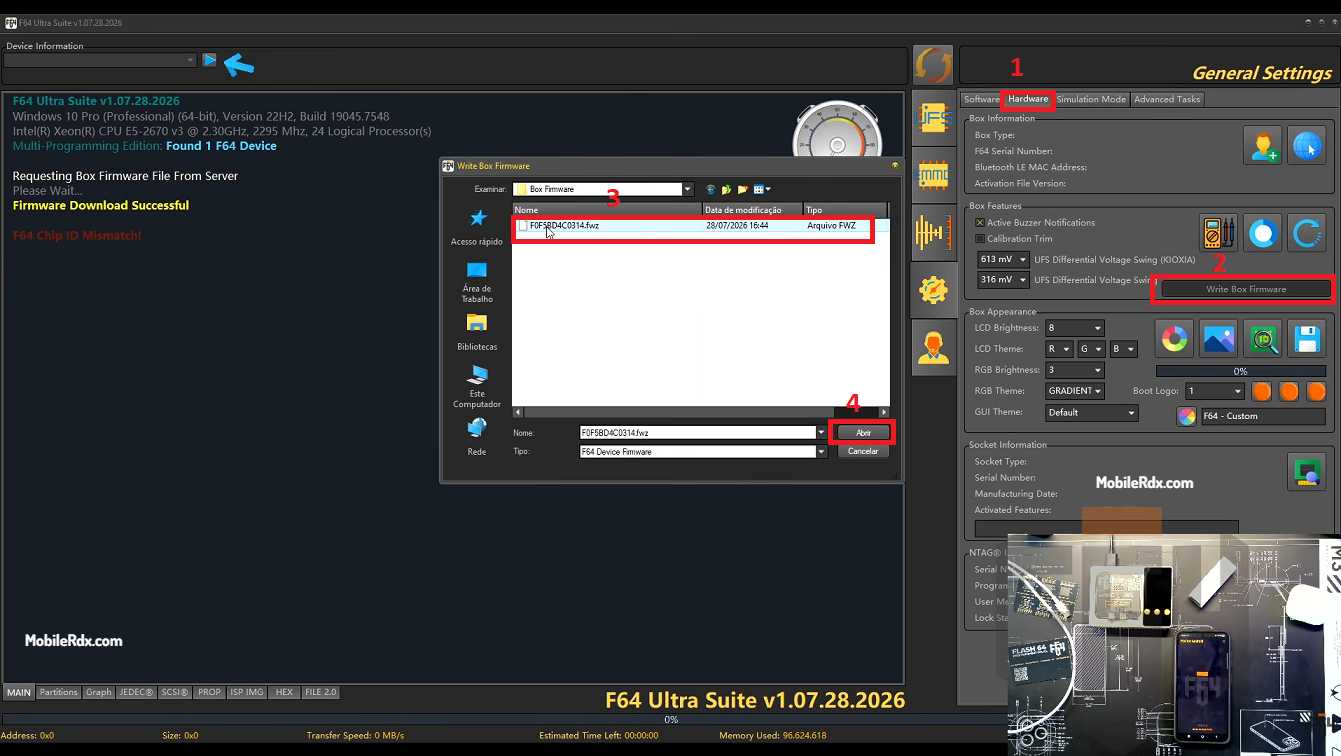
Before using the app, update your F64 Ultra firmware from the Windows software. Older firmware versions are not compatible with this Android release.
Features of the F64 Android App
- First stable Android application for the F64 Ultra hardware box
- Connects to the box via Bluetooth Low Energy (BLE 5.0)
- Supports UFS 4.1, 4.0, 3.1, 3.0, 2.2, 2.1 and 2.0
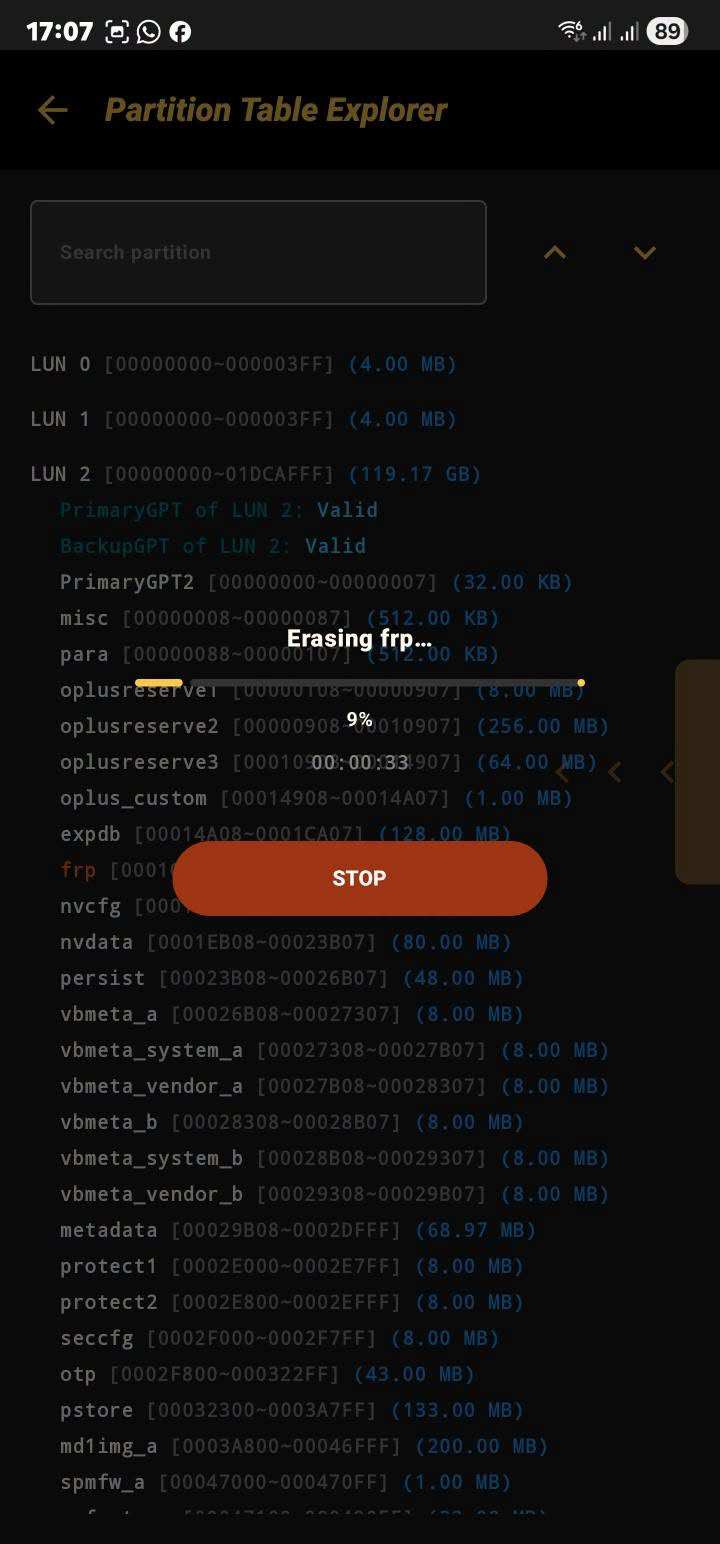
- Complete Partition Table Explorer with full partition details
- Read, write and erase UFS partitions directly
- Reads complete JEDEC information from the UFS chip
- Shows OTP Lock status and security configuration
- Displays Android version info from the connected UFS
- Quick UFS attribute and flag settings
- Change Android Boot Slot (AB system) from the app
- Supports both ISP and Chip-Off operation modes
- Reads Android boot logs through UART RX/TX
What’s New in v2026.10.08
10.08.2026 – Dual APK and EXE Update
F64 for Android V2026.10.08 – Box Firmware Update is REQUIRED (requires ASIC Firmware 08.03.2026)
1. Added eMMC Support for F64 Android APK
2. Added Support for Nokia HMD .bat and .sh files for loading firmware to partitions.
3. Finalized Hua UPDATE.APP flashing
4. Added eMMC VCCQ saving per Clock Speed Selection (Requested by Alone Solution)
5. Added RTTTL Start Up Tone Customization for F64 Box (Firmware Update is REQUIRED) (requires SoC Firmware 10.05.2026)
6. Added Samsung Dimensity 9500 support for UFS Provision and GPT Authoring via CSC or PIT files
* Galaxy Tab S12 Ultra 5G SM-X946B
* Galaxy Tab S12 Ultra Wi-Fi SM-X940
* Galaxy Tab S12+ 5G SM-X846B
* Galaxy Tab S12+ Wi-Fi SM-X840
7. Added Samsung Watch with Snapdragon SW6100 Wear Elite SoC GPT Authoring Support via CSC or PIT files
F64 Android App: First Stable Release!! + F64 for Windows: File Manager 2.0 update!!
Version 1.07.30.2026📅
07.28.2026 – F64 for Android: First Stable Release
07.28.2026 – F64 for Windows: File Manager 2.0
F64 for Android V2026.10.08 – Box Firmware Update is REQUIRED
(Connect to the F64 Ultra via BLE 5.0)
1. Supports UFS 4.1, 4.0, 3.1, 3.0, 2.2, 2.1 and 2.0
* FULL Partition Listing via Partition Table Explorer
* Read/Write/Erase partitions
* Reads full JEDEC® Information
* Quick Setting of UFS Attributes and Flags
* Android Boot Slot change
* ISP and Chip Off both supported
2. Supports UART for reading Android Boot Logs via RX/TX lines
IMPORTANT: I. eMMC is not yet supported in this version
II. The APP will only work on SoC Firmware 07.25.2026 + ASIC Firmware 07.23.2026
F64 for Windows V2026.10.08 – File Manager 2.0
1. Updated EROFS File Manager
* Added support to Delete File/Folder
* Added support to Inject FLAT_PLAIN, FLAT_INLINE files (should fit original blocks allocated)
* Added support to Extract COMPRESSED files (LZ4, LZMA, DEFLATE, ZSTD)
* Added support to Extract CHUNK_BASED files
* Added support to Inject CHUNK_BASED files (should fit original blocks allocated)
2. Updated EXT4 File Manager
* Added support to Inject files larger than the original file size
as long as the total size can still fit in the blocks allocated
3. Added F2FS Support for File Manager
* Supports File/Folder Find
* Supports File/Folder Rename
* Supports File/Folder Delete
* Supports Plain File Extract
* Supports Plain File Inject (should fit original blocks allocated)
* Supports Compressed File Extract (LZO, LZ4, ZSTD and LZO-RLE)
* Supports Compressed File Inject (should fit original blocks allocated)
* Supports File property changes (UID, GUI, R-W-X)
4. Added FAT32, FAT16 and FAT12 Support for File Manager
* Supports File/Folder Find
* Supports File/Folder Rename
* Supports File/Folder Delete
* Supports File Extract
* Supports File Inject (should fit original clusters allocated)
5. Added vbmeta flags setting
* Only works for phones with a bootloader that is already unlocked
* Sets AVB_VBMETA_IMAGE_FLAGS_HASHTREE_DISABLED ON/OFF
* Sets AVB_VBMETA_IMAGE_FLAGS_VERIFICATION_DISABLED ON/OFF
* Available in the Dev Tools tab of the Software
6. Added an option in settings to change the M-PHY differential swing on KIOXIA UFS
(Thank you, Diện Nguyễn for testing)
7. Added support for MBR + EBR (chain) partition listing
* Used by some Smart TV (Thank you valeraйфф and Aakash Hukpachongbang for TV Dumps)
8. Fixed UART Logging buffer overflow
9. Fixed BackupGPT write overflow when changing Android Boot Slots
10. Fixed WriteBooster Size/Type Generation on newer Snapdragon SoC
11. Added support for Android 17 ABV 1.4.0
12. Added New UART Pinouts by Giovanni Lucas Da Paz (ISP Pinouts\UART\)
Motorola Moto G73 5G XT2237-1 DEVONF Pin Mapping UART.isp
Samsung Galaxy A07 SM-A075M Pin Mapping UART.isp
Realme C30S RMX3690 Pin Mapping UART.isp
Samsung Galaxy A73 5G SM-A736B Pin Mapping UART.isp
Samsung Galaxy M14 SM-M146B – Samsung Galaxy F14 5G SM-E146B Pin Mapping UART.isp
13. Added New/Updated ISP Pinouts by Giovanni Lucas Da Paz
SM4250 EMMC.isp
Samsung Galaxy M55 SM-M556B.isp
Honor X7D LGN-LX2.isp
OPPO A6 Pro 5G CPH2781.isp
Realme C30S RMX3690.isp
REDMI 15C dew.isp
Samsung Galaxy A14 SM-A145P.isp
Samsung Galaxy A73 5G SM-A736B.isp
How to Use F64 Android App
- Update your F64 Ultra firmware to the latest version using the Windows software.
2. Install the F64 Android App APK on your Android phone.
3. Enable Bluetooth and Location on your phone (required for BLE scanning).
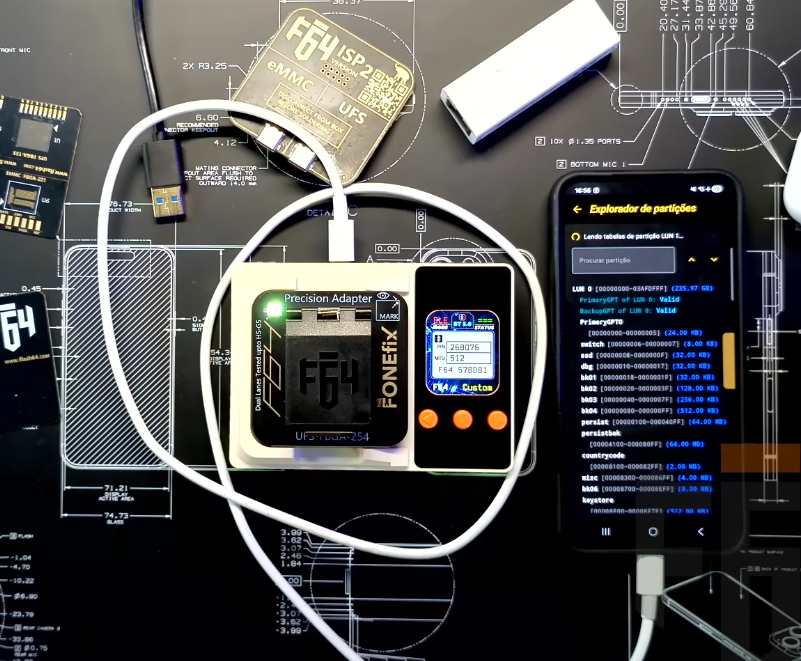
4. Power on the F64 Ultra box and connect it to the target device via ISP or Chip-Off.
5. Open the app and tap Scan — it will discover the F64 Ultra box via BLE 5.0.
6. Select the device and pair — a secure BLE connection will be established.
7. Once connected, the app will read the UFS chip information automatically.
8. Use the Partition Explorer to browse, read, or erase partitions.
9. To bypass FRP: go to the partition list, select the FRP partition, and erase it.
10. Change the active Boot Slot from the Quick Set menu if needed.
Download F64 Android App v2026.10.08
Download the latest F64 Android App APK from the link below. Install it on your Android phone and pair it with your F64 Ultra box via BLE 5.0 for wireless UFS repair operations.
| App Name | F64 Android App |
| Version | v2026.07.30 (Stable) |
| File Type | APK (Android) |
| Developer | F64 Team |
| Android Required | Android 10+ |
| Connection | BLE 5.0 (Bluetooth Low Energy) |
| Storage Support | UFS 4.1 / 4.0 / 3.1 / 3.0 / 2.2 / 2.1 / 2.0 |
Download F64 Android App v2026.10.08
Compatible Devices
The F64 Android App works with the F64 Ultra hardware box only. Ensure your box firmware is updated to the latest version before attempting to pair.
- F64 Ultra — All versions (firmware must be updated)
- Android smartphones running Android 10 or higher
- UFS-based devices for ISP or Chip-Off operations
App F64 v2026. 07. 28 for Android is excellent for technicians and users of F64 Ultra. It works reliably via BLE 5. 0 and has a clean interface. You can fix UFS directly from your phone and this is a huge benefit for quick work when traveling. Basic tasks including FRP erase, partition management, switching slots and reading chip information are all easy. We are looking forward to future updates that will add support for eMMC and additional protocols and further improve it.
Frequently Asked Questions
No, the current version supports UFS storage only (UFS 4.1, 4.0, 3.1, 3.0, 2.2, 2.1, 2.0). eMMC support may be added in future updates.
The app connects via Bluetooth Low Energy (BLE 5.0). No cables are needed between the phone and the box.
Yes. Connect to the UFS chip via ISP, open the Partition Explorer, find the FRP partition, and erase it directly from the app.
Yes. The Android app requires the latest F64 Ultra firmware. Older firmware is not compatible.
Android 10 or higher is required. Both Bluetooth and Location permissions must be enabled for BLE scanning.