

Are you an Android user who wants to customize your smartphone or gain full control over its system? If so, this guide is for you. Here, you can find the download link and installation steps for SRSRoot v6.1 – One Click Root Tool for Android. Since Android is an open-source operating system, users can gain root access through traditional rooting methods or by using one-click root tools.
SRSRoot is a free tool for Windows users who want to root or remove root access from a smartphone with just a few clicks. Developed by company 123Unlock, the software lets you quickly get superuser access to supported Android phones directly.
Once they are rooted, users gain more control over system of their device. They can install apps that require rooting, manage or modify system files, remove unwanted preinstalled apps (bloatware), customize appearance of the device, and access additional features that are usually off limits on phones without root.
What is SRSRoot?
SRSRoot is a simple one click tool for rooting Android devices for Windows users. Intended for people who want to root their phones and tablets without the hassle of complicated flashing or manual rooting steps. Beginners can use this tool with very little effort too. It makes rooting and unrooting supported smartphones and tablets very easy via just a few clicks.
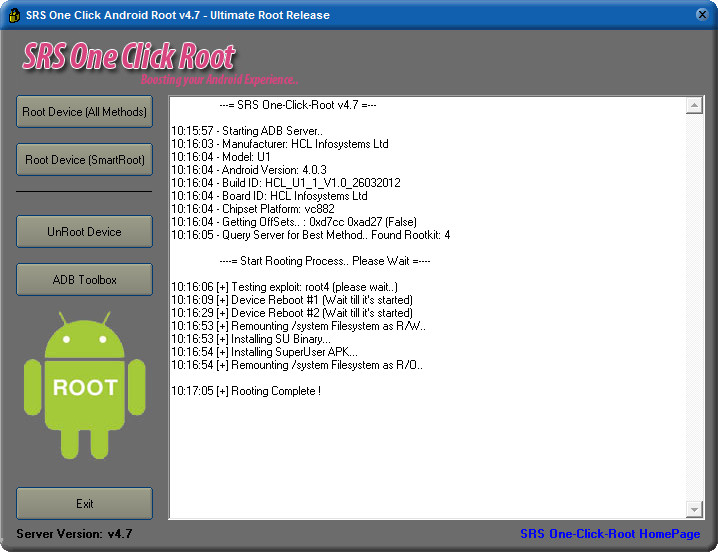
SRSRoot v6.1 Features
Here are some of the main features of the SRSRoot One Click Root Tool:
- One Click Root: Root supported Android smartphones with a simple process.
- Unroot Android: Remove existing root access from compatible devices.
- Windows Support: Install and run the tool on a Windows computer.
- Easy Interface: Simple options make the tool suitable for beginners.
- Superuser Access: Gain administrative access to supported Android devices.
- Root Applications: Use applications that require root permissions.
- System Customization: Modify supported system settings and files.
- Remove Bloatware: Uninstall unwanted pre-installed applications where supported.
- Free Utility: The tool is available without a paid license.
Download SRSRoot v6.1 for Windows
You can use the following information to identify the SRSRoot package before downloading it.
| Tool Information | Details |
|---|---|
| Tool Name | SRSRoot |
| Latest Version | v6.1 |
| Developer | 123Unlock |
| Platform | Windows |
| Device Support | Supported Android Smartphones & Tablets |
| Tool Type | Android Rooting Utility |
| Root Function | Yes |
| Unroot Function | Yes |
| License | Free |
Download: SRSRoot v6.1 – One Click Root Tool
How to Install SRSRoot on Windows
Follow these basic steps to prepare SRSRoot on your Windows computer:
- Download the SRSRoot v6.1 package from a trusted source.
- Extract the downloaded ZIP file if it is compressed.
- Open the extracted folder.
- Run the SRSRoot setup or executable file as administrator, depending on the package.
- Follow the installation instructions if a setup wizard appears.
- Open the tool after installation.
2 Comments
nice
nice