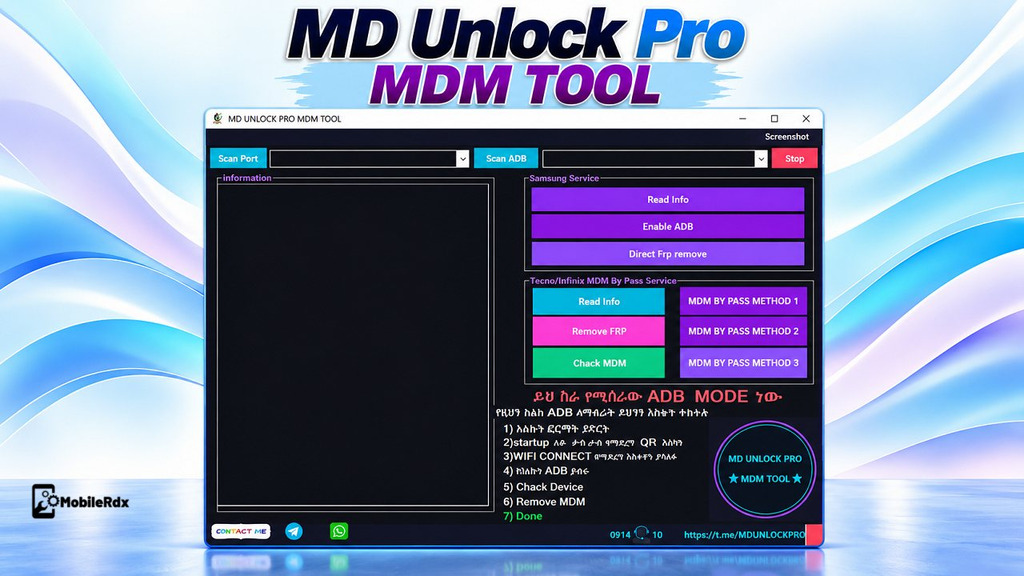
MD Unlock Pro MDM Tool is a small, simple Windows program now available for free that helps you to bypass MDM locks, enable ADB, remove FRP, and repair other Android OS-related errors in just one click, easily, on Samsung Tecno and Infinix phones.
The MD Unlock Pro Tool enables you to bypass MDM lock,read info, remove FRP lock, check MDM lock enable and direct FRP remove and more on any MediaTek, Spreadtrum-powered smartphone.
What Is MD Unlock Pro MDM Tool
MD Unlock Pro MDM Tool is a lightweight, portable MDM lock removal tool designed for Samsung, Tecno, and Infinix smartphones. It provides a simple interface for MDM-related servicing tasks without requiring the tool to be installed.
The tool package includes the main executable and a DATA folder, so all required files should remain together in the same extracted directory. MD Unlock Pro MDM Tool is not a universal solution, and its available functions can vary depending on the phone model, Android version, USB connection mode, installed drivers, security level.
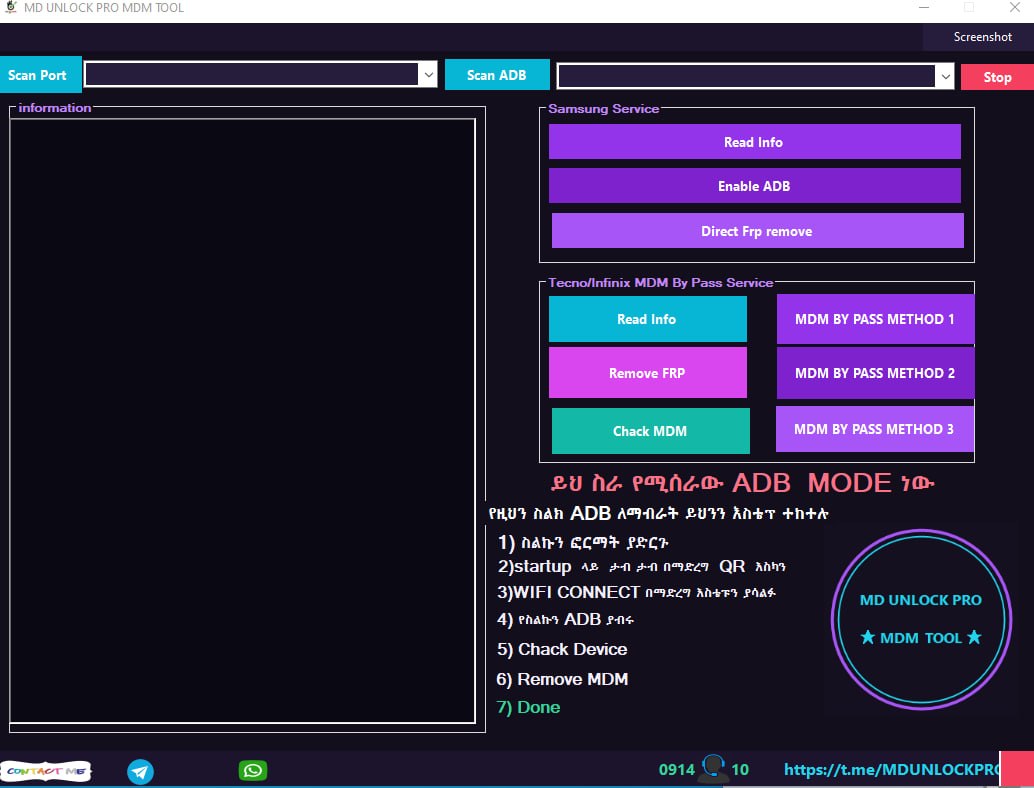
Features of MD Unlock Pro MDM Tool
Common Connection Options
- Scan Port: Scan and select a detected service or COM port.
- Scan ADB: Check whether the connected phone appears through ADB.
- Stop: Stop the current task from the main window.
- Information Panel: Show device details, connection output, and operation messages.
Samsung Service
- Read Samsung device information
- Enable ADB on supported devices
- Direct FRP Remove option
- ADB and port detection before service work
Tecno and Infinix MDM Service
- Read device information
- Remove FRP option
- Check active MDM status
- MDM Bypass Method 1
- MDM Bypass Method 2
- MDM Bypass Method 3
The three bypass buttons are separate methods, not a guarantee that all three methods work on one device. Start with device detection and the least destructive option. If you work mainly with MediaTek models, our TFT MTK Module Tool post covers a wider MTK-focused workflow.
MD Unlock Pro MDM Tool Download
Download the Nice Unlocker MDM latest version comes with a loader by Pradeep Udayanga. So, you don’t need a license or activation to activate the version anymore, it’s totally free No more logins or activation
- Tool Name: MD UNLOCK PRO MDM TOOL
- Version: v1
- File Name: MD UNLOCK PRO MDM TOOL.rar
- Size: 5 MB
- Platform: Windows PC
- Type: Portable window tool
- Focus: Samsung, Tecno, and Infinix MDM/FRP service
Download archives from a trusted source, scan the RAR file, and do not run unknown executables on a production repair computer. For a paid multi-brand alternative, see our TSM Tool Pro latest version guide.
How to Install MD Unlock Pro MDM Tool
- Download the MD Unlock Pro MDM Tool RAR package.
- Scan the archive before opening or extracting it.
- Find the MDM UNLOCKER.exe file outside the DATA folder.
- Extract the RAR file with WinRAR or 7-Zip.
- Open the extracted folder and keep the DATA folder in its original location.
- Right-click the MDM UNLOCKER EXE and Run as administrator.
- Wait for the tool window to open,
- now connect your phone to pc in ADB or other mode
- Now select function you want to use
How to Use MD Unlock Pro MDM Tool
Use MD Unlock Pro MDM Tool only for devices you are authorized to service. Install correct Samsung USB drivers or ADB specific drivers first and for the selected operation. Connect your phone with proper USB mode and make sure it is correctly detected.
Samsung Service Steps
- Open the tool as an administrator.
- Connect the supported Samsung phone with a good USB cable.
- Click Scan ADB or Scan Port, depending on the connection mode.
- Click Read Info and confirm the device details in the information panel.
- Use Enable ADB or Direct FRP Remove only when the device and operation are supported.
- Keep the cable connected until the log shows a result.
Tecno/Infinix MDM Steps
- Connect the Tecno or Infinix phone and open the tool as an administrator.
- Use Read Info to confirm detection.
- Click Check MDM to check the reported device state.
- Use the appropriate MDM method for the exact device and security level.
- Try the next method only if the first method fails and the device is authorised.
- Restart the phone and verify setup, network, and basic functions after completion.
Do not remove or disable MDM locks from any device unless you have explicit permission from owner or authorized administrator. MDM restrictions are usually put by schools, businesses and financial institutions and other organizations for management and protection of devices. Always check ownership and authorization before performing any service operation related to MDM.
System Requirements and Safety Notes
- Windows computer with administrator access
- Compatible Samsung, ADB, Tecno, or Infinix USB drivers
- Good-quality USB data cable
- Stable USB port; avoid USB hubs during service operations
- Backup of important user data before FRP or MDM work
- Antivirus scan before extracting the archive
- Owner or organisation authorisation for every managed device
MD Unlock Pro MDM Tool FAQs
It is a portable Windows service utility with Samsung and Tecno/Infinix MDM sections, port scanning, ADB scanning, and selected FRP or MDM options.
Samsung, Tecno, and Infinix devices. Compatibility depends on the exact model, Android version, driver, and security patch.
The available package is listed as V2 Main 2A. Check the archive and interface before publishing future version claims.
Yes. The package is distributed as an archive with an MDM UNLOCKER executable and a DATA folder that should remain together.
No. The buttons shown in the interface do not guarantee success on every model or security patch.