
The Oppo Reno 11F 5G CPH2603 Test Point is useful for mobile technicians who need to access MediaTek BROM (BootROM) or Download Mode for servicing and repairing the device. If your Oppo Reno 11F 5G is stuck on FRP lock, not detected by a servicing tool, or requires low-level software access, the test point method may help establish a connection with the computer.
In this guide, you can find the Oppo Reno 11F 5G CPH2603 test point location, motherboard image, microscope zoomed image, and basic instructions for entering Download Mode using a compatible MTK servicing tool.
What is Oppo Reno 11F 5G Test Point?
A test point is a small contact point available on a smartphone’s motherboard. Mobile technicians use this point to access a low-level communication mode when normal USB detection or software-based methods are unavailable.
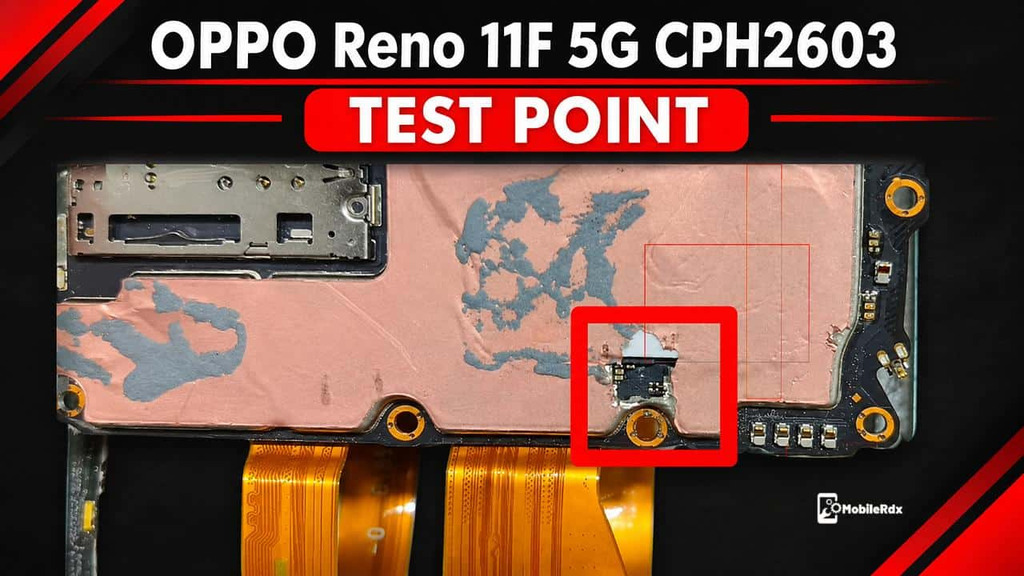
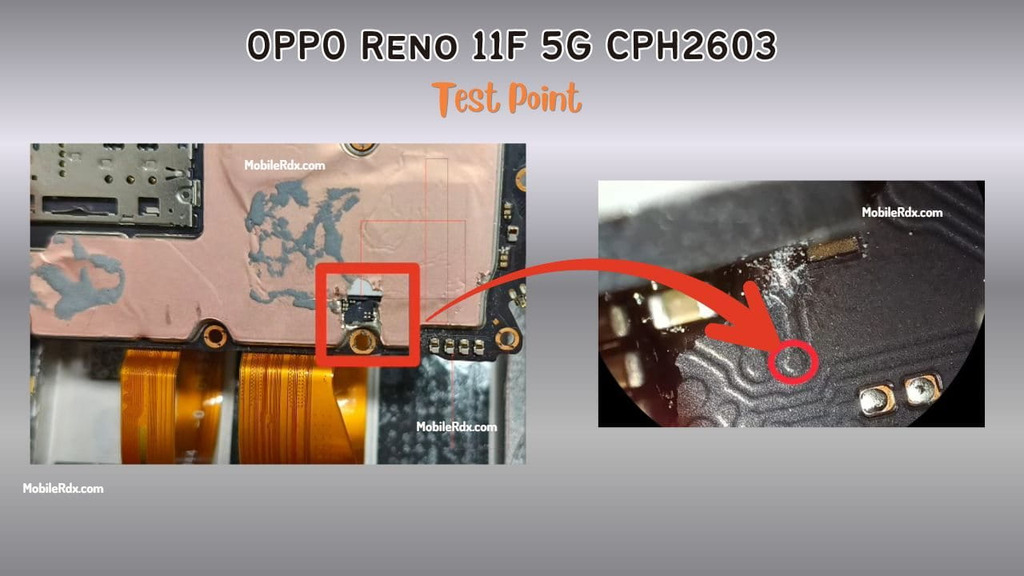
On the Oppo Reno 11F 5G, the test point is located near the motherboard shielding area. The highlighted red box in the image identifies the approximate test point location, while the circular microscope image provides a closer view of the marked contact.
Below are the motherboard test point images for the Oppo Reno 11F 5G CPH2603. Use the main motherboard image to identify the location and the zoomed image to inspect the small contact area.
Oppo Reno 11F 5G CPH2603 Test Point Image
Test Point Location: Check the red-marked area in the motherboard image.
Microscope View: The circular zoomed image for a closer look at the contact test point.
Credit: Test point reference image – Free4Me | Abdullah Abu Haloul GSM.
Required Tools
- Screwdriver set
- Plastic opening tool
- Tweezers or copper wire for shorting the test point
- Microscope or 10x magnifier to see the small test point clearly
- MTKUSB drivers installed on your PC
- MTK Flash Tool, UnlockTool, or AMT Tool with proper cables
- A Windows PC with a quality USB cable
How to Enter Download Mode Using Test Point
Follow these basic steps to connect the Oppo Reno 11F 5G to a computer in MediaTek BROM mode.
- Switch off the Oppo Reno 11F 5G completely.
- Remove the back cover and carefully disconnect the battery.
- Locate the test point on the motherboard using the provided image.
- Install the required MediaTek USB drivers on your Windows computer.
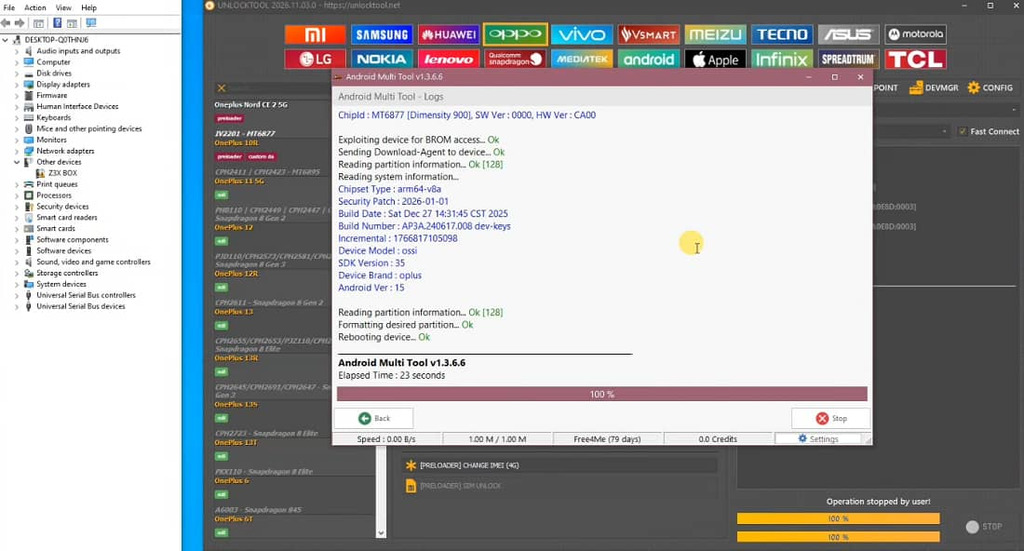
- Open a compatible MTK servicing tool.
- Select the correct Oppo CPH2603 / MT6877 platform if supported by your tool.
- Follow the tool’s test point connection instructions and connect the USB cable.
- Check whether the device is detected in MediaTek BROM or BootROM mode.
- Once detected, proceed with the required supported servicing operation.
What Can You Do in Download Mode?
After successfully connecting the device in MediaTek BROM mode, a compatible servicing tool may provide operations such as:
- Read device information.
- Remove FRP and user lock
- Identify the MediaTek chipset.
- Communicate with the device at the BootROM level.
- Perform supported firmware flashing.
- Access partition operations.
- Carry out authorized software repair operations.
The Oppo Reno 11F 5G CPH2603 Test Point is a useful hardware reference for mobile repair technicians working with MediaTek-based Oppo devices. The provided motherboard image and microscope zoom view help identify the test point area for the download mode connection.
Always verify the motherboard revision and use a compatible MTK servicing tool before performing any operation.