By using the Samsung Galaxy F22 E225F Test Point, you can easily restore the stock ROM, bypass FRP lock, or reset user data on your device via UFi Box. In this guide, we will also guide you on how to reboot into MTK Download Mode.
If you want to see where is the Samsung Galaxy F22 (SM-E225F) test point is located, follow the steps below. Then use them to enter the emergency download mode for performing various functions such as flashing the firmware, installing custom ROMS/Kernels, etc.you can use this test point in any box-like MRT, UFI, UMT, Medusa just shot gold point to the ground, and connect USB cable Despite it is an advanced method, some users still prefer to use this technique to bypass the need for the officially unlocked bootloader.
Each and every phone comes with different developer options like Recovery mode, Fastboot mode/bootloader mode, and EDL mode. All these modes use to perform different testing processes. Some of them only can be used for advanced android users or developers or mobile repairing and some of them can be used by normal users.
How To Remove Samsung Galaxy F22 E225F Pattern Lock and FRP:
You can use EFT dongle, UMT dongle, octopus FRP tool, MRT key tool for remove FRP and pattern lock from Samsung Galaxy F22 (SM-E225F) or you can try other tools use the above test point to boot your phone in an emergency download mode remove Battery short test point to the ground and insert USB cable.
Samsung Galaxy F22 (SM-E225F) Test Point – ISP EMMC PinOUT
How To Find Samsung Galaxy F22 (SM-E225F) Test Point.
- Install “Samsung Galaxy F22 MTK USB Drivers” on windows pc.
- Remove back panel of the device carefully. Make sure you are not going to damage any hardware component.
- Now check the below screenshot and find the Samsung Galaxy F22 Test points.
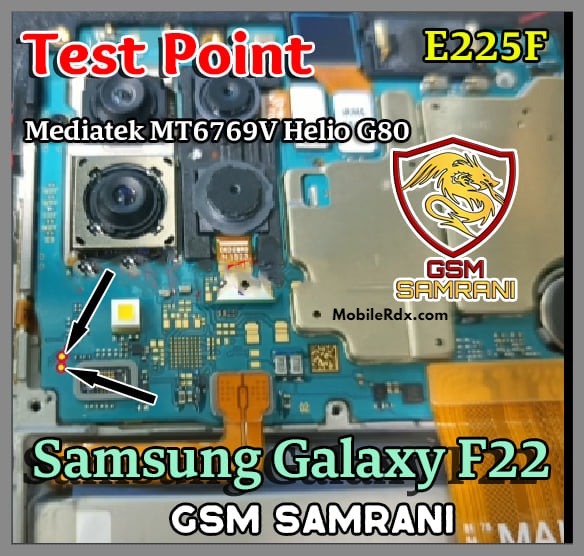
- Remove the battery and Short bot points using any copper wire and attach a USB cable at the same time.
- Now you are free to flash stock ROM on Samsung Galaxy F22 (SM-E225F) mobile using any tool.
Uses Of Samsung Galaxy F22 E225F Test Point
- Install stock ROM on.
- Flash without unlocking the bootloader. Bootloader unlocking permission not required.
- Recovery dead by flashing firmware.
- Install stock ROM easily, if the device is not able to boot into fastboot mode or device stuck on Samsung Logo.
What is Screen Lock for Samsung Galaxy F22 (SM-E225F):
Screen Lock is a privacy lock for android, many ways to enable screen locks on your device if screen lock enabled then the user need to enter the right password, Pattern, Pin lock to access devices again, screen lock means you can lock your device by pattern lock, password lock, pin lock, nowadays face locks and fingerprint lock also include in the screen locks menu,
Why do we need to Remove Screen Lock
If you forget the screen locks from your device and went to remove the pattern lock from your device then I am here to share with you the right method to Remove Pattern lock, Password lock, Pin locks.
or
If your device shows too many attempts to unlock the pattern if you want to unlock then follow the below process very carefully.