Download MRST Pro Tool v1.4.3 [Latest Version]
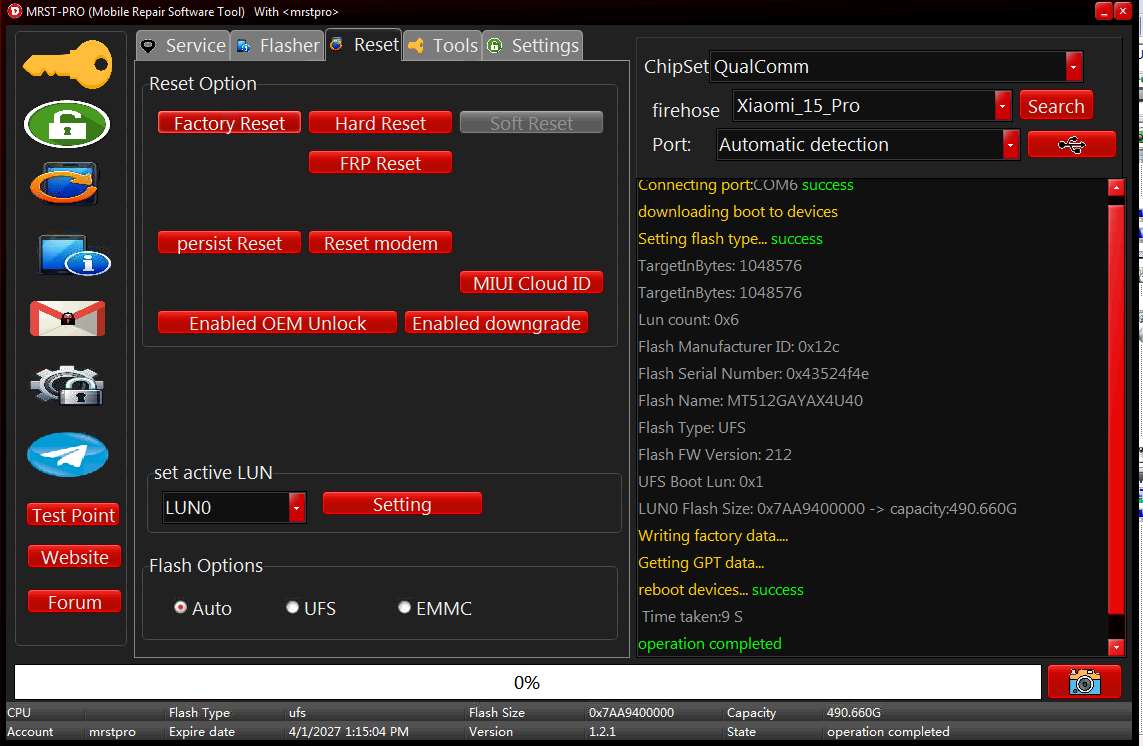
Mobile Repair Software Tool (MRST) Tool version 1.4.3 is professional software for technicians servicing mobile phones. It serves GSM technicians and mobile repair shops. This tool works with different platforms such as MediaTek (MTK), Qualcomm and UnisocSPRD. It also handles flashing, removing FRP lock, factory reset and data dump operations, bootloader unlocking, and servicing multiple mobile chipsets
What is the MRST Pro Tool?
MRST Pro is an all-in-one mobile repair tool for technicians who work with Android smartphones and tablets. It support for different chipsets and brands in one software platform.. MRST Pro is the next-generation platform to the MRT Dongle. The original MRT hardware is largely discontinued, and the industry has shifted to MRST Pro for daily servicing. The tool runs on Windows and works with MTK, Qualcomm, and Unisoc devices for flashing, FRP reset, factory reset, and firmware operations.

Key Features of the MRST Pro Tool
- Multi-Chipset Support – Supports Qualcomm, MediaTek (MTK), and Unisoc/SPRD platforms.
- Samsung Servicing – Provides Samsung-specific servicing functions with support for new models and BIT versions.
- Samsung FRP Reset – FRP support is available on supported Samsung models, with additional models added in v1.4.3.
- Samsung Factory Reset – Factory Reset support for selected Samsung devices, including models added in the latest update.
- Samsung Exynos Support – Includes Exynos servicing functions and support for selected Exynos platforms.
- Samsung EDL Loader – Supports EDL-based Samsung operations such as Format + FRP Reset on supported models.
- Samsung Qualcomm Loader – Improved Samsung Qualcomm loader support and loader-error handling in recent updates.
- Motorola MTK Fastboot – Supports selected Motorola MTK devices through Fastboot, including FRP and bootloader-related functions.
- Xiaomi & Redmi Support – Provides Xiaomi servicing functions, including selected Snapdragon models.
- FRP & Reset Functions – FRP and Factory Reset operations are available across supported brands and chipsets.
- Read/Write Dump – Supports reading and writing dumps on compatible devices.
- Bootloader Servicing – Bootloader-related servicing functions are available on selected supported devices.
- OFP Flashing Support – Recent versions added OFP flashing support as part of the firmware servicing improvements.
- MTK DA Improvements—Recent updates include improvements to MediaTek DA support.
- Multiple Connection Modes – Current MRST-related documentation and reseller information lists support for service modes such as EDL, BROM, Fastboot, ADB, Diag and USB, depending on the device/function.
- Regular Loader Updates – The MRST Team continues adding new loaders, models and BIT versions through regular updates.
- Improved Stability – Latest updates include bug fixes, loader-error fixes and reliability improvements.
- Light & Dark Interface – Recent versions added Light/Dark UI options.
- Multi-Brand Support – The MRST platform is designed for servicing multiple Android brands rather than being limited to one manufacturer.
What’s New in MRST Pro v1.4.3
MRST PRO v1.4.3 — MAJOR CHIPSET SUPPORT EXPANSION!
WORLD EXCLUSIVE | OPPO • realme • OnePlus
NEW MediaTek Chipset Support
MRST PRO continues expanding its global device database with new MediaTek chipset support, covering Dimensity 6300, Dimensity 7300, Dimensity 7400, Dimensity 8300, Dimensity 8300 Ultra, and Dimensity 8350.
MRST PRO v1.4.3 — KEY FEATURES
- Read / Write
- Format
- Remove FRP
- Reset RPMB (Beta)
- Lock / Unlock
- Unlock Bootloader (Beta)
- Android 15 and 16 compatibility for supported devices
- Android bug fixes
- Improved operation stability
- Expanded device database
1. MT6897 — DIMENSITY 8300 / 8300 ULTRA / 8350
Supported Device List
OPPO
- OPPO Pad 3 (OPD2406)
- OPPO Reno13 5G (CPH2689)
- OPPO Reno13 China (PKM110)
- OPPO Reno13 Pro 5G (CPH2697)
- OPPO Reno13 Pro 5G China (PKK110)
- OPPO Reno14 5G (CPH2737)
- OPPO Reno14 5G China (PLA110)
realme
- realme P3 Ultra 5G (RMX5030 / RMX5031)
OnePlus
- OnePlus Nord CE5 (CPH2717 / CPH2719)
- OnePlus Pad 3 (OPD2407 / OPD2408)
2. MT6878 — DIMENSITY 7300 / 7400
Supported Device List
OPPO
- OPPO F31 Pro 5G (CPH2763)
- OPPO Reno16 F 5G (CPH2859)
realme
- realme 13+ 5G (RMX5000 / RMX5002)
- realme 13 Pro 5G (Model number pending)
- realme 14 Pro 5G (RMX5056)
- realme 15 5G (RMX5105 / RMX5106)
- realme 16 Pro 5G (RMX5120)
- realme Narzo 70 Turbo 5G (RMX5003)
- realme P1 Speed 5G (RMX5004)
- realme Pad 3 Wi-Fi (RMP2502)
- realme Narzo 80 Pro 5G (RMX5033)
- realme P4 5G (RMX5110)
- realme P4 Power 5G (RMX5107)
3. DIMENSITY 6300 — DEVICE DATABASE EXPANSION
OPPO, realme and OnePlus | 2023–2026
2024 — OPPO
- OPPO A3 Pro 5G / A80 5G
- OPPO A3x (China)
- OPPO K12x 5G
- OPPO A3x 5G (Regional verification)
2024 — realme
- realme 13 5G
- realme C63 5G
- realme C65 5G
- realme Narzo N65 5G
- realme V60
- realme V60 Pro
- realme 14x 5G
2025 — OPPO
- OPPO A5 5G
- OPPO A5x 5G
- OPPO A5 Pro 5G
- OPPO A5 Energy
- OPPO K13x 5G
- OPPO F31 5G
- OPPO A6 Pro 5G (Verification required)
2025 — realme
- realme 14x 5G
- realme 14T 5G
- realme C73 5G
- realme C75 5G
- realme Narzo 80 Lite 5G
- realme P3 Lite 5G
- realme 15x 5G (Verification required)
2026 — OPPO (Verification List)
- OPPO A6 Series
- OPPO K14x 5G
- Other regional A-series variants
2026 — realme (Verification List)
- realme 16x
- realme C100 5G
- realme C83
- realme Narzo 100 Lite
- realme P4 Lite
- realme P4R
MRST PRO v1.4.3 UPDATE HIGHLIGHTS
- New MT6897 chipset database expansion
- New MT6878 chipset database expansion
- Expanded Dimensity 6300 device database
- Improved OPPO, realme and OnePlus model identification
- **Android 16
Supported Devices and Chipsets
- MediaTek (MTK) devices — flashing and servicing
- Qualcomm devices — EDL format and FRP reset
- Unisoc (Spreadtrum) devices
- Samsung Exynos — FRP reset across 850 to 1580 chipsets
- Motorola MTK — Fastboot FRP and bootloader operations
- Xiaomi, Oppo, Vivo — supported through the legacy MRT lineage
System Requirements
- Windows PC
- 4 GB RAM minimum
- Stable USB connection with good quality cable
- Correct USB drivers for the target brand
- MRST Pro activation for full module access
- Internet for updates
Download MRST Pro Tool Latest Version
Tool Name: MRST_Pro_Tool.zip
Latest Version: v1.4.3
Latest Update: September 8, 2026
Platform: Windows PC
Chipsets: MTK, Qualcomm, Unisoc/SPRD
Main Uses: FRP, Factory Reset, Flashing, Dump Operations
Latest Focus: Samsung Support
Activation: Paid/digital activation options available
Developer: MRST Team
How to Install and Use MRST Pro Tool v1.4.3
1. Download & extract the MRST Tool to your computer.
2. Extract the Setup.zip & open the extracted folder.
3. Run the tool as an administrator.
4. Then, click on Register or Login.

5. Type your registered EMAIL ID & PASSWORD in the tool.
6. Click Login.
7. Now you can use the tool on your computer.
8. Power Off the Phone.
9. Connect it to the PC.
The required mode to connect:
- ADB
- Fastboot
- Download Mode
- EDL
- MTK mode
- Meta mode
- Other supported service modes

10 Select the correct brand, model, chipset and operation.
11. That’s all there is to it.
MRT Dongle vs. MRST Pro
| Factor | MRT Dongle (Old) | MRST Pro (New) |
| Status | Legacy — largely discontinued | Active development |
| Exynos FRP | Limited | Exynos 850–1580 covered |
| ADB from Download Mode | No | Yes |
| Motorola MTK Fastboot | No | Yes |
| Updates | Stopped | Regular releases |
Frequently Asked Questions
MRST Pro is a professional mobile servicing platform with MTK, Qualcomm, and Unisoc support. It can flash, FRP reset, factory reset, and perform firmware operations, and it is the successor to the legacy MRT Dongle.
The v1.3.1 release covers Exynos 850, 990, 1280, 1330 (tested), 1380, 1480, and 1580 chipsets through the ADB method after enabling ADB from Download Mode.
The tool needs activation for full module access. The setup itself is available through official sources and distributors, and daily workshop use requires a valid license.
Check the security patch level first. The Exynos ADB FRP method works up to the June 2026 patch. Devices on June 2026 or newer are not supported for this operation yet.
The MRT Dongle is a legacy product, with the original hardware largely discontinued. MRT Pro has replaced it as the active platform, receiving ongoing updates and support for new models.