Download Prime ToolX v26.7.2 Free—Latest Version
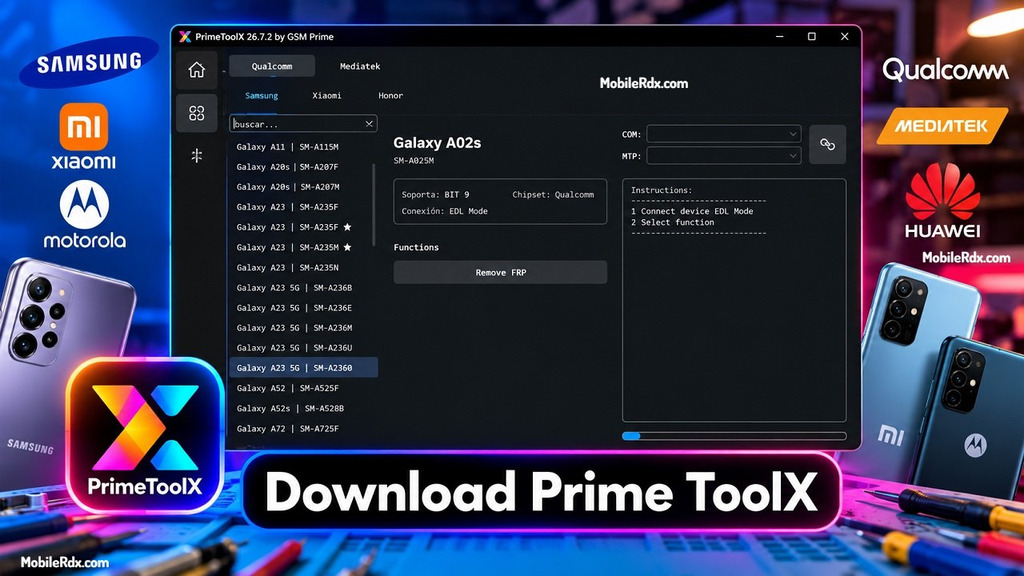
Prime ToolX v26.7.2 is a free Windows tool made for the mobile repair technician community. It removes locks from Samsung, Xiaomi, Motorola, and other Android phones. It works at the hardware level using Preloader, Brom, and EDL modes, which means you can clear the Google lock if the phone setup gets stuck. The tool is free; this tool does not require any activation key, dongle, or subscription.
This tool offers some great features for Android phones. You can reset to factory defaults, remove Knox and KeyGuard locks, and flash firmware to avoid OEM locks. Here are its key features:
What is Prime ToolX?
Prime ToolX, a professional tool from GSM Prime, quickly bypasses Factory Reset Protection for Samsung and Xiaomi devices. It uses a single interface and supports a variety of brands. Version 26.7.2 of the 26 series has the strongest protection bypass yet.
This build is practical for daily work at the shop. No Zadig drivers need installing. EDL drivers are included and come pre-installed. Hence, it works directly on a brand new PC without any additional setup and supports Android 5 up to Android 13 for most functions. For Samsung 16, it works via EDL, ADB, preloader, and Brom.
Key Features of Prime ToolX v26.7.2
Main Features of Prime ToolX v26.7.2
- Samsung FRP Remove—Works with supported Samsung phones for FRP-related servicing through MTP, ADB, Test Mode, and Download Mode.
- Samsung Test Mode—Lets technicians access Test Mode functions on supported Samsung models.
- Samsung MTP Support – Provides useful MTP options, including supported reset and servicing functions.
- Samsung ADB Tools – Includes ADB-based options for supported Samsung devices, such as CSC-related functions and other maintenance tasks.
- Samsung Download Mode – Offers options for Download Mode, including exiting the mode and some supported software repair tasks.
- Odin Firmware Flashing – Supports Samsung firmware flashing with features like file detection, slot selection, ZIP extraction, and MD5 checking.
- Xiaomi / Redmi Support – Includes ADB, Fastboot, and Sideload options for supported Xiaomi and Redmi phones.
- MiCloud Functions – Provides selected MiCloud-related options and device information features for compatible Xiaomi devices.
- LG Support – Supports MTP and EDL-based servicing on selected LG models, along with KDZ firmware flashing through LG UP.
- Qualcomm EDL Support – Works with Qualcomm 9008/EDL mode on supported devices for compatible servicing operations.
- MediaTek Support – Includes Preloader and BROM communication for supported MediaTek phones.
- Android ADB Tools – Provides useful options such as battery information, language settings, OTA controls, factory reset, and developer options.
- APK / XAPK Installation – Makes it possible to install APK and XAPK files on supported Android devices.
- App Management – Allows technicians to manage installed apps with options such as enable, disable, and clear data where supported.
- Driver Tools – Includes Samsung USB driver installation and other tools that can help with device detection.
- Simple Interface – Comes with a clean and updated interface that makes the different servicing options easier to find and use.
Supported Devices
Samsung (Android 5–13, Android 16 via EDL/ADB)
Phones similar to A02, A20s, A03, A05, A06, A10s, A11, A32, and other A-series phones are almost similar.
Xiaomi / Redmi
Redmi A1, A2, A3, 9A, 10, 12C, Note 12S, Note 13C, and Note 14C support Android 11 to 15.
LG (EDL Mode, Android 8–13)
LG G5, G6, G7, G8, G8S, G8X, V20, V30, V35, V40, V50, V50S, V60s and Q6
Other Brands
You can remove FRP locks from devices by using universal modules: Motorola, POCO, OnePlus, OPPO, Realme, Infinix, Google Pixels and Honor.
What’s New On Prime ToolX v26.7.2
- Added Samsung Android 16 FRP Bypass.
- Added Samsung Qualcomm New bit.
- Samsung Galaxy A05s | SM-A057F | BIT D
- Samsung Galaxy A05s | SM-A057G | BIT B
- Samsung Galaxy A23 | SM-A235F | BIT E
- Samsung Galaxy F14 4G | SM-E145F | BIT C
- Samsung Galaxy S21 FE 5G | SM-G990B | BIT K
- Samsung Galaxy S21 FE 5G | SM-G990B2 | BIT I
- Samsung Galaxy S21 FE 5G | SM-G990U | BIT N
- Samsung Galaxy S22 | SM-S901U | BIT 9
- Samsung Galaxy S22+ | SM-S906U | BIT 9
- Samsung Galaxy S23+ | SM-S9160 | BIT 7
- Samsung Galaxy S23 Ultra | SM-S918B | BIT A
- Samsung Galaxy S24 | SM-S921U | BIT 6
- Samsung Galaxy S24 Ultra | SM-S928B | BIT 6
- Samsung Galaxy S24 Ultra | SM-S928N | BIT 6
- Samsung Galaxy Z Flip3 5G | SM-F926B | BIT H
- Samsung Galaxy Z Flip4 5G | SM-F936U | BIT A
- Samsung Galaxy Z Flip5 5G | SM-F731B | BIT 7
- Samsung Galaxy Z Flip5 5G | SM-F946B | BIT 7
- Samsung Galaxy Z Flip5 5G | SM-F946U | BIT 7
- Samsung Galaxy Tab Active4 Pro | SM-T630 | BIT B
- Samsung Galaxy Tab A9+ 5G | X216B | BIT C
- No longer zadig is required for new Qualcomm models
- Redesigned UI (User Interface)
- Improvements
- Fixes bugs.
Download Prime ToolX v26.7.2 – Lates Version
| Software Name | PrimeToolX |
| Version | v26.7.2 |
| File Size | 137 MB |
| Platform | Windows PC |
| Developer | GSM Prime |
| License | Free—no activation required |
| Chipsets | Qualcomm, MediaTek |
| Modes | EDL, Preloader, Brom, ADB |
| Android Range | Android 5–13, Samsung Android 16 via EDL/ADB |
System Requirements
- Windows 10 or Windows 11 PC
- 4 GB RAM minimum
- 500 MB free disk space
- Stable USB connection with good quality cable
- Brand USB drivers (EDL drivers are built in)
- Internet for the download and updates
How to Use Prime ToolX v26.7.2
Follow these steps to set up and start unlocking with Mi FRP in Tool:
- Download and extract the setup using WinRAR or 7-Zip.
- Disable antivirus/Windows Defender temporarily—it may block the tool.
- Run Prime_ToolX.exe as Administrator.
- Wait for the built-in EDL drivers to load—no Zadig step needed.
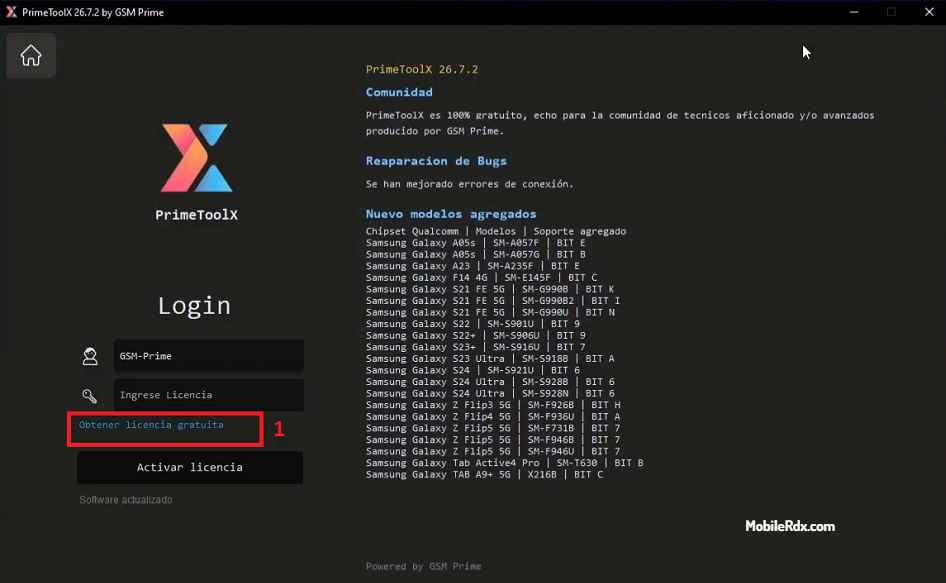
- Click on Obtener licencia gratuita → Get Free License
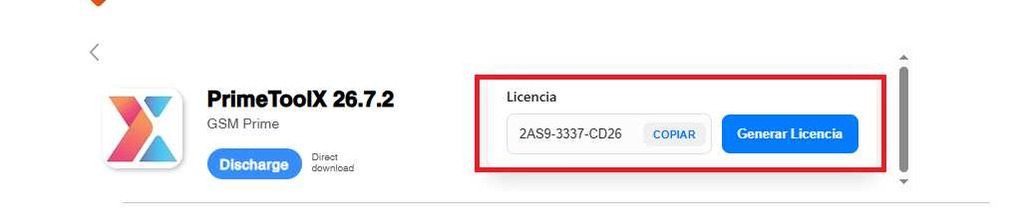
- Now Generate License
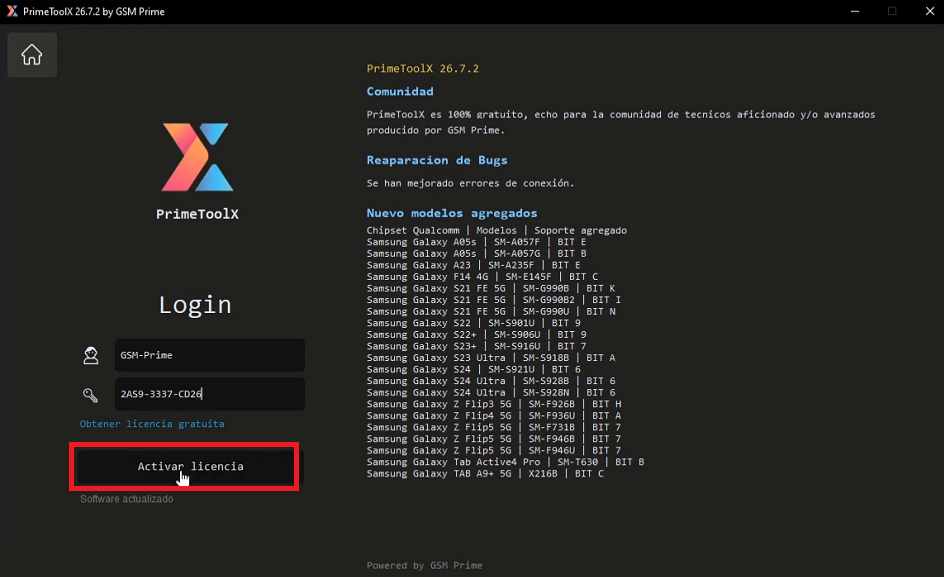
- Click on Activate License.
- Connect the device in the required mode (EDL, Brom, Preloader, or ADB).
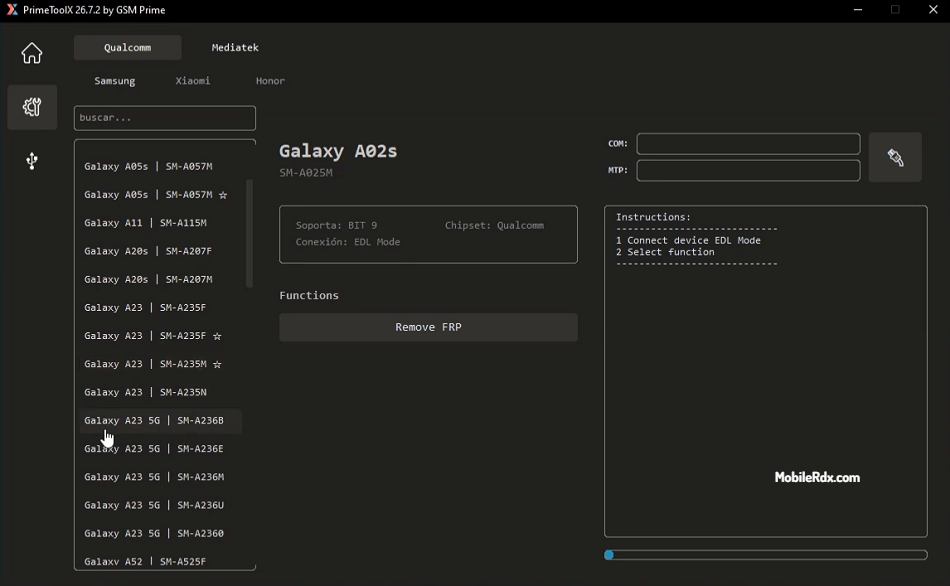
- Select the brand and operation from the main window.
- Run the function and wait for the success message.
How to Remove FRP with Prime ToolX
Samsung—EDL Mode
Enter the mode EDL 9008 on your phone. Next, choose the option FRP in the Samsung module. The tool loads its own loader, removes lock and leaves both the Knox and OEM lock intact. This is how to do it for Android 16 devices.
Xiaomi / Redmi—Brom Mode
For Redmi models based on MTK, boot to Brom mode with the test point and select your model to run FRP removal. Preloader mode is a fallback if Brom is patched.
LG and Others — ADB Mode
LG smartphones use EDL mode to reset and bypass FRP, while other brands use ADB after the home screen or setup wizard is complete.
- Device not detected: confirm the mode—EDL requires 9008 drivers; Brom requires a test point on patched devices.
- Brom fails on newer Redmi: switch to the Preloader route; patched bootloaders often block Brom.
- The tool does not open: run it as an administrator and check whether the antivirus has quarantined a file.
- Android 14/15 phones are not supported: most functions are available for Android 5–13; use the Samsung EDL route for Android 16 devices instead.
Frequently Asked Questions
Yes. Prime ToolX v26.7.2 is completely free—no activation key, dongle, or paid subscription is needed to access its features.
Yes, for Samsung devices. The tool supports Android 16 FRP removal through EDL, ADB, Preloader, and Brom modes. Most other functions cover Android 5 through 13.
No. The tool removes FRP without tripping Knox or breaking OEM locks, so the warranty status stays intact on Samsung devices.
It supports Samsung Galaxy A-series, Redmi A/Note models, LG G and V series, plus Motorola, POCO, OnePlus, OPPO, Realme, Infinix, Google Pixel, and Honor devices for FRP removal.